
- Why SMS Reservation Confirmations Outperform Email and Phone
- Common Challenges with Traditional Reservation Confirmations
- How Email-to-SMS Solves Reservation Confirmation Problems
- Industries Using SMS for Reservation Confirmations
- How to Send Reservation Confirmations from Email with TextBolt
- SMS Reservation Confirmation Templates by Industry
- Best Practices for Reservation Confirmation Texts
- Why TextBolt Is the Best Solution for Reservation Confirmations
- Start Sending SMS Reservation Confirmations Today
- Frequently Asked Questions
Reduce Reservation No-Shows by 38%
How to Send Reservation Confirmations via Email to SMS

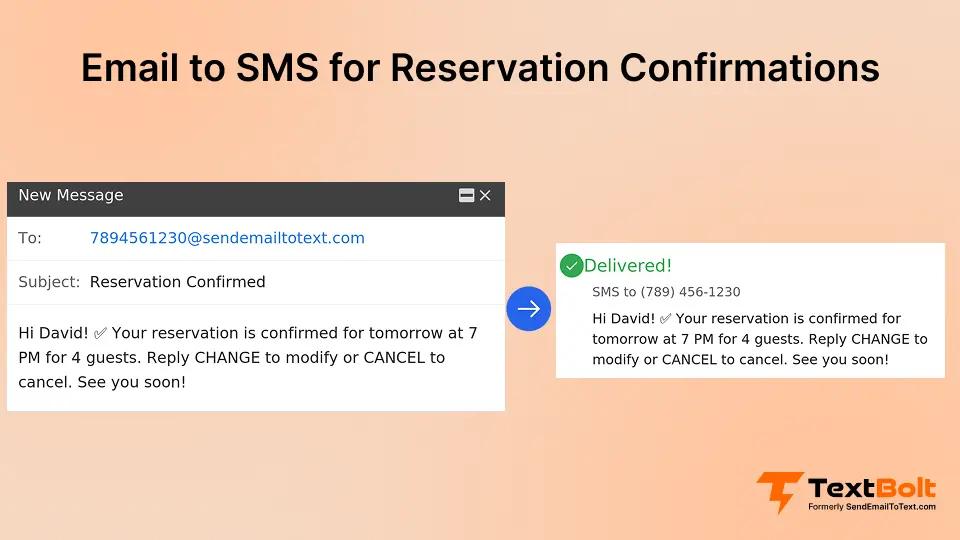
Every reservation confirmation you send is a promise. A promise that the table will be ready. The hotel room is waiting. The appointment slot was held. But when those confirmations go unread, that promise becomes a costly no-show.
Here’s the reality: email confirmations have a 20-30% open rate. Most sit unopened in crowded inboxes. Meanwhile, SMS reservation confirmations boast a 98% open rate, with 95% of texts read within three minutes of delivery.
The challenge? Most businesses think sending SMS confirmations means learning new software, managing another dashboard, or hiring developers for API integration. It doesn’t.
With email-to-SMS tool like TextBolt, you can send professional reservation confirmation texts directly from Gmail or Outlook. No new platform. No training. No IT department required.
In this guide, you’ll discover exactly how to implement SMS reservation confirmations using your existing email workflow, including templates, best practices, and step-by-step setup instructions that work for hotels, restaurants, salons, and any reservation-based business.
Why SMS Reservation Confirmations Outperform Email and Phone
The numbers tell a compelling story. According to industry research, SMS has a 209% higher response rate than phone, email, and social media combined. But raw statistics only scratch the surface.
The Immediacy Advantage
When someone books a table for 7 PM Saturday, they need instant confirmation. Email sits in an inbox competing with newsletters, promotions, and work messages. Phone calls go to voicemail. SMS arrives instantly on the device that’s almost certainly within arm’s reach.
Studies show it takes 90 seconds on average to respond to a text message versus 90 minutes to respond to an email. For time-sensitive reservations, that difference matters.
The No-Show Problem
No-shows cost the hospitality industry billions annually. A single empty table on a Saturday night represents lost revenue that can’t be recovered. Research indicates that 36% of customers who missed reservations said they would have shown up if they’d received a reminder.
Businesses implementing SMS confirmations and reminders report no-show reductions of up to 38%. That’s not incremental improvement. That’s transformational.
The Trust Factor
SMS confirmations feel more personal and urgent than email. Recipients perceive them as coming from a real person, not an automated marketing system. This perception increases engagement, response rates, and follow-through on reservations.
Tired of Reservation No-Shows Eating Into Your Revenue?
TextBolt lets you send professional SMS confirmations directly from Gmail. No new software to learn. Your team already knows how to use it.
Common Challenges with Traditional Reservation Confirmations
Before exploring solutions, let’s acknowledge the problems businesses face with existing reservation confirmation systems.
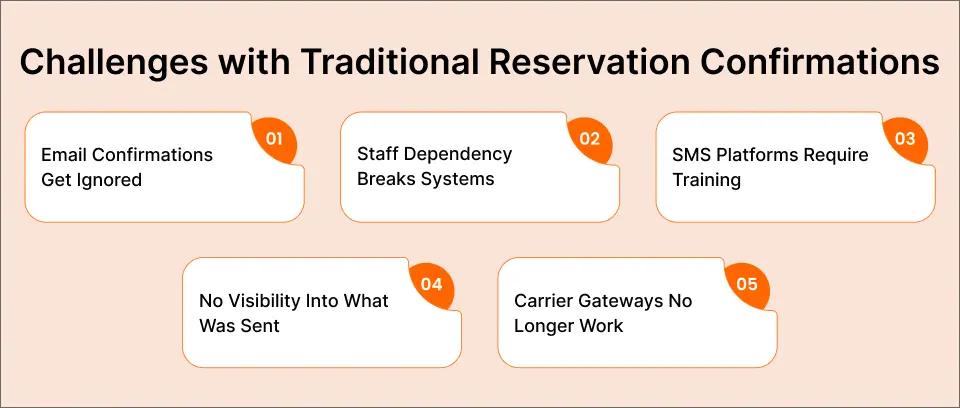
Challenge 1: Email Confirmations Get Ignored
You send a beautifully formatted confirmation email. It lands in the customer’s inbox at 2 PM. By 6 PM, they’ve received 47 other emails. Your confirmation gets buried. The customer forgets. The table sits empty.
This isn’t theoretical. With email open rates hovering around 20-30%, the majority of your confirmation emails are never seen at all.
Challenge 2: Staff Dependency Creates Single Points of Failure
Picture this: Maria handles all reservation confirmations from her personal phone. She texts each customer individually. Works great until Maria calls in sick on the busiest night of the week.
When one person owns the confirmation process, your entire system becomes fragile. If that person is unavailable, confirmations don’t go out.
Challenge 3: Expensive SMS Platforms Require Training
Enterprise SMS platforms promise reliability, but they come with $300-500 monthly price tags and complex dashboards nobody has time to learn. Your front desk staff doesn’t want another login to remember. They want to confirm reservations and get back to serving customers.
Challenge 4: No Visibility Into What Was Sent
With phone-based texting, there’s no audit trail. Who confirmed which reservation? What exactly was said? When disputes arise, you’re left guessing. This lack of documentation creates problems for accountability and customer service.
Challenge 5: Carrier Gateways Are Shutting Down
Many businesses relied on free carrier email-to-text gateways like @txt.att.net or @vtext.com. In 2025, AT&T discontinued their email-to-text service, with Verizon and T-Mobile following suit. Businesses using these gateways saw their confirmation systems fail overnight.
The good news? There’s a solution that addresses every one of these challenges without requiring you to learn new software or change your workflow.
How Email-to-SMS Solves Reservation Confirmation Problems
Email-to-SMS technology bridges the gap between what your staff knows how to do (send email) and what your customers need (instant text confirmation). Here’s how it works:
The Workflow Is Identical to Sending Email
You compose a message in Gmail or Outlook. Instead of sending to an email address, you send to a special format like 5551234567@sendemailtotext.com. The message converts to SMS and delivers to the customer’s phone in seconds.
Your staff already knows how to send email. That means zero training required. The learning curve is literally zero. For a detailed walkthrough, see our guide on how to send email to text.
Team Resilience Built In
With email-to-SMS, anyone on your team can send confirmations from their own email account. When Maria’s out, Tom sends from his Gmail. The customer receives the same professional confirmation from your business number. No disruption.
This eliminates single points of failure. Your confirmation system works whether you’re fully staffed or running lean.
Complete Audit Trail
Every confirmation sent via email-to-SMS is logged in your sent folder with timestamps. You know exactly who sent what and when. When a customer claims they never received confirmation, you have documentation.
This audit trail proves invaluable for resolving disputes and maintaining accountability across your team.
Professional Business Number
Messages arrive from your dedicated business toll-free number, not a random personal cell phone or cryptic carrier address. This builds trust with recipients and presents a professional image.
Two-Way Communication via Your Inbox
When customers reply to confirm, cancel, or ask questions, those replies arrive in your email inbox. You can continue the conversation without switching between apps or checking a separate dashboard.
Industries Using SMS for Reservation Confirmations
Email-to-SMS reservation confirmations work across virtually any industry that takes bookings. Here are the most common applications:
Hotels and Hospitality
Hotels use SMS confirmations to:
- Confirm room reservations immediately after booking
- Send pre-arrival instructions and check-in times
- Notify guests when rooms are ready
- Share WiFi passwords and amenity information
- Request post-stay feedback
65% of hotel reservations involve SMS texting at some point in the booking journey. Guests expect text communication.
Restaurants and Dining
Restaurants leverage SMS confirmations to:
- Confirm table reservations instantly
- Send waitlist notifications when tables open
- Remind diners 24 hours before reservations
- Alert guests to menu changes or event cancellations
- Request confirmations via reply (“Reply Y to confirm”)
The food and beverage industry reports that SMS booking confirmations are now synonymous with outstanding customer service.
Salons and Spas
Appointment-based businesses use SMS to:
- Confirm bookings at time of scheduling
- Send reminders 24-48 hours before appointments
- Alert clients to cancellations or stylist changes
- Promote last-minute availability
- Request rescheduling when needed
For salons and other small businesses, SMS confirmations can dramatically reduce the revenue lost to missed appointments.
Healthcare Practices
Medical offices send confirmation texts for:
- Appointment confirmations with provider name and location
- Pre-visit instructions (fasting requirements, paperwork)
- Reminder messages to reduce no-shows
- Lab result notifications
- Follow-up scheduling prompts
For healthcare, the audit trail provided by email-to-SMS is particularly valuable for compliance documentation. Learn more about healthcare text messaging solutions.
Event Venues and Entertainment
Event spaces use SMS confirmations for:
- Ticket purchase confirmations
- Event reminders with start times and parking info
- Day-of updates about weather or schedule changes
- VIP check-in instructions
- Post-event feedback requests
Ready to Send Reservation Confirmations from Your Email?
TextBolt delivers SMS messages with up to 98% delivery rates. Setup takes 30 minutes. Your staff will be sending confirmations the same day.
How to Send Reservation Confirmations from Email with TextBolt
Here’s exactly how to implement SMS reservation confirmations using TextBolt’s email-to-SMS service.
Step 1: Sign Up and Verify Your Business
Create your TextBolt account and complete the business verification process. This typically takes 30 minutes and ensures your messages are sent through compliant, carrier-approved channels.
TextBolt handles all 10DLC registration automatically. You don’t need to understand carrier compliance, just complete the simple verification form.
Step 2: Receive Your Dedicated Business Number
Once verified, you receive a dedicated toll-free number for your business. All your confirmation texts will come from this number, creating consistent professional branding.
Step 3: Compose Your Confirmation in Gmail or Outlook
Open your email client. Create a new message. In the “To” field, enter the customer’s phone number followed by @sendemailtotext.com: 5551234567@sendemailtotext.com
Step 4: Write Your Confirmation Message
Type your reservation confirmation in the email body. Keep it under 160 characters for a single SMS segment, or up to 303 characters for standard messages.
Example:
Hi [Name], your reservation at [Restaurant] is confirmed for [Date] at [Time]. Party of [#]. Reply Y to confirm or call 555-123-4567 with questions.
Step 5: Hit Send
Click send. TextBolt instantly converts your email to SMS and delivers it to the customer’s phone. The message appears from your business number, not an email address.
Step 6: Receive Replies in Your Inbox
When the customer replies to confirm, cancel, or ask questions, their response arrives in your email inbox. You can continue the conversation without leaving Gmail.
Bonus: Schedule Confirmations in Advance
Using Gmail’s schedule send feature, you can write confirmation emails today and schedule them to send as SMS at a future date and time. Perfect for sending day-before reminders automatically.
SMS Reservation Confirmation Templates by Industry
Use these proven templates as starting points for your confirmation messages.
Hotel Booking Confirmation Templates
Immediate booking confirmation:
Hi [Name], your stay at [Hotel] is confirmed! Check-in: [Date] at 3 PM. Confirmation #[Number]. Questions? Reply to this text or call [Phone].
Pre-Arrival reminder:
[Name], reminder: You’re checking into [Hotel] tomorrow at 3 PM. Early check-in available. Reply EARLY to request. See you soon!
Room ready notification:
Great news, [Name]! Your room at [Hotel] is ready. Stop by the front desk anytime. WiFi: [Password]. Enjoy your stay!
Restaurant Reservation Templates
Table confirmation:
Hi [Name]! Your table for [#] at [Restaurant] is confirmed for [Day], [Date] at [Time]. Reply Y to confirm or C to cancel. See you soon!
Day before reminder:
Reminder: [Restaurant] reservation tomorrow at [Time] for [#] guests. Reply Y to confirm, N to cancel, or R to reschedule. Can’t wait to serve you!
Waitlist notification:
Good news, [Name]! A table just opened at [Restaurant] for [Time] tonight. Reply YES within 15 min to claim it. First come, first served!
Salon and Spa Appointment Templates
Appointment confirmation:
Hi [Name], your appointment with [Stylist] at [Salon] is confirmed for [Date] at [Time]. Reply to Y to confirm. Questions? Reply here!
Service reminder:
Reminder: [Service] appointment at [Salon] tomorrow at [Time] with [Stylist]. Running late? Reply with your ETA. See you soon!
Healthcare Appointment Templates
Appointment confirmation:
[Name], your appointment with Dr. [Name] is confirmed for [Date] at [Time]. Please arrive 15 min early. Reply Y to confirm or call [Number] to reschedule.
Pre visit instructions:
Reminder: Your appointment is tomorrow at [Time]. Please fast after midnight and bring an insurance card. Reply with questions. See you then!
General Reservation Template
Universal confirmation:
Hi [Name], your reservation is confirmed! [Details]. [Date] at [Time]. Reply Y to confirm, N to cancel. Questions? Just reply to this text.
Best Practices for Reservation Confirmation Texts
Follow these guidelines to maximize the effectiveness of your SMS confirmations.
Keep Messages Concise
SMS works best when messages are brief and scannable. Include only essential information:
- Customer name (personalization matters)
- Business name
- Date and time
- Party size or service type
- Clear call-to-action (confirm, cancel, reply options)
Aim for under 160 characters when possible. Longer messages split into multiple segments, which uses additional credits and can arrive out of order.
Include Clear Response Options
Make it effortless for customers to confirm or make changes:
- “Reply Y to confirm”
- “Reply C to cancel”
- “Reply R to reschedule”
- “Reply STOP to opt out”
The easier you make it to respond, the higher your confirmation rates.
Time Your Messages Strategically
Send confirmation messages at optimal times:
- Immediate confirmation: Within minutes of booking
- Reminder: 24-48 hours before reservation
- Day-of reminder: Morning of reservation (for evening bookings)
For more detailed guidance on reminder timing, see our guide on sending appointment reminders via email. Avoid sending messages late at night or very early morning. Respect your customers’ time.
Personalize Every Message
Use the customer’s name. Reference specific details about their reservation. Personalization increases open rates and builds trust.
Always Include Your Business Name
Customers receive texts from many businesses. Make sure they immediately know who’s contacting them by including your business name early in the message.
Provide an Easy Way to Reach You
Include a phone number or note that they can reply to the text. Some customers will have questions, and making it easy to get answers reduces no-shows.
Comply with TCPA Regulations
Only send messages to customers who have opted in to receive SMS communications. Include opt-out instructions (“Reply STOP to unsubscribe”) in at least your first message. TextBolt handles TCPA compliance automatically with built-in opt-out handling.
Why TextBolt Is the Best Solution for Reservation Confirmations
Several options exist for sending SMS reservation confirmations. Here’s why businesses choose TextBolt:
Works from Your Existing Email
Unlike platforms that require learning new dashboards, TextBolt works directly from Gmail, Outlook, or any email client. Your staff already knows how to use it.
Team-Wide Access
Multiple team members can send confirmations from their own email accounts while messages appear from your single business number. No more dependence on one person’s phone.
Up to 98% Delivery Rate
TextBolt uses 10DLC-registered business numbers that carriers trust. Your messages actually arrive instead of getting filtered as spam.
Complete Message History
Every text sent is logged in your email sent folder. You have documentation of what was sent, when, and to whom.
Two-Way Replies in Your Inbox
Customer replies come directly to your email inbox. Continue conversations without switching apps.
30-Minute Setup
Most businesses are sending reservation confirmations within 30 minutes of signing up. No IT department required.
Affordable Pricing
Starting at $29/month for 500 messages, TextBolt costs less than most no-shows cost your business. Plans scale as you grow.
| Feature | TextBolt | Traditional SMS Platforms | Phone-Based Texting |
| Works from email | Yes | No | No |
| Team access | Included | Often extra cost | Single device |
| Audit trail | Email logs | Platform dashboard | None |
| Learning curve | Zero | Hours of training | None |
| 10DLC compliance | Handled automatically | You manage | Not available |
| Starting price | $29/month | $100-500/month | “Free” but unreliable |
Stop Losing Revenue to No-Shows
Your reservations deserve confirmations that actually get read. TextBolt delivers 98% open rates directly from your Gmail. Setup takes 30 minutes.
Start Sending SMS Reservation Confirmations Today
Every reservation confirmation that goes unread is a no-show waiting to happen. Every no-show is revenue walking out the door.
With TextBolt, your team sends professional SMS confirmations directly from Gmail. No new software to learn. No expensive platforms. No single points of failure.
Setup takes 30 minutes. Your first confirmation goes out today.
Your next step: Start your free 7-day trial and send your first SMS reservation confirmation in the next hour. Your empty tables will thank you.
Frequently Asked Questions
Can I send reservation confirmations from my existing email?
Yes. With TextBolt, you compose messages in Gmail or Outlook and send them as SMS by using a special email address format. The recipient receives a standard text message from your business number.
Can customers reply to confirmation texts?
Yes. With TextBolt, customer replies arrive in your email inbox. You can respond via email, and your reply goes out as another SMS. Full two-way conversation without switching platforms.
Can multiple staff members send confirmations?
Yes. Any team member with an email account registered with TextBolt can send confirmation messages. All messages appear from your single business number, maintaining professional consistency.