
- What is Email-to-SMS for Parent Notifications?
- Why Do School Emails Fail to Reach Parents During Emergencies?
- 1. Parent Inboxes Are Crowded With 100+ Emails Competing for Attention
- 2. Spam Filters Route School Alerts Away From the Primary Inbox
- 3. Parents Check Email When Convenient, Not When Urgent
- 4. School Emails Get Opened Hours After the Decision Window Closes
- 5.Missed Alerts Cost Families Wasted Trips and Create Safety Risks
- 6. Parents Treat Every School Email as ‘Check Later
- When Should Schools Use SMS Instead of Email to Reach Parents?
- How Does Email-to-SMS Work for School Administrative Staff?
- 1. Parent Replies Come Back as Emails in Your Inbox
- 2. One Email Reaches Every Parent in a Grade, Bus Route, or Team
- 3. Any Authorized Staff Member Can Send Alerts From Their Own Email
- 4. Account Setup Takes 30 Minutes, Carrier Approval Takes 48 Hours
- 5. Email-to-SMS Complements ParentSquare and Remind, It Doesn’t Replace Them
- What Are the Best Practices for Sending SMS Alerts to Parents?
- 1. Tell Parents During Registration That Texts Mean Urgent Action Required
- 2. Keep Alerts Under 160 Characters With Who, What, When, and Action Required
- 3. Good vs Bad Alert Examples: What Parents Actually Respond To
- 4. Send Weather Alerts by 6 AM, Dismissal Changes 2 Hours Before Release
- 5. Pre-Write Templates So Staff Can Send Alerts in Seconds During Emergencies
- 6. Collect SMS Consent During Registration to Stay Legally Compliant
- 7. Send Bilingual Alerts When Your Community Needs Them
- 8. Quick SMS Best Practices Checklist
- What Are Real-World Examples of School Emergency SMS Alerts?
- Streamline Email-to-SMS Communication with TextBolt
- Frequently Asked Questions
Emails Get Ignored. Texts Don’t.
How Email-to-SMS Reaches Parents When School Emails Go Unread

It’s 5:47 AM. The superintendent just called. School’s closed due to ice. You send the email blast to 2,000 parents from your district account. By 7:30 AM, 300 families are still driving to school because they never checked their inbox.
School emails get buried under promotional clutter, newsletters, and spam filters. This is especially problematic for time-sensitive emergency alerts. According to an analysis of 3.3 million school text messages reported by The 74, 73% of parents respond to text messages within just 11 minutes — a response speed that email simply can’t match for urgent school communications.When you need parents to take immediate action (weather closures, early dismissals, emergency pickups), email often fails to reach them in time.
This guide shows you when SMS cuts through the noise and how to layer it onto your existing email workflow without adding complexity for your staff. Learn how email-to-SMS for emergency alerts to students and parents creates an urgency channel that complements (not replaces) your standard school communications.
What is Email-to-SMS for Parent Notifications?
Email-to-SMS converts emails into text messages that parents receive instantly on their phones, sent directly from school staff’s existing email accounts. You compose a regular email, address it to a special format (phone number followed by a specific domain), and the system converts your message into SMS. Parents receive it as a standard text message on their phone without requiring teachers or staff to use their personal devices, helping schools avoid relying on teachers’ personal phones to text parents.
This is not a replacement for all school emails. It’s a strategic urgency layer for time-sensitive information that requires immediate parent action. Use it specifically for weather closures, emergency lockdowns, same-day schedule changes, and urgent individual pickups.
When you need to notify parents about an emergency early dismissal, you send an email to 5551234567@sendemailtotext.com from your Gmail. The parent receives “EARLY DISMISSAL: School releases at 1:00 PM today. Buses depart 12:45 PM.” as an SMS within seconds. No app download or login required on their end.
Reserve email-to-SMS for scenarios where parents need to take action within hours, not days. For detailed newsletters, event planning, or routine updates, continue using standard email. For “school closed this morning” or “pick up your child immediately” scenarios, SMS ensures the message reaches parents when it matters most.
Learn more about how to send email to text for business communications.
Stop Relying on Parents Checking Their Inboxes for Urgent School Updates
TextBolt sends critical alerts as SMS directly from your existing email. No new platform for your staff to learn, no training required, and no per-user fees for your team.
Why Do School Emails Fail to Reach Parents During Emergencies?
Schools send an average of 80+ emails per month to parents — newsletters, lunch menus, fundraiser reminders, permission slips, and PTA updates all competing for attention in the same inbox. When a water main breaks at 7:15 AM and buses need to reroute, that emergency alert lands in the same crowded place as last week’s book fair flyer. The result is predictable: parents don’t see it in time. This is exactly why more schools are turning to an email-to-SMS service built for education to make sure urgent alerts actually reach parents before the decision window closes. But first, it helps to understand the specific reasons school emails fail when timing matters most.
1. Parent Inboxes Are Crowded With 100+ Emails Competing for Attention
Parents receive 100+ emails daily. School newsletters, PTA updates, promotional offers, and work emails compete for attention in increasingly crowded inboxes. Your carefully crafted emergency alert sits unread alongside retail promotions and social media notifications.
2. Spam Filters Route School Alerts Away From the Primary Inbox
Spam filters create another layer of failure. School domain emails often get filtered to Gmail’s Promotions tab or flagged as spam, especially mass-sent announcements. When you send to 1,500 parents simultaneously, email providers assume it’s marketing content and route it away from the primary inbox. Parents trained to ignore the Promotions tab never see your weather closure alert.
3. Parents Check Email When Convenient, Not When Urgent
Mobile behavior has shifted dramatically. Parents check email sporadically throughout the day, responding when convenient. Text messages demand immediate attention. Industry data shows parents respond to SMS within 90 seconds on average, compared to 90 minutes for email. When you need parents to change their morning plans because school is closed, 90 minutes is too late.
4. School Emails Get Opened Hours After the Decision Window Closes
School email open rates vary widely, often ranging from 20-35%. Industry-standard SMS open rates reach approximately 98%. Even when parents eventually open your email, timing matters. A weather closure email opened at 9:00 AM (after the parent already drove to school) provides no value.
5.Missed Alerts Cost Families Wasted Trips and Create Safety Risks
Missed communication costs schools and families real time and money. Parents arriving at closed schools during weather emergencies waste gas and create parking lot confusion. Students waiting at pickup locations without notification about schedule changes cause safety concerns. Emergency protocols delayed when lockdown status remains unclear put students at risk. Last-minute event cancellations cause wasted trips when parents don’t receive timely notification.
6. Parents Treat Every School Email as ‘Check Later
The urgency gap creates the biggest problem. Parents receive so much routine school communication via email that they treat all messages as “check later” items. Even emails marked “URGENT” or “HIGH PRIORITY” get mentally filed as non-critical because schools use email for everything from lunch menu changes to fundraising campaigns. Your actual emergency loses its urgency signal in the noise.
The data supports what schools already experience firsthand. According to a randomized evaluation published by J-PAL (MIT’s Poverty Action Lab), automated text message alerts sent to parents reduced course failures and decreased missed assignments by 26% among high school students. When parents received timely, specific information via text instead of email, they were significantly more likely to act on it.
When Should Schools Use SMS Instead of Email to Reach Parents?
Reserve SMS for time-sensitive, action-required messages that need immediate parent attention. Don’t use it for routine communications. SMS works as an “urgency signal” to parents. Overuse diminishes its effectiveness and trains parents to ignore texts just like they ignore emails.
Here are the scenarios where SMS outperforms email:
1. Use SMS When Parents Need to Act Within 24 Hours
Weather closures and delays require morning decisions before parents leave home. When snow starts falling at 5:00 AM, parents need to know immediately whether to prepare for school or arrange alternative childcare.
Emergency lockdowns or safety alerts provide critical information affecting student safety. During active situations, parents need real-time updates about building security and student status.
Same-day schedule changes create pickup coordination challenges. Early dismissal announcements, event cancellations, or facility emergencies all require parents to adjust plans immediately, making email to SMS for class schedule changes critical for preventing missed pickups and last-minute confusion.
Urgent individual pickups demand immediate parent response. Student illness, medical emergencies, or behavioral situations can’t wait for parents to check their email at their convenience.
Time-sensitive permission deadlines apply when you need documents returned quickly. “Sign and return by tomorrow, or the student cannot participate” messages require urgent action.
Facility emergencies affecting dismissal procedures need immediate communication. Building evacuations, utility failures, or security concerns require parents to adjust pickup plans with minimal notice.
2. Keep Routine Updates in Email Where Parents Can Read at Their Pace
Weekly newsletters and updates provide general announcements, principal messages, and classroom highlights that parents can read when convenient. These don’t require immediate action or response.
Event reminders (days or weeks in advance) give parents time to plan. Parent-teacher conferences, school plays, and sports schedules communicated well in advance allow for calendar coordination and help improve attendance at school events.
Detailed policy information works better in email format. Handbook updates, registration procedures, and calendar changes contain too much detail for SMS and don’t require immediate action.
Fundraising campaigns represent non-urgent requests for participation or donations. Parents can respond when their schedule and budget allow.
Routine grade updates inform parents about student progress but rarely require immediate action unless a critical deadline approaches.
3. The 24-Hour Rule: If It Can’t Wait, Text It
If parents need to take action within 24 hours, use SMS. If the information is educational or allows a multi-day response time, use email. When both urgency and detailed explanation are needed, send SMS for the alert (“Check your email for full details”) followed by a comprehensive email with complete information.
Selective use preserves SMS effectiveness. When you send SMS only 3-4 times per year (weather closures, true emergencies), parents recognize it as critical. When you send SMS weekly, it becomes background noise they ignore, just like email.
Learn how to trigger SMS notifications from email for advanced notification workflows.
Your School Secretary Already Knows How to Send Email (Now It Sends Texts Too)
TextBolt works from Gmail, Outlook, or any email client your team already uses. When your principal is unavailable during a morning emergency, anyone with email access can send alerts to parents.
How Does Email-to-SMS Work for School Administrative Staff?
The workflow matches what your staff already does every day. In fact, most schools can add SMS alerts without training staff or changing their existing process. Open Gmail, Outlook, or your district email system (the same interface you use for regular emails). Instead of typing a parent’s email address, you format their phone number as 5551234567@sendemailtotext.com. Write your message in the email body, keeping it concise. Standard SMS uses 160 characters per segment. Longer messages automatically split into multiple segments.
Send the email. The system converts it to SMS and delivers to the parent’s phone within seconds. Parents receive it as a standard text message. No app download, no account creation, no special setup required on their end.
Here’s how the key features work in practice:
1. Parent Replies Come Back as Emails in Your Inbox
When parents reply to your SMS, their response comes back as a standard email reply in your inbox. You can continue the conversation by replying to that email. Your reply sends as SMS back to the parent. Full conversation threading is maintained in your email system, creating a complete communication record.
2. One Email Reaches Every Parent in a Grade, Bus Route, or Team
Create contact groups in Google Contacts (All 6th Grade Parents, Soccer Team Families, Bus Route 12). Send one email to the entire group. The system delivers individual SMS to each phone number. Parents only see their own message, not a mass text group.
This approach personalizes delivery while maintaining efficiency. You send once. Each parent receives what appears to be a direct message from the school, not a group text where other families’ numbers are visible.
3. Any Authorized Staff Member Can Send Alerts From Their Own Email
Multiple staff members can send from their own email accounts. All team members share the same message credit pool. No separate allocations or individual account management needed. All plans include 10 user accounts (1 admin + 9 team members) with no per-user fees.
When you’re unavailable during a morning emergency, your assistant principal or office manager can send alerts immediately. No password sharing, no access requests, no bottlenecks. Anyone with authorized email access can communicate with parents during critical situations.
4. Account Setup Takes 30 Minutes, Carrier Approval Takes 48 Hours
Account creation takes 10-30 minutes. You provide business information, select your plan, and configure basic settings. After account creation, 10DLC carrier approval takes up to 48 hours. This approval is required before you can send messages. Carriers verify your school as a legitimate business sender to ensure message deliverability and prevent spam.
Plan ahead. Set up before emergency season (late fall for winter weather alerts) or early in the school year for year-round readiness. Don’t wait until you’re facing an emergency to discover you can’t send messages yet.
5. Email-to-SMS Complements ParentSquare and Remind, It Doesn’t Replace Them
Email-to-SMS complements existing communication platforms. Many schools use comprehensive parent engagement platforms for newsletters, calendars, lunch payments, and routine updates. Those platforms work well for their intended purpose.
Email-to-SMS fills a specific gap for highest-urgency scenarios. When you need immediate reach at 5:30 AM without requiring parents to open an app, check a dashboard, or log into a platform, email-to-SMS works from the tools your staff already has open. It’s not about replacing your existing systems. It’s about ensuring critical messages break through when every minute matters.
What Are the Best Practices for Sending SMS Alerts to Parents?
Following these practices ensures your SMS alerts reach parents effectively while maintaining the urgency signal that makes texts valuable for critical school communications.
1. Tell Parents During Registration That Texts Mean Urgent Action Required
Inform parents during registration that you use SMS only for urgent alerts (weather closures, emergencies, same-day schedule changes). This preserves SMS as an “urgency signal” parents respond to immediately. When they receive a text from school, they know it requires immediate attention.
Consider including specific language in your parent handbook: “If you receive a text message from [School Name], it requires immediate attention. We reserve SMS for weather closures, emergency alerts, and time-sensitive schedule changes only.”
2. Keep Alerts Under 160 Characters With Who, What, When, and Action Required
Standard SMS uses 160 characters per segment. Messages longer than 160 characters automatically split, using additional message credits. Include only essential details: Who, What, When, Action Required. Avoid lengthy explanations. Direct parents to “Check email for details” if comprehensive information is needed.
Focus on the immediate decision or action parents must take. Don’t include background information, justifications, or apologies in urgent SMS. Save context for follow-up email.
3. Good vs Bad Alert Examples: What Parents Actually Respond To
❌ Too Wordy: “Hi parents! Just wanted to let you know that we’re thinking about maybe having an early dismissal next week if the weather forecast looks bad. We’re monitoring the situation and will keep you posted throughout the week. Please plan accordingly and have a great day!”
This message wastes characters on pleasantries (“Hi parents!”), uses uncertain language (“thinking about maybe”), provides no actionable information, and creates confusion about timing (“next week” vs. immediate action).
✓ Concise and Clear: “WEATHER ALERT: School dismisses 2 hours early today at 1:00 PM due to approaching storm. Buses depart 12:45 PM. Check email for details.”
This message immediately signals urgency (WEATHER ALERT), provides specific timing (today, 1:00 PM, 12:45 PM), states the reason concisely, and directs to email for additional information.
❌ Missing Critical Info: “School closed today. Stay safe!”
This message lacks the school name (problematic for families with students in multiple schools), doesn’t specify the date, and provides no information about when school resumes or whether activities are canceled.
✓ Complete Essentials: “SNOW DAY: [School Name] closed Friday, Jan 31. All activities canceled. School resumes Monday, Feb 3.”
This message includes all decision-critical information: which school, which day, what’s affected, and when normal operations resume.
4. Send Weather Alerts by 6 AM, Dismissal Changes 2 Hours Before Release
Weather closures require a 6:00-7:00 AM delivery. Parents are still home and can adjust plans before commuting. Alerts sent at 8:00 AM arrive after many families have already left.
Early dismissal alerts need at least a 2-hour advance notice. This provides minimum time for working parents to arrange pickup, coordinate with relatives, or adjust work schedules.
Emergency lockdowns demand immediate notification during the event (“lockdown in place”) followed by prompt all-clear communication when the situation resolves.
Phone trees and manual calls can’t reach hundreds of parents fast enough in these scenarios learn why schools are replacing phone calls with faster parent communication methods.
Event cancellations should be sent as soon as the decision is made. Respect parents’ time and travel planning by notifying them before they leave home for the event.
5. Pre-Write Templates So Staff Can Send Alerts in Seconds During Emergencies
Pre-write standard messages for weather closures, early dismissal, and lockdown alerts before you need them. This saves critical time during high-stress emergencies when you need to communicate quickly and clearly.
Templates ensure consistent messaging across different staff members. When your principal, assistant principal, or office manager sends an alert, parents receive the same professional communication regardless of who pressed send.
Store templates in a shared document your team can access quickly. Include placeholders for variable information (dates, times, specific details) that you fill in before sending.
6. Collect SMS Consent During Registration to Stay Legally Compliant
Obtain parent consent for SMS notifications during registration. Include simple opt-in language on your registration forms: “I consent to receive urgent school alerts via SMS at the phone number provided.”
Respect opt-outs immediately. TextBolt includes automatic STOP keyword handling. When parents text STOP, they’re removed from your messaging list. Don’t manually override opt-out requests.
Document consent in your student information system. Maintain records showing which parents consented to SMS notifications and when.
7. Send Bilingual Alerts When Your Community Needs Them
Some school communities require bilingual alerts. English/Spanish represents the most common combination in many U.S. districts. Consider your community’s specific language needs.
You can send two separate messages to different language groups based on contact list segmentation. Or use “Check email for Spanish details” to direct Spanish-speaking families to translated email content where you have more space for complete information.
For critical emergency alerts, sending both language versions via SMS ensures all families receive time-sensitive safety information.
8. Quick SMS Best Practices Checklist
- Set parent expectations: SMS equals urgent only
- Keep under 160 characters when possible
- Include who, what, when, and action required
- Send weather alerts 6-7 AM, dismissal changes 2+ hours advance
- Create templates for common scenarios
- Obtain opt-in consent during registration
- Consider bilingual needs for your community
- Test your messages before emergency situations
- Store templates in shared location for team access
- Document all SMS communications in student records
Learn more about email-to-text service capabilities for business communications.
What Are Real-World Examples of School Emergency SMS Alerts?
Here are real-world examples showing exactly when and how to use email-to-SMS for the most common urgent school situations.
1. Weather Closures and Delays
When you need to alert 1,500 parents about a snow day closure at 5:30 AM, you compose the message in your Gmail and send it to your parent contact group. Parents receive: “SNOW DAY: [School Name] closed Friday, Jan 31. All activities canceled. School resumes Monday, Feb 3.”
If you’re out sick the following week and another storm hits, your principal can send the alert from their email instead. No special access needed, zero disruption to your emergency communication system. The assistant principal, athletic director, or office manager can all send from their own accounts because all team members share authorization.
2. Emergency Lockdowns and Safety Alerts
During a lockdown situation, you send an immediate SMS: “LOCKDOWN: [School Name] secure lockdown in place. Students safe. More info to follow.” Parents receive this within seconds, reducing panic calls to the office that interfere with emergency response.
When the situation resolves, you follow up promptly: “LOCKDOWN LIFTED: [School Name] secure. Students safe. Normal dismissal 3:00 PM.” This prevents parents from arriving at school during the incident or keeping students home unnecessarily the next day.
3. Same-Day Schedule Changes
When the superintendent calls at 11:00 AM about afternoon weather concerns, you quickly send: “EARLY DISMISSAL: School releases at 1:00 PM today due to approaching storm. Buses depart at 12:45 PM. After-school activities canceled.”
Parents receive this with enough time to arrange pickup or confirm their student can take the bus. Two-hour advance notice allows working parents to coordinate coverage without last-minute panic.
4. Individual Urgent Pickups
When a student needs immediate pickup from the nurse’s office, you send directly to that parent’s number: “Your child needs pickup from the nurse’s office. Please call 555-0123 when you arrive at the main entrance.”
This reaches the parent faster than voicemail messages to work phones that they may not monitor. Parents can respond via text to confirm they’re on the way, creating a communication record of the pickup coordination.
5. Last-Minute Event Cancellations
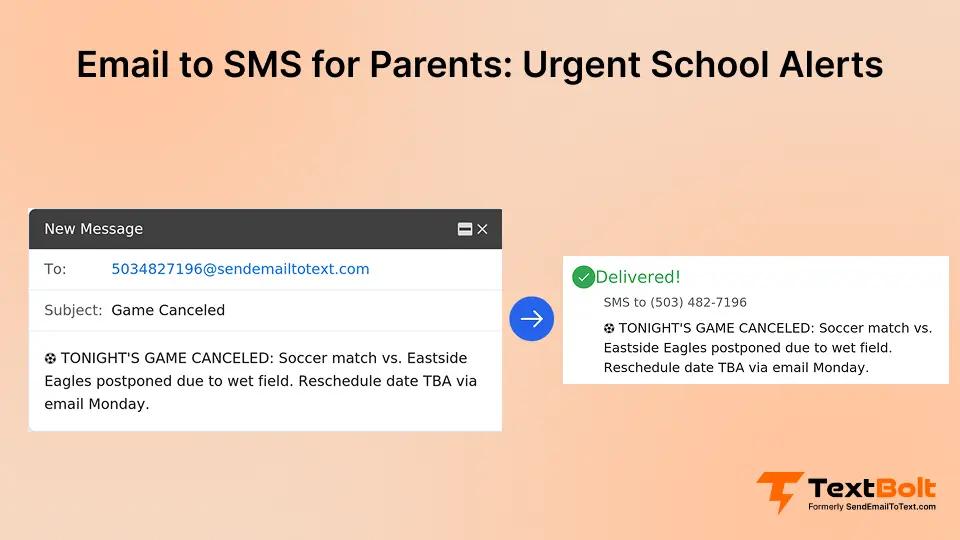
When Friday afternoon’s soccer game gets canceled due to field conditions, you send to the team parent group: “TONIGHT’S GAME CANCELED: Soccer match vs. [Opponent] postponed due to wet field. Reschedule date TBA via email Monday.”
Parents receive this before leaving work or home for the game. You prevent wasted trips and the frustration of families arriving at a closed field with no information.
6. Time-Sensitive Permission Deadlines
When you’re 24 hours from field trip departure and still missing permission forms, you send: “FIELD TRIP DEADLINE: Return signed permission form by 3 PM tomorrow or [Student Name] cannot attend Wednesday’s museum visit.”
This creates urgency for parents who may have forgotten the deadline. The specific cutoff time (3 PM tomorrow) eliminates ambiguity about whether emailing a photo of the form is acceptable or if physical delivery is required.
Streamline Email-to-SMS Communication with TextBolt
School email overload means critical information gets buried when parents need it most. Weather closures are missed until families are already driving to school. Emergency updates are sitting unread in spam folders. SMS creates a distinct urgency channel reserved specifically for weather alerts, emergencies, and time-sensitive schedule changes like exam updates requiring immediate parent action.
By layering SMS onto your existing email workflow rather than replacing it, you preserve the urgency signal while maintaining the detailed communication that newsletters and routine updates provide. Your staff continues using the email system they already know. Parents receive texts only when immediate action is required.
TextBolt sends emergency alerts and urgent notifications from the email your team already uses. No separate platform to log into during a 5 AM snow day. No per-user fees for multiple staff members (all plans include 10 users). No training required for your administrative staff. Start your free trial with 10 message credits to ensure your next urgent message reaches every parent when it matters most.
How to Get Started with TextBolt for Your School
- Create your account (10–30 minutes)
- Complete 10DLC carrier registration (up to 48 hours for approval)
- Import your parent contact list into Google Contacts or your email system
- Create SMS alert templates for weather closures, lockdowns, and schedule changes
- Send a test message to verify delivery
- Brief your administrative team — anyone with email access can send alerts
Frequently Asked Questions
Do Parents Need to Download an App to Receive School SMS Notifications?
No. Parents receive messages as standard text messages on their phones, just like texts from friends or family. No app download, account creation, or special setup required on their end. Works with any mobile phone that receives SMS.
Can Multiple School Staff Members Send Emergency SMS Alerts?
Yes. Anyone with email access can send SMS notifications from their own email account. All plans include 10 user accounts (1 admin + 9 team members) with no per-user fees. If you’re unavailable during a morning emergency, your assistant principal or secretary can send alerts immediately without requesting access or credentials.
How Long Does It Take to Set Up Email-to-SMS for School Alerts?
Account creation takes 10-30 minutes. 10DLC carrier approval (required before you can send messages) takes up to 48 hours. Plan ahead by setting up before emergency season (late fall for winter weather alerts) or early in the school year for year-round readiness.
How Is Email-to-SMS Different from Apps Like ParentSquare or Remind?
Email-to-SMS works from your existing email client (Gmail, Outlook, district email) without staff logging into a separate platform during emergencies. It’s designed for urgent alerts that complement (not replace) existing parent communication tools you may already use for newsletters and routine updates.
How Many Parents Can Receive One SMS Alert at Once?
You can send to entire contact groups (all parents, specific grade levels, sports teams, bus routes) with a single email using Google Contacts integration. The system delivers individual SMS messages to each phone number in the group. Parents receive personalized messages, not group texts.
What Happens If a Parent Replies to a School SMS Alert?
Replies come back as standard email responses in the sender’s inbox. You can continue the conversation via email reply, which sends as SMS, creating a two-way communication thread. Full conversation history is maintained in your email system for record-keeping and documentation.
How Much Does It Cost to Send SMS Notifications to Parents?
TextBolt starts at $29/month for 500 message credits (Basic Plan). Most schools fit within the $49/month Standard Plan (1,000 credits) with 10 user accounts included and no per-user fees. All team members share the credit pool. 7-day free trial includes 10 message credits.