
- Why Do Recruiters Lose Candidates to Email?
- How Does Email to SMS Work for Recruitment?
- Setting Up Email to SMS for Your Hiring Process (4 Steps)
- 5 Best Practices for Sending Recruitment Texts
- Email to SMS at Every Stage of the Hiring Process
- Can You Use Email to SMS Without Replacing Your ATS?
- Getting Started With Recruitment SMS Today
- Frequently Asked Questions
Stop Losing Candidates to Slow Email
How to Send Job Application Updates via Email to SMS (A Complete Guide)

Every recruiter has lived this scenario. You find a strong candidate on Monday morning, send an interview invitation that afternoon, and wait. By Wednesday, there is still no reply. You send a follow-up. On Thursday, the candidate finally responds: “Sorry, I accepted another position yesterday.”
The candidate was not ignoring you. They simply never saw your email. It was sitting in their inbox behind dozens of other messages, and the competing company reached them by text first.
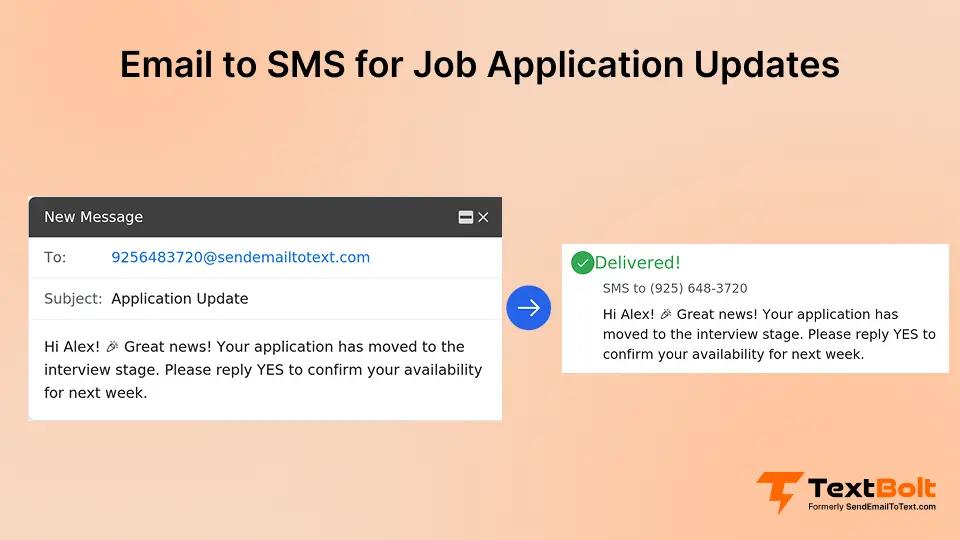
Email to SMS solves this problem by letting you send hiring updates as text messages directly from your Gmail or Outlook inbox. You compose a regular email, but instead of sending it to the candidate’s email address, you send it to their phone number through an SMS gateway. The message arrives on their phone as a text within seconds.
This guide walks you through the full process: why email falls short for recruitment communication, how the email-to-text mechanism works, how to set it up step by step, which hiring updates to send as texts, ready-to-use templates, and the best practices that keep your messages professional and compliant.
Why Do Recruiters Lose Candidates to Email?
Before jumping into the setup, it helps to understand why email has become unreliable for time-sensitive recruitment communication. The problem is not that candidates are careless. It is that modern inboxes work against you.
1. Inbox Overload and Spam Filters Bury Your Messages
Think about what happens when you send an interview invitation to a candidate’s personal email. Gmail, the most widely used email provider, automatically sorts incoming messages into tabs. Your interview request lands in the Primary tab only if Gmail’s algorithm recognizes you. Otherwise, it gets filed under Promotions or Updates, where candidates rarely look.
Even when your email avoids the Promotions tab, it still competes with every other message in the candidate’s inbox. Most people receive dozens of emails per day, and recruitment emails often look similar to marketing newsletters at a quick glance. The subject line says something like “Exciting Opportunity” or “Next Steps for Your Application,” which sounds a lot like the promotional emails candidates are trained to scroll past.
Passive candidates make the problem worse. Someone who is casually exploring opportunities but not actively job hunting may only check their email once or twice a day. If your message arrives at 2 PM and they do not open their inbox until the next morning, you have already lost 18 hours of response time.
2. Delayed Responses Push Candidates to Competitors
Here is where the real damage happens. Picture a recruiter named Sarah who is hiring for a marketing manager role. She finds an ideal candidate on Monday, sends an interview request via email at 3 PM, and moves on to other tasks. By Wednesday, the candidate has not responded, so Sarah sends a polite follow-up.
On Thursday morning, the reply comes in: “Hi Sarah, thanks for reaching out. Unfortunately, I accepted an offer from another company yesterday.”
What happened? The competing company sent their interview confirmation as a text message. The candidate saw it within minutes, replied immediately, moved through the process faster, and accepted the offer before Sarah’s email was ever opened.
This scenario plays out across hiring teams everywhere, and each lost candidate carries real costs. The recruiter spent hours sourcing and reviewing that applicant. Now the position stays open for additional weeks while the team restarts the search. According to SHRM’s benchmarking data, the average cost per hire in the United States runs into thousands of dollars, and every week a role stays vacant adds to the productivity gap.
The takeaway is simple: when two companies want the same candidate, the one that communicates faster usually wins.
Hire Faster With SMS Notifications
Send job updates right from your email and beat competitor offers with faster candidate engagement.
How Does Email to SMS Work for Recruitment?
Now that the problem is clear, here is exactly how email to SMS works and why it fits so naturally into a recruiter’s existing workflow.
The Email-to-SMS Gateway Turns Emails Into Texts
The entire process runs through something called an SMS gateway. Think of it as a translator that sits between your email client and the mobile phone network. Here is the step-by-step flow:
- You open Gmail or Outlook and compose a new email, just like you normally would.
- In the “To” field, instead of typing the candidate’s email address, you type their phone number followed by a gateway domain. For example: 5551234567@sendemailtotext.com
- You skip the subject line (text messages do not have subjects, so the gateway ignores it).
- In the body of the email, you write your message. Something like: “Hi Alex, we’d like to interview you for the Marketing Manager role. Are you available Thursday at 2 PM? Reply YES to confirm.”
- You hit Send. The gateway receives your email, strips out any formatting, converts the body text into an SMS, and delivers it to the candidate’s phone within seconds.
- The candidate sees a normal text message on their lock screen. They tap it, read it, and reply.
- Their reply travels back through the gateway and arrives in your email inbox as a regular incoming email.
The entire round trip, from your email to their phone and back to your inbox, typically takes less than a minute. You never leave Gmail or Outlook. The candidate never knows they are replying to an email-based system. It feels like a natural text conversation on both sides.
This is a significant advantage for recruiting teams that do not want to learn a new platform or ask their IT department to set up another tool. If you can send an email, you can send an SMS from your work email.
Texts Bypass Inbox Filters and Reach Candidates Directly
The reason SMS outperforms email for recruitment communication comes down to how phones handle text messages versus how email clients handle emails.
When an email arrives, it passes through spam filters, gets sorted into tabs, and sits in an inbox alongside hundreds of other messages. The recipient has to actively open their email app, scroll to the message, and decide to read it. At any point in that chain, the message can be missed, filtered, or ignored.
When a text message arrives, it appears as a notification on the candidate’s lock screen. There is no spam filter for SMS. There is no Promotions tab. The message is visible the moment the phone lights up, and most people check their texts within minutes of receiving them.
For recruiters, this means interview requests, schedule changes, and offer alerts land directly in front of the candidate instead of waiting in an inbox queue. The response time difference is dramatic. Where email responses can take 24 to 48 hours (if they come at all), text responses typically arrive within minutes.
Recruitment Updates That Work Best as Texts
Not every hiring message needs to be a text. Detailed documents like offer letters, employment contracts, and background check authorization forms should still go through email or a secure document portal. Text messages work best for communication that is short, time-sensitive, or requires a quick reply.
Here are the categories where SMS consistently outperforms email in recruitment:
- Time-sensitive alerts are the biggest win. Interview scheduling requests, last-minute time or location changes, urgent document requests, and offer notifications all benefit from the immediacy of a text. These are messages where a 24-hour email delay can cost you the candidate.
- Status updates that candidates care about also work well as texts. An application received confirmation, a “you’re moving to the next round” notification, a background check status update, or a start date confirmation are all short messages that candidates want to see right away.
- Quick two-way exchanges are where SMS really shines. When you need a candidate to confirm their availability, answer a yes-or-no question, verify their address, or respond to a simple onboarding question, a text gets you the answer in minutes instead of days.
The general rule: if the message is under 160 characters and you need a fast reply, send it as a text. If it contains detailed information, attachments, or sensitive data, keep it in email.
Setting Up Email to SMS for Your Hiring Process (4 Steps)
Getting started does not require technical skills or IT support. The entire setup takes about 30 minutes, and you will be sending your first recruitment text the same day.
Step 1: Pick a Provider With 10DLC Compliance and Two-Way Replies
Not all email-to-SMS services are built for business communication. For recruitment use, you need a provider that meets five specific requirements:
- 10DLC registration. This is the most important feature. 10DLC (10-Digit Long Code) is the carrier-level registration system that verifies your business identity. Without it, mobile carriers like AT&T, T-Mobile, and Verizon will filter or block your messages entirely. Any provider that skips this step is setting you up for delivery failures.
- Two-way messaging. Recruitment communication is a conversation, not a broadcast. You need candidates to be able to reply to your texts, and those replies need to arrive in your email inbox so you can respond without switching platforms.
- Gmail and Outlook compatibility. The whole point of email-to-SMS is working from your existing inbox. Make sure the provider supports both major email clients so every recruiter on your team can send texts from whichever email platform your company uses.
- Message logging. Every text you send and receive should be automatically stored in your email system. This creates a compliance trail that matters for equal opportunity documentation, candidate disputes, and internal audits.
- Team access. If multiple recruiters handle hiring, they should all be able to send texts from a single business phone number. This keeps communication consistent and prevents candidates from receiving messages from random personal numbers.
TextBolt covers all five requirements and is specifically designed for business messaging from email. Setup takes about 30 minutes with no technical background needed.
Step 2: Complete 10DLC Business Verification
Once you have chosen your provider, the first step is registering your business for 10DLC messaging. This is a one-time process that verifies you are a legitimate company, not a spam operation.
Here is what the registration involves:
- Provide your business name, address, and EIN (Employer Identification Number).
- Describe your messaging use case. For recruitment, you would say something like “sending interview scheduling, application status updates, and onboarding communication to job candidates.”
- Submit the registration and wait for carrier approval, which typically takes 1 to 2 business days.
After approval, your messages are routed through verified channels, which means significantly better delivery rates. Messages from unregistered numbers are increasingly being filtered by carriers, so this step is not optional. It is the difference between your texts actually reaching candidates and disappearing into carrier filters.
For a detailed walkthrough of the registration process, see the TextBolt setup guide.
Step 3: Send Your First Recruitment Text From Email
With registration complete, you are ready to send. Open Gmail or Outlook and compose a new email using this format:
To: 5551234567@sendemailtotext.com (replace with the candidate’s actual phone number)
Subject: (leave blank or type anything; SMS does not support subject lines, so the gateway ignores this field)
Body: Hi Jordan, your interview with Greenfield Marketing is confirmed for Tuesday at 2:00 PM. The office is at 450 Commerce Drive, Suite 300. Reply YES to confirm or let us know if you need to reschedule.
Hit Send. The candidate receives this as a standard text message within seconds. When they reply, their response appears in your email inbox like any other incoming message.
That is the entire process. If you have ever sent an email, you already know how to send a text from your work email.
Step 4: Save Templates for Common Hiring Scenarios
Recruiters send the same types of messages repeatedly, so building a small template library saves significant time. Create these four templates as saved drafts or email signatures, and customize the bracketed fields for each candidate:
Template 1: Application Received
Hi [Name], thanks for applying to the [Position] role at [Company]. We have received your application and will review it within [X] business days. If you have any questions in the meantime, reply to this message.
This confirmation is small but powerful. Candidates who receive an immediate acknowledgment are less likely to send anxious follow-up emails or calls, and they are more likely to stay engaged with your opportunity instead of moving on.
Template 2: Interview Scheduling
Hi [Name], we would like to interview you for the [Position] role at [Company]. Are you available on [Date] at [Time]? Reply YES to confirm or suggest a time that works better for you.
Notice the structure: greeting, purpose, specific time slot, and a clear call to action. Offering one or two specific slots gets faster responses than an open-ended “let us know your availability,” which puts the coordination burden on the candidate.
Template 3: Interview Reminder
Hi [Name], reminder: your interview for the [Position] role is tomorrow at [Time]. Location: [Address/Video Link]. Need to reschedule? Reply to this message.
Send this 24 hours before the interview. For high-priority roles, you can also send a shorter reminder 2 hours before. Interview reminders sent via SMS reduce no-shows significantly because the reminder appears on the candidate’s phone instead of getting lost in email.
Template 4: Offer Alert
Hi [Name], great news! We would like to offer you the [Position] role at [Company]. The full offer letter is in your email inbox. Questions? Reply here or call [Phone Number].
This template works as a bridge between channels. The text gets the candidate’s attention immediately, and the email contains the detailed offer document they need to review. It combines the speed of SMS with the detailed capacity of email.
5 Best Practices for Sending Recruitment Texts
Texting candidates is not the same as texting a friend. Recruitment SMS represents your company brand, and there are compliance rules to follow. These five practices will keep your messages effective and professional.
1. Keep Messages Under 160 Characters When Possible
A single SMS segment holds 160 characters. Messages longer than that get split into multiple texts, which can arrive out of order on some carriers and feel less polished to the recipient. Shorter messages also tend to get faster responses because they are easier to read and act on.
Here is a comparison:
Too long: “Dear Candidate, we are pleased to inform you that after careful review of your application materials, our hiring committee has decided to move forward with your candidacy for the Senior Account Manager position. Please let us know your availability for an interview at your earliest convenience.”
That is 299 characters and reads like a formal email crammed into a text. It also lacks a specific call to action.
Just right: “Hi Alex, we’d like to interview you for the Account Manager role. Available Thursday 2 PM or Friday 10 AM? Reply with your preference.”
That is 134 characters, fits in one segment, and gives the candidate two specific options to respond to. The response rate on a message like this will be dramatically higher.
2. End Every Text With a Clear Next Step
Every recruitment text should tell the candidate exactly what to do after reading it. Without a clear call to action, candidates read the message, think “I’ll deal with this later,” and forget.
Effective next steps include: “Reply YES to confirm,” “Reply with your availability,” “Check your email for the full details,” “Call [number] if you have questions.” The key is making the response easy and immediate. The less effort required, the faster candidates reply.
3. Send Texts During Business Hours (With Exceptions)
The best windows for recruitment texts are 9:00 AM to 11:00 AM and 1:00 PM to 3:00 PM on weekdays. During these hours, candidates are awake, alert, and near their phones.
Avoid sending texts before 8:00 AM, after 7:00 PM, or on weekends unless the candidate has specifically indicated those times work for them. A text that wakes someone up or interrupts their Saturday does not create a good impression of your company.
The exception is genuinely time-sensitive communication. If an interview needs to be rescheduled on short notice, or if there is an urgent change to the schedule, send the message immediately regardless of the time. Candidates would rather hear about a cancellation at 7 PM than show up to an office the next morning only to find out the interview was moved.
4. Stay Professional Even in a Casual Channel
Text messages feel informal by nature, but recruitment communication still represents your employer brand. Every text a candidate receives from you shapes their impression of your company.
Always use proper grammar and complete words. Abbreviations like “u,” “ur,” or “thx” look unprofessional in a hiring context. Always identify yourself by including your company name and your name or department in the message. If a candidate receives a text from an unknown number with no context, they are likely to ignore it.
Keep sensitive information out of text messages. Salary figures, reference check details, medical information, and anything that would be problematic if seen by someone looking over the candidate’s shoulder should go through email or a secure portal.
Finally, respond promptly when candidates reply. The whole point of SMS is faster communication. If a candidate texts back within five minutes and you take two days to reply, you have undermined the speed advantage that made SMS worth using.
5. Honor Opt-Out Requests Immediately
Under TCPA (Telephone Consumer Protection Act) regulations, candidates have the right to stop receiving text messages at any time. If someone replies with STOP, UNSUBSCRIBE, or any similar request, remove them from SMS communication immediately.
This is not just about legal compliance. A candidate who asks to stop receiving texts and then gets another message will view your company negatively, and they may share that experience publicly. Respecting communication preferences is part of creating a positive candidate experience.
For more details on SMS regulations, see TextBolt’s SMS compliance guide.
Email to SMS at Every Stage of the Hiring Process
Different stages of recruitment benefit from different types of text messages. Here is a stage-by-stage breakdown of when and what to text throughout the candidate journey.
1. Application Stage: Confirm Receipt Within 24 Hours
When a candidate submits an application, they enter a period of uncertainty. Did the system receive it? Is anyone reviewing it? Should they apply elsewhere?
A quick confirmation text within 24 hours answers all of those questions. Something as simple as “Hi [Name], we received your application for [Position] and will review it within 5 business days” sets expectations and shows the candidate that a real person is on the other end of the process. This small touchpoint reduces the number of follow-up calls and emails your team has to handle, and it keeps the candidate engaged with your opportunity instead of assuming their application disappeared.
2. Screening Stage: Notify Candidates Who Move Forward
The screening phase is where candidates feel the most anxiety. They have applied, heard nothing, and are wondering whether to keep waiting or move on. A brief status update via text keeps your best candidates from accepting other offers out of frustration.
For candidates advancing to the next round, a text like “Hi [Name], your application for [Position] is moving forward. We will be in touch this week to schedule an interview” is enough to keep them excited and available.
For candidates you are not advancing, a professional rejection text is actually more respectful than a rejection email, because the candidate is more likely to see it. A brief message acknowledging their time and wishing them well closes the loop without leaving them wondering.
3. Interview Stage: Schedule and Remind via Text
This is where SMS delivers the most measurable impact on your hiring process. Interview scheduling over email often takes multiple days of back-and-forth. Over text, the same coordination can happen in minutes.
A proven SMS scheduling workflow looks like this:
- Send the candidate a text offering 2 to 3 specific time slots.
- The candidate replies with their preferred slot (usually within minutes).
- Send a confirmation text with the date, time, location or video link, and the interviewer’s name.
- Send a reminder text 24 hours before the interview.
- Send a brief “see you in 2 hours” reminder on the day of the interview.
This five-step sequence works because it removes friction at every point. The candidate does not have to open their calendar app and draft a formal email response. They just text back “Thursday works” and the interview is confirmed.
The reminder texts are equally important. Candidates who receive a text reminder the day before and the morning of the interview are far less likely to forget, oversleep, or simply not show up. For teams that struggle with interview no-shows, SMS reminders are often the single most effective fix.
4. Offer Stage: Alert Candidates to Check Email for the Offer Letter
When you are ready to extend an offer, speed is critical. The longer a candidate sits without hearing from you, the more likely they are to accept a competing offer or lose enthusiasm.
Use this two-channel approach:
Send the full offer letter via email (it contains detailed terms, benefits information, and legal language that belongs in a document format). Then immediately send a text alerting the candidate that the offer letter is in their inbox. This ensures they see the notification right away instead of discovering the offer letter 24 hours later when they happen to check email.
If the candidate has not responded within 24 hours, send a follow-up text. Once they confirm receipt, use text for quick questions and clarifications, and confirm their acceptance via text with a summary of next steps.
5. Onboarding Stage: Keep New Hires Connected Before Day One
The gap between offer acceptance and the first day of work is a surprisingly risky period. New hires who do not hear from the company during this time may continue interviewing, second-guess their decision, or simply feel disconnected before they even start.
Pre-boarding texts bridge that gap:
Send a welcome message shortly after they accept (“Welcome to the team, [Name]! We’re excited to have you start on [Date].”). Remind them about paperwork deadlines a few days before documents are due. Share first-day logistics like where to park, what to wear, and who to ask for at the front desk. If possible, introduce them to their manager or team lead via a brief text.
These messages are short, easy to send, and they make new hires feel like they are already part of the company before they walk through the door.
Can You Use Email to SMS Without Replacing Your ATS?
If your team already uses an applicant tracking system like Greenhouse, Lever, Workable, or BambooHR, you do not need to replace it to start using email-to-SMS. The two systems serve different purposes and work best when used together.
Three Ways to Connect Email-to-SMS With Your ATS
- Direct routing through custom notification addresses. Many ATS platforms allow you to configure custom email addresses for candidate notifications. If your ATS sends an automated email when a candidate moves to the interview stage, you can route that notification through the SMS gateway so the candidate receives a text instead of (or in addition to) an email.
- Email forwarding rules in Gmail or Outlook. You can set up inbox rules that automatically forward certain ATS-generated emails to the SMS gateway. For example, create a rule that forwards any email with the subject line “Interview Scheduled” to the candidate’s phone number via the gateway address. This turns your existing ATS automations into text notifications without changing anything inside the ATS itself.
- Manual hybrid approach. The simplest method is using your ATS for what it does best (tracking candidates, storing resumes, managing the pipeline) and using email-to-SMS separately for time-sensitive communication. Most recruiting teams start here and add automation later as they get comfortable with the workflow.
Every Text Is Logged in Your Email for Compliance
One concern hiring teams often raise is record-keeping. Recruitment communication sometimes needs to be documented for equal opportunity compliance, internal audits, or candidate dispute resolution.
With email-to-SMS, every message you send and every reply you receive is stored in your email system automatically. The sent text appears in your Sent folder. The candidate’s reply appears in your Inbox. This creates a complete, searchable audit trail without any extra effort on your part.
Getting Started With Recruitment SMS Today
If candidate ghosting, slow interview scheduling, or lost offers are costing your team time and money, email-to-SMS is the fastest way to fix the communication gap without overhauling your hiring process.
Here is a five-step action plan to get started:
- Identify your biggest communication bottleneck. Is it interview scheduling? Offer response time? Application confirmations? Start with the area where slow communication is costing you the most.
- Pick one use case to start with. Do not try to move all recruitment communication to SMS at once. Choose your highest-impact scenario, build templates for it, and expand from there.
- Set up your email-to-SMS system. The TextBolt setup process takes about 30 minutes and requires no technical skills. You will complete 10DLC registration, connect your email, and be ready to send your first text the same day.
- Save 3 to 5 templates for your most common messages. Application confirmations, interview requests, interview reminders, offer alerts, and onboarding check-ins cover most hiring scenarios.
- Track your results. Compare your candidate response rate, time to respond, interview attendance rate, and overall time to fill before and after adding SMS. These four metrics will tell you exactly how much impact SMS is having on your hiring speed.
The job market rewards speed. Candidates receive multiple outreach messages, evaluate several opportunities simultaneously, and make decisions quickly. The company that communicates fastest and most conveniently is the company that lands the best talent.
Ready to stop losing candidates to your inbox? Start your free 7-day trial and send your first recruitment text in under an hour.
Hire Faster With SMS Notifications
Send job updates right from your email and beat competitor offers with faster candidate engagement.
Frequently Asked Questions
Can I send bulk texts to multiple candidates?
Yes. With email-to-SMS, you can send messages to contact groups using your email client’s existing group or distribution list features. This is useful for position-wide updates, hiring event notifications, or batch status updates that apply to multiple applicants at once.
Is it legal to text job applicants?
Yes, with proper consent. When candidates provide their phone number on a job application and agree to receive communications about their candidacy, you have implied consent for recruitment-related messages. Always include opt-out instructions in your initial message and honor STOP requests immediately. For a detailed overview of SMS regulations, see TextBolt’s compliance guide.
Can candidates reply to my texts?
Yes. With two-way email-to-SMS, candidate replies arrive directly in your email inbox. You read and respond to their texts without switching platforms, and the entire conversation thread is saved in your email for reference.
Do I need to replace my ATS?
No. Email-to-SMS complements your existing applicant tracking system. Use your ATS for candidate tracking, resume storage, and pipeline management. Use SMS for time-sensitive communication like interview scheduling, reminders, and offer alerts. The two systems work side by side.
Should I send salary or offer details via text?
No. Text messages should be used for alerts, scheduling, confirmations, and quick two-way questions. Detailed or sensitive information, including offer letters, salary breakdowns, benefits documents, and background check authorization forms, should always go through email or a secure document-sharing platform.