
- Why SMS Works Better Than Email for Event Invitations
- Common Challenges With Event SMS Platforms
- How to Send Event Invitation Texts From Gmail
- Event Invitation SMS Templates Ready to Use
- Event SMS Timing Strategy: When to Send Each Message
- Event Types That Benefit Most From SMS Invitations
- TextBolt vs. Other Event SMS Platforms
- Best Practices for Event Invitation Texts
- Start Sending Event Invitations From Your Inbox
- Frequently Asked Questions
Send Event Invites From Gmail
Email to SMS for Event Invitations: Complete Guide to Sending Event Texts From Your Inbox

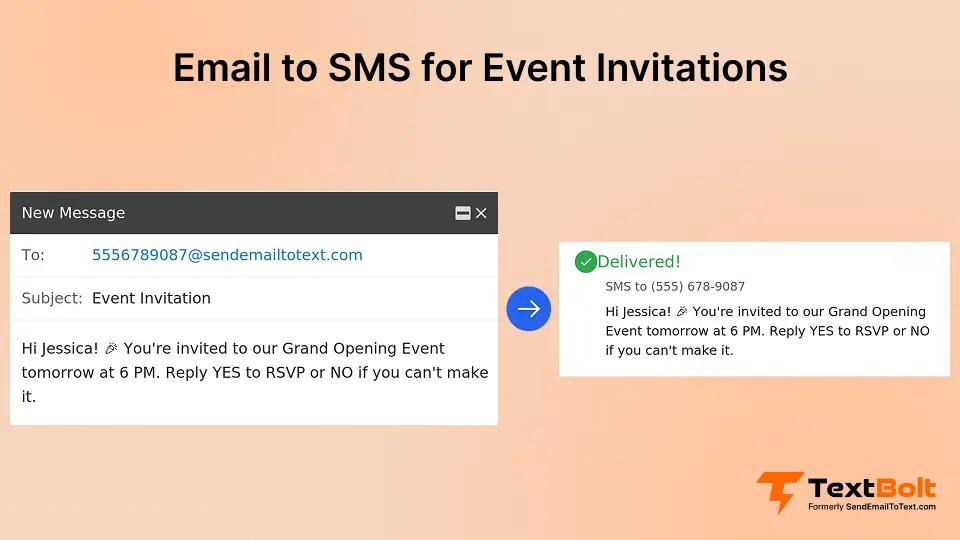
Your beautifully designed event invitation sits unopened in 80% of recipient inboxes. Meanwhile, the SMS you sent about a schedule change? Read within three minutes.
That is the reality event organizers face. Email open rates hover around 20-25%, while SMS messages achieve open rates up to 98%. When you are planning a corporate conference, charity gala, product launch, or community workshop, getting people to actually see your invitation determines whether your event succeeds or becomes an expensive empty room.
But here is the challenge most event planners encounter: dedicated SMS platforms require learning new software, managing separate contact lists, and juggling yet another login. When you are already coordinating venues, catering, speakers, and a hundred other details, the last thing you need is another complex tool.
What if you could send professional SMS event invitations directly from the Gmail or Outlook inbox you already use every day? This guide shows you exactly how to do that, complete with templates, timing strategies, and a step-by-step setup that takes less than 30 minutes.
Why SMS Works Better Than Email for Event Invitations
Before diving into the how, let’s examine why SMS consistently outperforms email for event communication.
The Numbers Tell the Story
Event organizers who switch to SMS invitations typically see dramatic improvements in attendance:
- Up to 98% open rate for SMS vs. 20-25% for email
- 90% of texts read within 3 minutes of delivery
- 45% average response rate for SMS vs. 6% for email
- 30-40% reduction in no-shows when using SMS reminders
These are not marginal improvements. They represent the difference between a packed venue and rows of empty seats. Learn more about how to reduce missed appointments with SMS reminders.
Why Attendees Prefer Text Invitations
SMS invitations cut through the noise because:
Your potential attendees are busy professionals, donors, customers, or community members. They check email sporadically, often in batches. But their phone? It is with them constantly.
- No spam folder risk: Texts arrive directly on the home screen
- Instant visibility: Most people check texts immediately
- Easy RSVP: A simple “YES” reply confirms attendance
- Calendar-friendly: Click-to-add calendar links work seamlessly on mobile
The challenge has always been that SMS platforms felt disconnected from the email workflows event teams already use. That changes when you can send event texts directly from your inbox.
Want to Send Event Invitations From Your Inbox?
TextBolt lets you compose event invitation texts in Gmail and deliver them as professional SMS messages. No new platform to learn.
Common Challenges With Event SMS Platforms
Before choosing an SMS solution for your events, it helps to understand the problems event organizers commonly face.
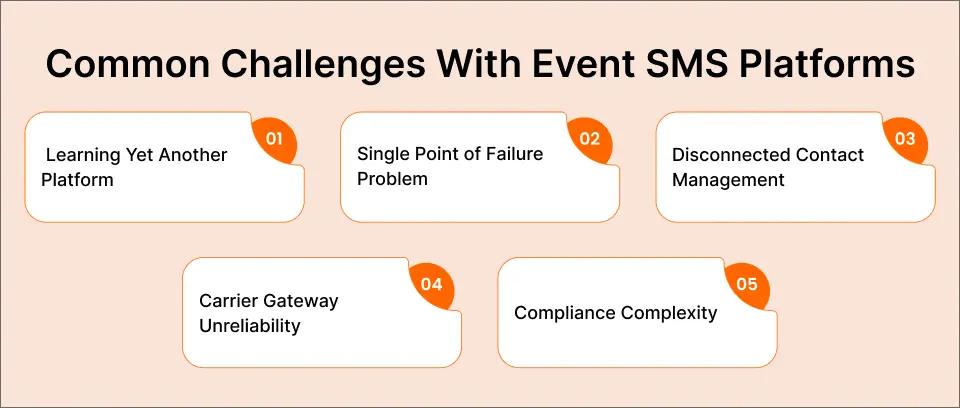
Challenge 1: Learning Yet Another Platform
Most SMS marketing tools require dedicated dashboards, separate logins, and hours of training. For event teams already stretched thin, this creates friction that delays implementation and reduces adoption.
Challenge 2: The Single Point of Failure Problem
When only one person knows how to use the SMS platform, your event communication becomes dangerously fragile. If your event coordinator is traveling, sick, or simply busy with venue setup, urgent attendee messages cannot get sent.
Challenge 3: Disconnected Contact Management
Maintaining separate contact lists in your email client AND your SMS platform creates duplication, version control issues, and the inevitable “we forgot to update the SMS list” disasters.
Challenge 4: Carrier Gateway Unreliability
Until mid-2025, many event organizers used free carrier gateways like @vtext.com or @txt.att.net. These services were shut down, and businesses that depended on them suddenly had no way to reach attendees via text.
Challenge 5: Compliance Complexity
TCPA regulations require proper opt-in consent for commercial text messages. Many event teams are unsure whether their invitation texts comply with regulations, creating legal exposure.
The good news? Email-to-SMS solutions like TextBolt address each of these challenges by letting you send event texts from the tools you already know.
How to Send Event Invitation Texts From Gmail
Sending SMS event invitations from your email inbox is straightforward with TextBolt’s Gmail text integration. Here is the complete setup process.
Step 1: Install TextBolt From Google Workspace Marketplace
Visit the Google Workspace Marketplace and search for TextBolt. Click “Install” and authorize the add-on for your Gmail account. The installation takes less than two minutes.
Step 2: Complete Business Verification
TextBolt handles 10DLC registration automatically. This carrier-approved verification process ensures your event texts achieve up to 98% delivery rates instead of being filtered as spam. Business verification typically takes 24-48 hours to complete after you submit your business information.
Step 3: Sync Your Event Contacts
Import your event guest list from Google Contacts or upload a CSV file. TextBolt syncs with your existing contact groups, so you can message specific segments like “VIP Guests,” “Sponsors,” or “General Attendees” without maintaining separate lists.
Step 4: Compose Your Event Invitation in Gmail
Open Gmail and click Compose just like you would for any email. Address the message to: [phone-number]@sendemailtotext.com
Or select multiple contacts from a synced group to send bulk invitations with a single email.
Step 5: Write Your Invitation and Send
Compose your event invitation message (keep it under 160 characters for a single SMS segment). Hit Send. TextBolt converts your email into an SMS and delivers it from your verified business number.
Step 6: Schedule for Perfect Timing
Use Gmail’s built-in “Schedule Send” feature to deliver invitations at optimal times. For example, schedule your initial invitation for Tuesday at 10 AM, then schedule reminders for one week before and one day before the event.
Step 7: Manage RSVPs in Your Inbox
When attendees reply “YES” or “RSVP,” their responses arrive in your Gmail inbox as part of the original conversation thread. No switching between platforms, no missed responses.
For a more detailed walkthrough, see our complete guide on how to send email to text or follow our TextBolt setup tutorial.
Event Invitation SMS Templates Ready to Use
Having proven templates saves hours of copywriting. Here are 12 event invitation texts organized by event type and purpose.
Corporate Events
- Conference Invitation: You’re invited! Join us at [Event Name] on [Date] at [Venue]. Industry leaders, networking, and insights. RSVP YES to confirm your spot. Reply STOP to opt out.
- Webinar Invitation: Free webinar: [Topic] on [Date] at [Time]. Learn [key benefit] from [speaker]. Register now: [link]. Reply STOP to opt out.
- Product Launch: Be first to see [Product Name]! Exclusive launch event [Date] at [Location]. Limited spots. Reply YES to reserve yours. Reply STOP to opt out.
Nonprofit and Charity Events
- Fundraiser Invitation: Join us for [Event Name]! [Date] at [Venue]. Your attendance supports [cause]. Tickets: [link]. Together we make a difference. Reply STOP to opt out.
- Volunteer Appreciation: You’re invited! [Org Name] Volunteer Appreciation Dinner on [Date]. Celebrating YOU! RSVP by [date]: [link]. Reply STOP to opt out.
Social and Community Events
- Holiday Party: You’re invited to our Holiday Party! [Date] at [Time], [Location]. Food, drinks, and celebration. RSVP YES by [deadline]. Reply STOP to opt out.
- Grand Opening: Grand Opening! Join us [Date] at [Address]. Exclusive offers for attendees. Be part of something new! Reply YES to RSVP. Reply STOP to opt out.
Professional Development
- Workshop Invitation: [Workshop Topic] Workshop – [Date] at [Time]. Hands-on learning, expert instruction. Limited to 25 attendees. Reserve: [link]. Reply STOP to opt out.
- Networking Event: Expand your network! [Event Name] on [Date], [Time]-[End Time] at [Venue]. Meet [industry] professionals. RSVP: [link]. Reply STOP to opt out.
Event Reminders
- One Week Reminder: Reminder: [Event Name] is one week away! [Date] at [Time], [Venue]. We look forward to seeing you. Questions? Reply to this text.
- Day-Before Reminder: See you tomorrow! [Event Name] at [Time], [Venue]. Parking info: [details]. Questions? Reply here or call [number].
- Day-Of Alert: [Event Name] starts in 2 hours! Doors open at [Time]. Address: [Venue]. See you soon!
For more promotional messaging templates, check out our guide on email to SMS for promotional offers. You can also browse our TextBolt blog for additional SMS strategies and use cases.
Stop Wrestling With Separate SMS Platforms
Send event invitations, reminders, and updates from the Gmail inbox you already use. TextBolt delivers professional SMS from your business number.
Event SMS Timing Strategy: When to Send Each Message
Timing determines whether your event texts drive action or get ignored. Here is a proven timeline for event SMS communication.
Pre-Event Phase (4+ Weeks Before)
Initial Invitation (4-6 weeks out)
- Send your primary invitation during business hours, Tuesday through Thursday
- Best times: 10 AM – 12 PM or 2 PM – 4 PM
- Include clear event details and easy RSVP method
Early Bird Reminder (3 weeks out)
- Target those who have not yet responded
- Emphasize limited spots or early registration benefits
- Create urgency without pressure
Build-Up Phase (1-2 Weeks Before)
Confirmation Request (2 weeks out)
- Ask confirmed attendees to reconfirm
- Share preliminary agenda or speaker announcements
- Build excitement with exclusive details
Final RSVP Deadline (1 week out)
- Send to non-responders with deadline urgency
- Include last-chance messaging
- Make RSVP dead simple (reply YES)
Event Week
Logistics Message (2-3 days before)
- Share parking instructions, dress code, what to bring
- Provide contact number for questions
- Include calendar link if not already added
Day-Before Reminder (24 hours out)
- Confirm time and location
- Share any last-minute updates
- Express anticipation (“We look forward to seeing you!”)
Event Day
Morning Reminder (event morning)
- For evening events, send a morning reminder
- Include start time and address
- Keep it brief and action-focused
Real-Time Updates (as needed)
- Session changes, speaker additions, room locations
- Emergency announcements if necessary
- Thank attendees for participating
Post-Event
Thank You Message (within 24 hours)
- Express gratitude for attendance
- Share photo album or recording link
- Request feedback via quick survey
Follow-Up (1 week after)
- Invite to upcoming events
- Share resources mentioned during event
- Keep engagement momentum going
Event Types That Benefit Most From SMS Invitations
While SMS works for virtually any event, certain event categories see exceptional results.
Corporate Conferences and Trade Shows
Large-scale events with hundreds or thousands of attendees benefit from SMS because:
- Last-minute session changes reach everyone instantly
- Networking meetup announcements drive participation
- Emergency evacuations or delays communicate immediately
Healthcare and Medical Events
Patient education seminars, community health fairs, and provider conferences use SMS because:
- Appointment-style events see dramatic no-show reduction
- Elderly attendees often prefer text to email
- HIPAA-conscious organizers appreciate documented communication
Nonprofit Fundraisers and Galas
Donor events and charity functions benefit because:
- High-value attendees expect professional communication
- RSVP tracking directly impacts catering and planning
- Last-minute donor table changes need immediate notification
Educational Workshops and Training
Professional development events see higher attendance because:
- Busy professionals miss emails but see texts
- Pre-session material reminders ensure prepared attendees
- Post-session follow-up maintains engagement
Many institutions also improve attendance at school events by using timely SMS reminders and updates to keep participants informed and engaged.
Product Launches and VIP Events
Exclusive events create buzz through SMS because:
- VIP guests feel prioritized receiving personal texts
- Limited-seating urgency translates well via SMS
- Real-time updates during launch create excitement
Learn how email-to-SMS powers product launch announcements with our guide.
Community and Local Events
Neighborhood gatherings, local business events, and community meetings benefit because:
- Diverse attendee demographics (some prefer text over email)
- Weather-dependent outdoor events need flexible communication
- Local events often have last-minute changes
TextBolt vs. Other Event SMS Platforms
How does sending event texts from email compare to dedicated SMS marketing platforms?
| Feature | TextBolt | Textedly | Text-Em-All | EZ Texting |
| Send SMS from Email/Gmail | Yes | No | No | No |
| Schedule SMS via Gmail | Yes | Dashboard only | Dashboard only | Dashboard only |
| Two-Way Replies in Inbox | Yes | Dashboard only | Dashboard only | Dashboard only |
| Team Access (Multiple Senders) | Yes | Extra cost | Yes | Extra cost |
| No New Platform to Learn | Yes | No | No | No |
| 10DLC Compliance Included | Yes | Yes | Yes | Yes |
| Setup Time | 30 minutes | Hours | Hours | Hours |
| Starting Price | $29/month | $24/month | $19/month | $20/month |
Why Event Teams Choose Email-to-SMS
Traditional SMS platforms require learning new dashboards, maintaining separate contact lists, and training team members on unfamiliar interfaces. For event teams already juggling multiple responsibilities, this creates friction.
With TextBolt, your event coordinator composes an invitation in Gmail, schedules it for optimal delivery, and manages RSVP replies in the same inbox they use for everything else. When the coordinator is traveling or unavailable, any team member with email access can handle urgent attendee communication.
For more engagement strategies, explore our guide on boosting customer engagement via SMS.
Best Practices for Event Invitation Texts
Follow these proven practices to maximize RSVP rates and attendance.
Keep Messages Concise
SMS has a 160-character limit per segment. While TextBolt supports longer messages (split automatically), shorter texts perform better:
- Lead with the most important information (event name, date)
- Include one clear call-to-action
- Save details for follow-up messages
Personalize When Possible
Use recipient first names when your contact list includes them:
Hi Sarah, you’re invited to…
Personalized messages see 29% higher engagement than generic blasts.
Include Clear Opt-Out Instructions
TCPA compliance requires easy opt-out. Always include:
Reply STOP to opt out.
This protects your business legally and builds trust with recipients.
Use a Recognizable Sender
With TextBolt’s business messaging platform, your messages come from your verified business number. Recipients see a professional sender, not a random email address or unknown number.
Time Zone Awareness
When inviting attendees across time zones, segment your list and schedule appropriately. Nobody wants a 6 AM event reminder.
Test Before Bulk Sending
Send your invitation to yourself and a colleague first. Check formatting, links, and how the message appears on different devices.
Track and Optimize
Monitor which message versions drive higher RSVP rates. A/B test invitation wording, timing, and call-to-action phrases for future events.
Start Sending Event Invitations From Your Inbox
Event communication does not have to mean learning another platform, maintaining separate contact lists, or depending on a single team member who knows how to use the SMS dashboard.
With TextBolt, you send professional event invitation texts directly from the Gmail inbox you already use. Your team can collaborate on attendee communication. Replies arrive where you already manage everything else. And setup takes less than 30 minutes.
Here is what you get:
- Send and schedule SMS directly from Gmail
- Up to 98% delivery rate with 10DLC compliance
- Two-way messaging with replies in your inbox
- Team access so anyone can handle urgent messages
- Complete audit trail of all event communication
- Professional business number for every message
Your next event deserves better than a 20% email open rate. Start reaching attendees where they actually see your messages.
Frequently Asked Questions
How do I send event invitations via SMS from email?
With TextBolt, compose your invitation in Gmail and address it to [phone-number]@sendemailtotext.com. TextBolt converts your email into an SMS and delivers it from your business number. Recipients receive a professional text message and can reply directly.
Is it legal to send event invitation texts?
Yes, when done properly. TCPA regulations require prior express consent for marketing messages. For event invitations to existing customers, members, or subscribers who have opted in to receive communications, SMS invitations are permitted. Always include opt-out instructions.
Can multiple team members send event texts?
Yes. TextBolt’s Standard and Professional plans include multi-user access. Multiple team members can send event communications from the same business number using their individual Gmail accounts. This eliminates the single-point-of-failure problem when your event coordinator is unavailable.
How do I track RSVPs from SMS invitations?
When you send event invitations via TextBolt, attendee replies arrive in your Gmail inbox. A simple “YES” or “RSVP” response appears in the same thread as your original invitation, making it easy to track confirmations and update your guest list.