
- Why Traditional Email Onboarding Fails
- How Email to SMS Solves the Onboarding Problem
- Setting Up Email to SMS for Client Onboarding
- Email to SMS Onboarding by Industry
- Best Practices for SMS Client Onboarding
- Building Your Team’s SMS Onboarding Capability
- Getting Started with Email to SMS Onboarding
- Transform Your Client Onboarding Today
- Frequently Asked Questions
Clients Missing Your Welcome Emails?
How to Use Email to SMS for Seamless Client Onboarding

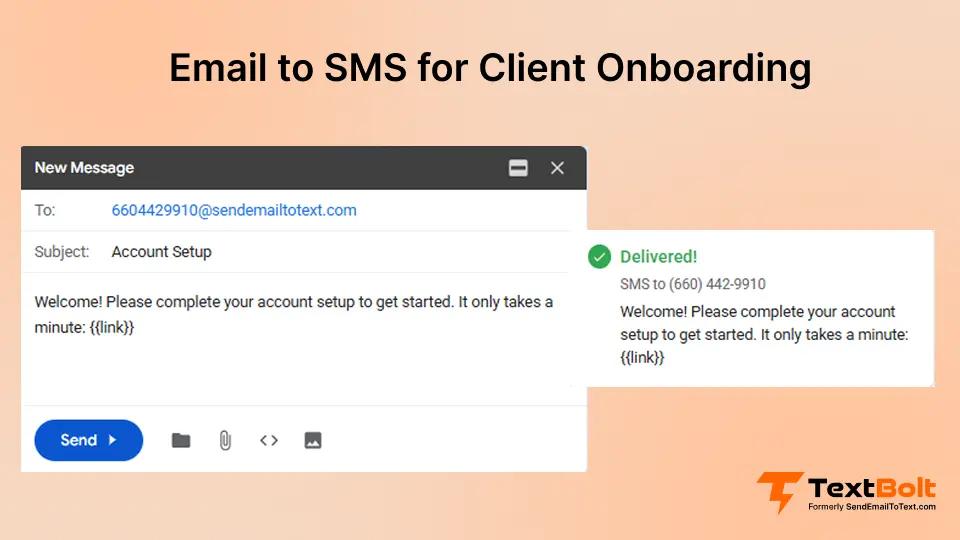
The first 48 hours after a client signs up determine whether they become a long-term customer or disappear forever. Studies show that companies lose up to 75% of new clients within the first week when onboarding communication fails. The problem is not that businesses do not reach out. The problem is that clients never see the message.
Email open rates hover around 20%. SMS open rates reach around 98%. When a new client signs up for your service and your welcome email lands in their spam folder or gets buried under 47 other messages, your onboarding process fails before it starts.
This is where email to SMS for client onboarding transforms how businesses welcome new customers. By sending critical onboarding messages as text messages directly from your existing email workflow, you ensure clients actually see and respond to your communications.
In this guide, you will learn how to set up email-to-SMS onboarding workflows, create effective welcome sequences, and turn new signups into engaged, long-term clients without learning new software or changing your existing processes.
Why Traditional Email Onboarding Fails
Every business owner has experienced this frustration. A new client signs up, you send a welcome email with important next steps, and then nothing. Days pass. The client never completes their profile, never schedules their first appointment, never responds to your follow-up.
You assume they are not interested. The truth? They never saw your message.
The Inbox Problem
Modern email inboxes work against onboarding success. Gmail sorts messages into tabs. Corporate filters quarantine unfamiliar senders. Mobile notifications get buried. Even when clients intend to read your email “later,” later never comes.
Consider what happens when a new patient signs up at a healthcare practice:
- Practice sends welcome email with intake forms
- Email lands in Promotions tab
- Patient checks inbox on phone, sees 23 unread messages
- Patient plans to “get to it later”
- Three days pass, patient forgets they even signed up
- Practice calls to follow up, patient is annoyed
- Patient considers going elsewhere
This pattern repeats across industries. Salons lose new clients. Consultants lose prospects. IT service providers lose contracts. The communication was sent, but it was never received.
The Cost of Failed Onboarding
Failed onboarding doesn’t just lead to a single lost client — it creates a long-term revenue gap that compounds over time.
Research consistently shows that early-stage onboarding is where most customer churn occurs. According to aggregated onboarding and retention studies, up to 70% of customer churn happens within the first 90 days when onboarding communication is unclear, delayed, or ignored. Businesses that improve communication timing and visibility can reduce customer churn with email to SMS by ensuring critical onboarding messages are seen and acted on immediately.
Businesses that invest in structured onboarding experience up to 50% higher customer retention, while customers who successfully complete onboarding are 2.5× more likely to remain long-term customers.
The financial impact of this drop-off is significant. Bain & Company found that increasing customer retention by just 5% can increase profits by 25% to 95%, because retained customers spend more, refer others, and cost less to support over time.
How Email to SMS Solves the Onboarding Problem
Email to SMS bridges the gap between your existing workflows and the communication channel clients actually check. Instead of hoping your welcome email gets opened, you send it as a text message that appears on their phone within seconds.
With email-to-text services like TextBolt, the process works exactly like sending a regular email. You compose a message, address it to the client’s phone number using a special format, and click send. The recipient receives it as a standard SMS.
Why SMS Works for Onboarding
Text messages succeed where emails fail for several reasons:
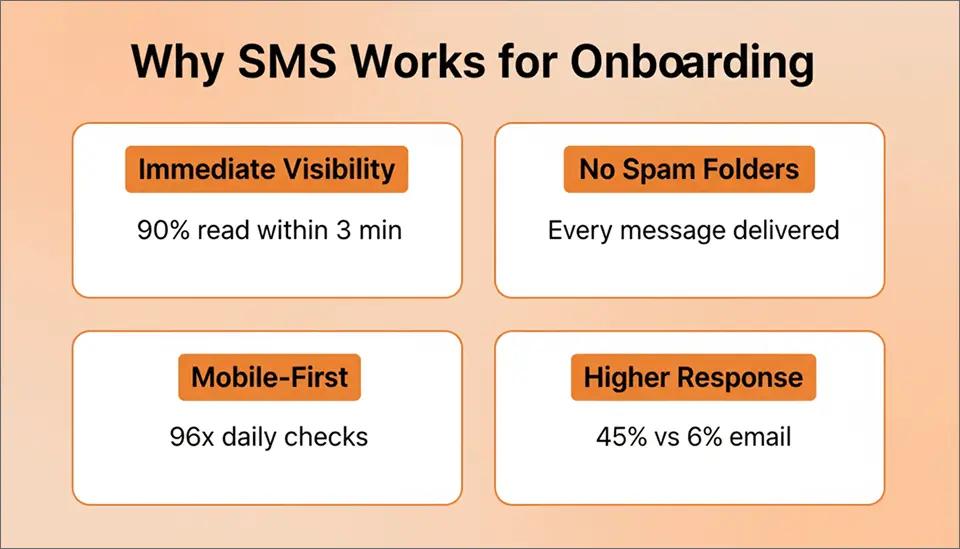
- Immediate visibility: 90% of SMS messages are read within 3 minutes of delivery. Your welcome message reaches clients while they are still thinking about your business.
- No spam folders: SMS does not have promotional tabs or spam filters that hide messages. Every text lands in the same place, with the same notification.
- Mobile-first behavior: Clients check their phones 96 times per day on average. They check email a fraction of that. Meeting clients on their primary device improves response rates.
- Higher response rates: SMS response rates average 45% compared to 6% for email. When you need clients to take action, text messages deliver.
- Personal feel: Text messages feel more personal and urgent than emails. A welcome text feels like genuine outreach, not marketing automation.
The Email-Native Advantage
The power of email to SMS for onboarding lies in workflow preservation. You do not need to learn new software, log into separate dashboards, or train staff on additional systems.
If your team already sends welcome emails, they already know how to send welcome texts. With Gmail text integration, the process is identical to sending any other message. Compose, address, send. The only difference is the email address format.
This means:
- Zero training required for staff
- No new software licenses to manage
- Existing email templates adapt instantly
- Any team member can send onboarding messages
- Complete audit trail in your email system
Stop Losing New Clients to Unread Emails
Send onboarding messages as SMS directly from Gmail with TextBolt. Setup takes less than 30 minutes no new software to learn.
Setting Up Email to SMS for Client Onboarding
Getting started with SMS onboarding takes about 30 minutes. Here is exactly how to set up your workflow.
Step 1: Choose Your Email-to-SMS Provider
Select a provider that offers reliable delivery, compliance, and ease of use. Key features to look for:
- 10DLC compliance: Ensures messages reach recipients instead of being blocked as spam
- Email-native workflow: Works directly from Gmail, Outlook, or your existing email client
- Two-way messaging: Allows clients to respond to your texts
- Professional business number: Messages appear from your business, not a random number
- Delivery confirmation: Know when messages are delivered
TextBolt provides all these features with setup taking less than 30 minutes. Start with their free trial to test your onboarding workflow before committing.
Step 2: Plan Your Onboarding Sequence
Before sending your first SMS, map out what clients need to do and when. Effective onboarding sequences typically include:
- Welcome message (immediate): Acknowledge the signup, set expectations, provide one clear next step.
- First action prompt (1-2 hours): Guide clients to complete their first task, whether that is filling out a form, scheduling an appointment, or accessing their account.
- Completion check (24 hours): Follow up with clients who have not completed the first action.
- Value delivery (48-72 hours): Share something useful, helpful information, a tip, or a resource that demonstrates your value.
- Engagement checkpoint (1 week): Confirm clients are getting what they need, ask if they have questions.
Keep each message focused on a single action. SMS works best for short, direct communication.
Step 3: Create Your Message Templates
Write your onboarding messages in advance. Each SMS should be:
- Under 160 characters for single-segment delivery
- Action-focused with one clear request
- Personal but professional
- Including your business name
Example welcome message:
Hi [Name], welcome to [Business]! Your account is ready. Complete your profile here: [link] – takes 2 min. Reply HELP for assistance. Reply STOP to opt out.
Example action prompt:
[Name], just checking in – noticed you haven’t scheduled your first [appointment/session]. Book now: [link]. Open slots filling fast this week.
Example completion check:
Hi [Name], did you have questions about getting started with [Business]? Reply to this text and we’ll help. We’re here 9-5 Mon-Fri.
Step 4: Configure Your Sending Workflow
With TextBolt, sending onboarding SMS works like sending email:
- Open Gmail or your email client
- Compose a new message
- Enter the recipient’s phone number followed by @sendemailtotext.com
- Write your onboarding message
- Click send
The message is delivered as an SMS within seconds. Replies come back to your email inbox, keeping all communication in one place.
For scheduled messages, use Gmail’s “Schedule Send” feature to time your onboarding sequence automatically.
Step 5: Test Before Launch
Before rolling out SMS onboarding to all clients:
- Send test messages to your own phone
- Verify delivery timing and formatting
- Test the reply function
- Confirm links work correctly on mobile
- Have a colleague review message clarity
Testing prevents embarrassing errors and ensures clients have a smooth experience from day one.
Email to SMS Onboarding by Industry
Different industries have different onboarding needs. Here is how email-to-SMS improves client onboarding across common use cases.
Healthcare and Medical Practices
Patient onboarding sets the tone for the entire care relationship. When new patients complete intake forms and understand pre-appointment requirements, visits run smoother and outcomes improve.
SMS onboarding sequence for healthcare:
- Signup confirmation: “Welcome to [Practice]. Your patient portal is ready. Complete intake forms here: [link]. See you on [date]!”
- Insurance reminder: “Hi [Name], quick reminder to bring your insurance card to your first visit on [date]. Questions? Reply to this text.”
- Pre-appointment prep: “[Name], appointment tomorrow at [time]. Arrive 15 min early for paperwork. Directions: [link]. Reply to C to confirm.”
- Post-visit follow-up: “Thank you for visiting [Practice]. Any questions about your treatment? Reply here or call [number].”
Healthcare providers using SMS onboarding report up to 38% reduction in no-shows and significantly improved form completion rates.
Professional Services and Consultants
Consultants, accountants, lawyers, and other professional service providers depend on engaged clients who provide information and attend meetings. Poor onboarding leads to scope creep, missed deadlines, and frustrated clients.
SMS onboarding sequence for consultants:
- Welcome and next steps: “Hi [Name], excited to work together! Please complete your intake questionnaire: [link]. This helps me prepare for our kickoff call.”
- Document request: “[Name], to get started I’ll need [specific documents]. Upload securely here: [link]. Let me know if you have questions.”
- Meeting confirmation: “Our strategy session is scheduled for [date/time]. Zoom link: [link]. Please review the prep materials I emailed.”
- First-week check-in: “[Name], how is your first week going? Reply if you need anything. Looking forward to our progress review Friday.”
Service-Based Businesses
Salons, fitness studios, home services, and other appointment-based businesses lose clients when onboarding friction prevents first appointments from happening.
SMS onboarding sequence for service businesses:
- Welcome and booking: “Welcome to [Business]! Book your first appointment: [link]. New client special: [offer]. Questions? Reply here.”
- Appointment prep: “Hi [Name], looking forward to your [service] tomorrow at [time]. Arrive 10 min early. Address: [address].”
- Post-service follow-up: “Thanks for visiting [Business]! How was your experience? Reply with feedback. Book your next appointment: [link].”
- Retention message: “[Name], it’s been a month since your last visit. Time for another [service]? Book now: [link]. We miss you!”
IT and Technology Services
For IT service providers and technology companies, onboarding often involves technical setup steps that clients delay or complete incorrectly. SMS keeps the process moving.
SMS onboarding sequence for IT services:
- Account activation: “Welcome to [Company]. Your account is active. Download our app: [link]. Setup takes 5 minutes.”
- Configuration guide: “[Name], noticed your setup isn’t complete. Quick guide here: [link]. Reply for support.”
- Feature introduction: “Did you know [product] can [feature]? Try it: [link]. Makes [benefit] easier.”
- Support check-in: “Hi [Name], any questions about [product] this week? Our support team is here. Reply or call [number].”
Education and Academic Institutions
Schools, universities, and training centers often struggle to ensure new students and parents receive critical information during enrollment and orientation. When onboarding messages are buried in email inboxes, students may miss deadlines for forms, course registration, or orientation events. Many institutions use SMS alongside email to improve student onboarding communication and ensure new students receive important updates immediately.
SMS onboarding sequence for education:
- Enrollment confirmation: “Welcome to [School/University], [Name]! Your enrollment is confirmed. Complete your student profile here: [link]. Reply if you need help.”
- Orientation reminder: “Hi [Name], orientation for new students is on [date] at [time]. Check the schedule here: [link]. We look forward to meeting you!”
- Document submission reminder: “Reminder: please upload your required documents before [date] to avoid registration delays. Upload here: [link].”
- First-week check-in: “Welcome to your first week at [School]! Need help finding classes or accessing student services? Reply to this message anytime.”
Best Practices for SMS Client Onboarding
Follow these guidelines to maximize the effectiveness of your SMS onboarding workflow:
Get Explicit Consent
SMS marketing regulations require consent before sending text messages. Include opt-in language in your signup forms:
“By providing your phone number, you consent to receive SMS messages from [Business] regarding your account and services. Message and data rates may apply. Reply STOP to unsubscribe.”
Always honor opt-out requests immediately. TextBolt handles STOP keyword processing automatically.
Time Messages Appropriately
Send onboarding messages during business hours when clients expect communication. Avoid early morning, late night, and weekend messages unless urgency requires it.
Optimal timing for onboarding SMS:
- Welcome message: Within 5 minutes of signup
- Follow-ups: Between 9 a.m. and 6 p.m. local time
- Reminders: 24-48 hours before required actions
- Check-ins: Mid-week, mid-day
Keep Messages Concise
SMS works because it is short. Each message should have:
- One clear purpose
- One call to action
- Essential information only
If you need to share detailed information, send a short SMS with a link to more details rather than cramming everything into the text.
Personalize When Possible
Using the client’s name and referencing their specific situation improves response rates. Instead of “Dear Customer,” use their actual name. Instead of generic timing, reference their specific appointment or signup date.
Enable Two-Way Communication
Make it easy for clients to respond. Include language like “Reply to this text for help” or “Questions? Just reply here.” When clients can respond directly, they are more likely to engage.
With TextBolt, all replies come to your email inbox, so you can manage the conversation from the same place you sent the original message.
Track and Improve
Monitor these metrics to optimize your onboarding:
- Message delivery rates
- Response rates by message
- Onboarding completion rates
- Time to first action
- Drop-off points in the sequence
Adjust messaging, timing, and sequence based on what the data shows.
Building Your Team’s SMS Onboarding Capability
One of the biggest advantages of email-to-SMS for onboarding is team resilience. When any team member can send onboarding messages from their email, your business does not depend on a single person or device.
Multi-User Access
With TextBolt’s team features, multiple staff members can send SMS from their individual email accounts while using the same business number. This means:
- Front desk can handle new client welcomes
- Account managers can send relationship check-ins
- Support staff can respond to questions
- Anyone can cover when colleagues are absent
Workflow Documentation
Document your SMS onboarding workflow so any team member can execute it:
- When to send each message
- What each message should contain
- How to handle responses
- Who owns which parts of the sequence
Store templates in shared documents or email drafts for easy access.
Training Takes Minutes
Because email-to-SMS works like regular email, training new staff takes minutes:
- Show them the message templates
- Explain the phone number format
- Have them send a test message
- Review response handling
Compare this to training on a new software platform, which can take hours or days.
Getting Started with Email to SMS Onboarding
Improving your client onboarding with SMS takes less time than you think. Here is how to start today:
- Step 1: Sign up for a TextBolt free trial. Setup takes about 30 minutes.
- Step 2: Write your welcome message template using the examples above.
- Step 3: Send your first onboarding SMS to a test phone number.
- Step 4: Verify delivery and test the reply function.
- Step 5: Start using SMS for your next new client.
You do not need to overhaul your entire onboarding process. Start with a single welcome message. Once you see the improved response rates, expand to a full sequence.
Turn Your Next Signup Into a Long-Term Client
Start sending onboarding SMS from your email today and see higher response rates immediately.
Transform Your Client Onboarding Today
The difference between businesses that retain clients and businesses that lose them often comes down to those critical first interactions. When clients feel welcomed, informed, and supported from day one, they stick around.
Email to SMS for client onboarding gives you a direct line to new clients when it matters most. No more messages lost in spam folders. No more clients who “meant to respond” but forgot. No more onboarding drop-off because the welcome email went unread.
Learn more about how to send email to text and start improving your client onboarding today. Your future long-term customers are waiting to hear from you.
Start your free 7-day trial with TextBolt and send your first onboarding SMS in the next 30 minutes. No new software to learn. Just better client communication from your existing email.
Frequently Asked Questions
Do I need consent to send onboarding SMS?
Yes. Include SMS consent language in your signup forms. Most businesses already collect phone numbers during signup. Adding consent language takes one line of text.
What if a client does not want SMS?
Always provide an opt-out option. Some clients prefer email-only communication. Respect their preference while defaulting to SMS for those who consent.
How many messages should I send during onboarding?
Start with 3-5 messages over the first week. Test and adjust based on response rates. More is not always better. Focus on messages that drive specific actions.
Can I automate the entire sequence?
With Gmail’s Schedule Send feature and TextBolt, you can schedule messages in advance. For fully automated sequences, consider integrating with your CRM or booking system.
What about international clients?
TextBolt supports messaging to Canada and USA countries currently.