
- What Are Exam Schedule Change Notifications?
- Why Your Exam Notifications Disappear Into Digital Noise
- What Happens When Your Exam Notifications Don’t Reach Students
- How SMS Escalation Ensures Critical Updates Reach Every Student
- Best Practices for Exam Change Notifications
- Creating an Exam Notification System That Scales
- Eliminate Missed Exam Notifications with Email-to-SMS Alerts
- Frequently Asked Questions
Students Don’t Check Email During Exam Week
How Email-to-SMS Alerts Ensure Students Never Miss Exam Schedule Changes

You’ve confirmed the exam room change. You’ve sent the detailed email to all 200 students enrolled in Chemistry 101. But when exam day arrives, 30 students show up at the wrong building, confused, stressed, and unprepared, because your notification sat unread in inboxes buried under club announcements, promotional emails, and group project threads.
Your students receive numerous emails daily. Critical academic information competes with everything from dining hall promotions to student organization newsletters. Exam schedule changes (information students desperately need) disappear into digital noise. This guide shows you how to ensure time-sensitive exam updates actually reach every student when sthe takes are highest, using SMS escalation for critical academic notifications.
Similar to emergency alerts, exam schedule changes require delivery guarantees that email alone can’t provide.
What Are Exam Schedule Change Notifications?
Exam schedule change notifications are official communications from your institution informing students about modifications to exam dates, times, locations, or formats after the original schedule was published. These updates directly impact student academic performance and require immediate attention.
Unlike routine course announcements, exam changes create high-stakes situations where students must adjust preparation schedules, travel plans, and personal commitments with limited notice.
The types of changes you need to communicate include date or time modifications (conflicts, faculty illness, facility issues), location or room changes (maintenance, capacity adjustments, accessibility), format changes (in-person to online, written to oral exams), and last-minute cancellations or postponements (weather, emergencies).
Here’s a scenario you might face: You need to move Friday’s Biology midterm from Science Building Room 401 to Student Center Auditorium due to HVAC failure, and you have 48 hours to ensure 150 students know about the change.
Email works for routine academic updates, but critical schedule changes need guaranteed delivery. That’s where SMS escalation comes in. The mechanics of how to send email to text make this escalation seamless for your team.
Ensure Every Student Sees Critical Exam Updates
Don’t let exam schedule changes get lost in overloaded student inboxes. Send SMS alerts for time-sensitive academic updates. Your students see texts within minutes, not hours or days later.
Why Your Exam Notifications Disappear Into Digital Noise
Your institutional emails compete against an overwhelming volume of daily messages, creating nearly impossible conditions for critical information to break through. Understanding these four communication barriers helps explain why even urgent exam changes go unnoticed.
1. Email Overload Creates Information Blindness
Your average student receives numerous emails daily from various campus sources. Institutional emails compete with club announcements, dining promotions, and career services newsletters.
Academic messages often get filtered to “Promotions” tabs or buried below personal correspondence. Students check email sporadically (maybe once daily, often less frequently).
2. Notification Fatigue Desensitizes Your Audience
You’re fighting against notification fatigue. Too many campus emails marked “important” desensitize your students. Subject lines blend together in crowded inboxes. “Urgent” loses meaning when overused across departments.
Students develop learned helplessness. They can’t read everything, so they prioritize social and personal messages first.
3. Communication Channel Mismatch
The communication habit mismatch is real. Your students respond to text messages within minutes. Their email response time? Hours or even days.
You’re using the same channel for critical exam information as you use for routine campus updates. The result: Critical information becomes invisible.
4. Generational Communication Preferences
Your traditional email-first approach assumes students actively monitor institutional inboxes.
Reality: SMS and messaging apps are your students’ primary communication channels.
Many students don’t even enable email notifications on their phones. They check email when required (submitting assignments), not proactively for updates.
These patterns create a stark contrast in how students engage with different communication channels:
| Channel | Student Check Frequency | Response Time | Open Rate |
| Institutional Email | 1-2x daily (or less) | Hours to days | Low |
| Text Messages | Constantly monitored | Minutes | ~98% |
| Campus Portal | When required only | N/A | Minimal |
Understanding these communication patterns is why many institutions are adopting email-to-text messaging services for schools to reach students and parents through the channel they actually check.
What Happens When Your Exam Notifications Don’t Reach Students
When students miss your exam change notifications, the impact ripples across your entire institution. The consequences affect students, staff, faculty, and your institution’s budget in measurable ways.
1. Direct Student Impact
Students arrive at the wrong locations or miss rescheduled exams entirely. They face unfair academic disadvantage because they prepared for the wrong date or time. Increased stress and anxiety come from feeling uninformed about critical academic events. They receive grade penalties for perceived “no-shows” at exams they didn’t know were rescheduled. Eventually, they lose trust in your institution’s communication systems.
2. Administrative Burden on Your Team
The administrative burden on your team grows exponentially. You process dozens of makeup exam requests after notification failures. You field “I never got the email” complaints from frustrated students and parents. You create and administer alternate exam versions for makeup sessions. You attempt manual student-by-student notifications (phone calls, tracking down students in person). You manage grade appeals and academic disputes stemming from missed notifications. You coordinate with faculty who are equally frustrated by poor attendance.
3. Faculty Frustration and Lost Instructional Time
Faculty frustration compounds the problem. They walk into empty exam rooms when you’ve changed locations without effective notification. Students showing up at wrong times create disruption and confusion. Faculty spend office hours explaining rescheduling individually instead of teaching. Lost instructional time from dealing with preventable communication failures decreases faculty confidence in administrative communication systems.
4. Quantifiable Institutional Costs
Your institution faces quantifiable costs with every failure. Staff time spent coordinating makeup exams adds up (2-5 hours per incident). Additional room booking complications create scheduling conflicts. Proctoring schedule disruptions require staff overtime. Student success and retention metrics take hits. You may even face potential Title IV compliance issues if communication failures become systemic.
5. Fairness and Equity Concerns
The fairness and equity concerns are serious. Some students see your email promptly while others don’t for days. Unequal access to time-sensitive academic information disadvantages students with less frequent email checking habits. This creates the appearance of inconsistent treatment across your student body.
A single failed notification creates cascading costs across your institution:
Hidden Costs of One Failed Exam Notification:
- 3-4 hours staff time processing makeup requests
- $150-300 in additional proctoring and facilities costs
- 10-15 student complaints requiring individual follow-up
- Faculty time is diverted from instruction to explanation
- Damage to institutional reputation and student satisfaction scores
How SMS Escalation Ensures Critical Updates Reach Every Student
SMS escalation creates a two-tier communication system where routine updates stay in email while critical information breaks through via text message. This approach preserves the high-impact nature of SMS while respecting students’ attention.
1. The Escalation Framework
Email remains your primary channel for routine academic communications and detailed information. You reserve SMS exclusively for critical, time-sensitive updates requiring immediate attention. This creates a two-tier system with a high signal-to-noise ratio for urgent information that students must see. Students learn to prioritize SMS from your institution because it’s used sparingly and consistently.
2. What Qualifies for SMS Escalation
Clear criteria help your team decide when to escalate from email to SMS. Messages that qualify for SMS escalation include:
- Exam date, time, or location changes within 7 days of scheduled exam
- Emergency cancellations or postponements due to facilities, weather, or faculty illness
- Facility emergencies affecting exam locations (evacuations, closures, accessibility issues)
- Last-minute format changes (online/in-person switches, accommodation updates)
Messages that remain email-appropriate include:
- Routine study tips or exam prep resources
- General academic calendar reminders
- Course content updates or reading assignments
3. How the Two-Channel System Works in Practice
Your practical workflow combines email detail with SMS urgency. You send a detailed email with complete exam change information, context, and instructions. You immediately follow with a concise SMS alert: “URGENT: Chem 101 midterm moved to Thursday, 3 pm, Baker Hall 205. Check email for details.”
The SMS drives students to check their email for comprehensive information. Two-channel reinforcement maximizes your reach across different student habits. Students who already seen the email get confirmation. Those who didn’t get an immediate alert.
4. Email-to-SMS Implementation
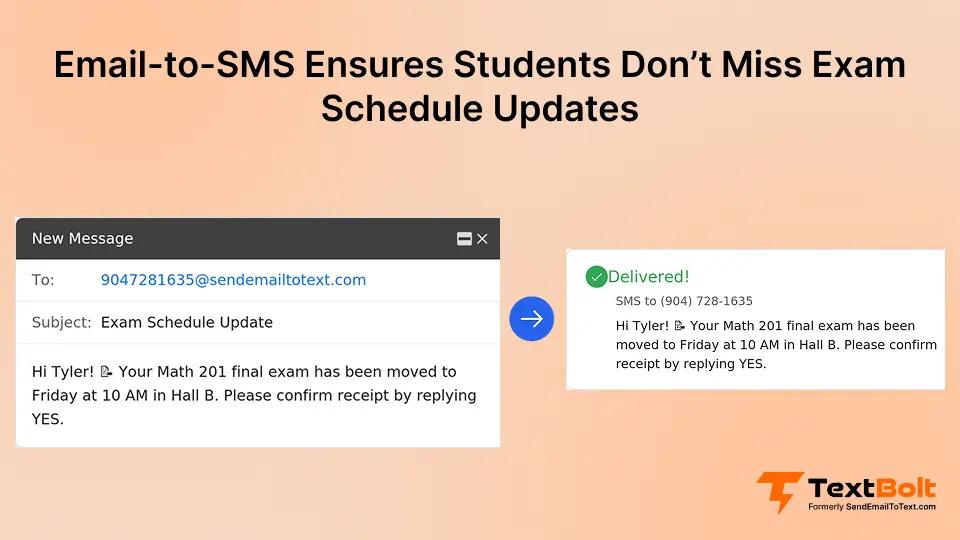
Implementation with the email-to-SMS workflow is straightforward. Your team sends from the same Gmail or Outlook you use for everything else. No separate platform needed. You format student phone numbers as email addresses (studentnumber@sendemailtotext.com).
You send one email to your exam cohort contact group, and individual SMS alerts are delivered automatically. You can schedule reminder alerts in advance using your email client’s native scheduling. Multiple team members (registrar, coordinators, faculty) can send from their own accounts.
5. The Student Experience
The student experience on the receiving end is simple. They get an immediate phone notification that cuts through digital noise. The brief message creates urgency to check the email for complete details.
Two touchpoints (email plus SMS) ensure information reaches them through their preferred channel. Clear, direct communication reduces their anxiety about missing critical updates.
6. How TextBolt Enables This Workflow
TextBolt makes this workflow seamless for educational institutions. Your team sends SMS from existing email accounts with no new platform to learn or manage. All plans include up to 10 user accounts with no per-user fees (registrar, multiple department coordinators, and faculty can all send).
The service works alongside your current student information systems via email workflow. Account setup takes 10-30 minutes, plus up to 48 hours for 10DLC compliance approval before sending first messages.
You can also trigger SMS notifications from email based on automated rules for systematic exam reminder sequences.
Stop Exam Notification Chaos Before It Starts
Reach every student instantly when exam schedules change. No separate platform to learn, no training required for your team. Just send from your existing email system.
Best Practices for Exam Change Notifications
Effective exam change notifications require strategic timing, clear messaging, and documented processes. These six best practices ensure your critical updates reach students and protect your institution.
1. Timing Guidelines for Your Notification Strategy
Announce changes as soon as confirmed, even if weeks ahead. Students need maximum adjustment time.
Send reminder alerts at critical milestones, such as:
- 7 days before the exam.
- 48 hours before the exam.
- 24 hours before the exam.
For last-minute changes (under 24 hours), send an immediate SMS alert followed by a detailed email with full context.
Never announce exam changes less than 24 hours in advance unless there’s a genuine emergency. For multi-section exams, coordinate timing so all sections receive notification simultaneously.
2. Message Clarity That Drives Action
Message clarity drives action. Lead with the specific change: “MOVED: Biology Final now Friday Dec 15, 2 pm” (not buried in a paragraph). Include in your SMS what changed, new essential details, and a directive to check email. Keep SMS under 160 characters (one segment).
For example: “URGENT: Bio 101 final moved to Friday 12/15 2 pm, Science Hall 301. Check email for parking/details.”
Put comprehensive information in the email: building maps, parking instructions, format changes, and accommodation updates. Your subject line must be unmistakably clear: “EXAM CHANGE – Bio 101 Final Rescheduled to Dec 15.”
3. Channel Selection Framework for Your Team
Your channel selection framework should be clear for your team. Use email only for routine exam prep resources, optional study sessions, and general reminders sent weeks in advance. Use email plus SMS for date/time/location changes, format modifications, and emergency cancellations within 7 days. Use SMS plus email plus portal plus website for campus emergencies affecting exams (weather closures, safety incidents, facility evacuations).
4. Consent and Compliance Requirements
For consent and compliance, collect student mobile numbers during course registration with clear opt-in language. Explain that SMS will be used exclusively for critical academic alerts (not marketing or routine updates).
Provide opt-out mechanisms while noting that some academic alerts may be mandatory for enrolled students. Maintain an updated contact database because students change numbers. Verify annually. Document consent in student records for compliance with TCPA regulations.
5. Documentation That Protects Your Institution
Documentation protects your institution. Keep records of when you sent notifications (email provides an automatic timestamp audit trail). Track delivery confirmations for critical alerts through your dashboard.
Document student acknowledgment when possible (email replies, portal check-ins). Protect your institution from “I was never informed” disputes with clear communication logs. Maintain records for academic appeals and grade dispute resolution.
6. Testing Before You Need It in a Crisis
Testing before you need it in a crisis is essential. Send welcome/test SMS to all students at semester start. Verify student phone numbers are current before relying on them for critical updates.
Familiarize your staff with the sending process during a low-stakes period. Don’t wait for an actual exam emergency to discover that contact information is outdated. Run drill notifications for your team to practice the workflow.
Follow this checklist every time you need to communicate an exam change:
Your Exam Change Notification Checklist:
- Confirm exam change details (date, time, location, format)
- Draft detailed email with comprehensive information
- Create concise SMS version (under 160 characters)
- Send email to full exam cohort
- Immediately send SMS alert to same group
- Post update to course portal/LMS
- Update official exam schedule
- Document notification timestamp and delivery
- Monitor for student questions/confusion
- Send reminder alerts at 48 hours and 24 hours before exam
Creating an Exam Notification System That Scales
Building a sustainable exam notification system requires clear policies, integrated workflows, and ongoing refinement. These five components ensure your system grows with your institution’s needs.
1. Establish Clear Criteria Across Your Institution
Define what triggers SMS alerts in the written policy (date/time/location changes within X days). Train faculty and staff on when to escalate to SMS versus email-only communication.
Ensure consistency across all departments, so students know what to expect. Students learn what “urgent SMS from school” means when you’re consistent and selective.
2. Workflow Integration with Existing Systems
Work with your current student information systems (Banner, PeopleSoft, Colleague) for workflow integration. If your student information system can send automated emails when schedules change, you can route those through TextBolt to trigger SMS alerts.
Keep manual SMS sending available for unexpected situations (faculty illness, facility emergencies). You don’t need a separate platform for your team to check or manage. Everything routes through email.
3. Team-Based Approach for Your Staff
Your team-based approach should enable multiple staff members to send alerts from their own email accounts (registrar, department coordinators, faculty). You’re not dependent on one person’s availability during emergencies or after hours.
Use shared contact groups for different exam cohorts organized by course and section. Maintain consistent messaging across different senders through templates and training.
4. Continuous Improvement Based on Results
Continuous improvement based on results keeps your system effective. Survey your students about notification effectiveness at the end of the semester. Track exam attendance rates before and after implementing SMS escalation.
Monitor the reduction in “didn’t know about change” complaints to your office. Refine your criteria based on what actually matters most to student success. Adjust messaging templates based on student feedback and comprehension.
5. Cost Considerations for Your Budget
Cost considerations for your budget are reasonable. Starting at $29/month for 500 message credits (Basic plan), the investment is minimal. All plans include up to 10 team member accounts with no per-user fees (unlike platforms charging $20/month per additional user). The Standard plan ($49/month for 1,000 credits) suits most department-level needs.
Volume scales with your exam notification needs across semesters. This is a small investment compared to staff time savings from reduced makeup exam coordination. The ROI is clear: The cost of one failed notification event (staff time, makeup exams) exceeds the monthly service cost.
Learn more about email-to-text service. Set up scheduled SMS from Gmail for automated reminder sequences at 7-day, 48-hour, and 24-hour milestones.
Eliminate Missed Exam Notifications with Email-to-SMS Alerts
Exam schedule changes are unavoidable in your institution. Room conflicts happen, faculty get sick, and facilities need emergency maintenance. But students missing these critical updates is entirely preventable.
SMS escalation for time-sensitive exam information ensures every student on your roster knows what’s happening when it matters most. Email remains your primary communication channel for detailed information. SMS cuts through inbox noise for urgent alerts that require immediate attention.
TextBolt makes this workflow seamless for your team. Send SMS from your existing Gmail or Outlook with no platform to learn and no training sessions required. No per-user fees for up to 10 team members. Account setup takes 10-30 minutes, plus up to 48 hours for 10DLC approval.
Start ensuring critical exam updates reach every student. Try TextBolt free for 7 days with 10 message credits included. See pricing plans designed for educational institutions.
Frequently Asked Questions
When Should Schools Use SMS vs Email for Academic Notifications?
Use SMS for urgent, time-sensitive updates requiring immediate action (exam changes within 7 days, emergency cancellations). Use email for routine communications, detailed information, and non-urgent academic content. SMS drives students to check email for complete details.
How Do You Prevent Notification Fatigue with Exam Alerts?
Reserve SMS exclusively for critical updates that genuinely require immediate attention. Clearly define SMS criteria (date/time/location changes, emergencies only). Email remains primary channel for routine content. Students learn to prioritize SMS when used sparingly and consistently.
What Information Should Be Included in Exam Change Notifications?
Lead with what changed. Include new date/time/location, reason for change if appropriate, and where to find detailed information. Keep SMS concise (under 160 characters), put comprehensive details in follow-up email with maps, parking, and format specifics.
How Far in Advance Should Exam Schedule Changes Be Communicated?
Announce changes immediately when confirmed, regardless of how far ahead. Send reminder alerts at 7 days, 48 hours, and 24 hours before exam. Emergency changes require immediate notification. Never change exams less than 24 hours in advance except emergencies.
Do Students Need to Opt-In to SMS Notifications for Exam Updates?
Collect mobile numbers during registration with clear explanation of how SMS will be used for critical academic alerts. While opt-out mechanisms should be available, many institutions classify exam notifications as essential academic communications that may be mandatory for enrolled students.