
- Why Staff Coordination Needs Email-to-SMS During High-Volume Days
- Why Email-to-SMS Solves What Other Methods Can’t
- Why Phone Calls and Email Can’t Deliver Staff Alerts as Fast as Email-to-SMS
- 4 Ways to Coordinate Staff Faster With Email-to-SMS
- How 3 Clinics Use Email-to-SMS to Coordinate Staff Faster
- How TextBolt Helps Healthcare Providers Coordinate Staff Faster
- Frequently Asked Questions
Reach Your Entire Team in Seconds
How to Coordinate Healthcare Staff Faster Using Email-to-SMS

Peak hours scatter your staff across exam rooms, lab areas, the front desk, and break rooms. Everyone is simultaneously helping patients. The lab tech needs a nurse in Room 4 for a blood draw, but can’t find anyone. She checks the nursing station, the break room, and the back hallway. Five minutes later, she finally finds someone.
This creates a coordination breakdown: urgent patient needs get delayed because teams cannot locate the right person fast enough, or staff waste time walking around looking for help instead of providing care.
The solution is sending coordination messages as texts directly from your email inbox—reaching your team’s phones instantly without requiring them to check email or monitor chat apps. Email-to-SMS lets you send to everyone simultaneously. First available person responds. No walking around, no overhead paging, and no separate platforms to learn. The same system that helps practices send appointment reminders to patients also enables instant staff coordination during peak hours. This dual-purpose approach means practices can reduce patient no-shows and improve staff coordination using the same email-to-SMS platform TextBolt.
But why does staff coordination break down so completely during high-volume days? And why is email-to-SMS the answer?
Why Staff Coordination Needs Email-to-SMS During High-Volume Days
Peak hours scatter your staff across the front desk, lab areas, exam rooms, and break rooms while simultaneously burying them in patient care tasks. This physical dispersion, combined with focused patient interactions, creates coordination blind spots.
Busy Staff Can’t Check Email During Patient Care
During peak volume, every staff member handles patients actively. Phones stay busy, email notifications get ignored during patient interactions, and verbal messages fail because nobody can leave their current task to relay information.
Multiple locations compound the problem. Your medical assistant in Exam 3 needs a wheelchair from storage while your nurse covers Exam 5 and 6 simultaneously. Your front desk is buried in check-ins while your lab tech runs samples in the back. Nobody is monitoring email or phone messages because they’re all engaged in direct patient care.
The coordination breakdown creates measurable delays. Critical lab results need provider review immediately, but the staff member who knows the result cannot locate the provider. Result review gets delayed 20 minutes, affecting medication timing and care quality.
Duplicate work happens when coordination fails. Two staff members both responded to the same patient request because neither knew the other was handling it. Time gets wasted, tasks overlap, and efficiency drops during the exact moments you need it most.
Email Checking and Phone Paging Fail During Peak Hours
Email requires staff to check it actively, but during patient care, email checking stops. Messages sent at 10:15 am get seen at 11:30 am when the staff finally have a gap between patients.
Text messages create a different urgency. According to a 2024 NIH review, about 95 percent of text messages are opened within three minutes, while email open rates average only 20 percent. This visibility difference matters when coordination delays affect patient wait times.
Phone paging systems tie up phone lines. Your front desk cannot page while on a call with a patient. Staff hear overhead announcements poorly in closed exam rooms, and message clarity suffers in noisy clinical environments.
Verbal coordination reaches whoever you find first, then the message often dies before reaching everyone who needs it. Staff frustration builds when they cannot locate colleagues quickly. Running around looking for help wastes energy and extends patient waits. Many practices face similar healthcare communication challenges during peak hours.
Why Email-to-SMS Solves What Other Methods Can’t
Email-to-SMS bridges the gap between traditional email and urgent staff coordination. Staff don’t need to check their email inbox—messages arrive as texts on lock screens instantly. Unlike overhead paging, messages are clear and documented. Unlike verbal coordination, everyone receives the message simultaneously. Unlike chat apps, staff don’t need to monitor another platform.
Your front desk composes a message in Gmail or Outlook just like a regular email. Email-to-SMS converts it to a text and delivers it to every staff member’s phone within seconds. First available person responds. This is why practices switch to email-to-SMS during high-volume periods—it reaches staff where they actually look without disrupting their existing workflow.
The key difference: email-to-SMS combines the familiarity of email with the immediacy of text messages. Staff keep working in the tools they already use (Gmail, Outlook), but coordination happens at SMS speed. No new apps to learn. No separate platforms to check. Just instant staff coordination from your existing inbox.
But what specifically makes phone calls and traditional email so much slower than email-to-SMS? The speed difference isn’t just about convenience—it directly impacts patient care during your busiest hours.
Why Phone Calls and Email Can’t Deliver Staff Alerts as Fast as Email-to-SMS
Email and phone systems handle routine communication well, but fail during time-sensitive staff coordination when seconds determine patient experience. An email-to-SMS solution eliminates these delays by delivering messages instantly to staff phones without requiring them to check email.
1. Email Messages Sit Unread for 60-90 Minutes During Peak Hours
Email coordination assumes staff check email frequently, but reality contradicts this assumption. During patient rush, email gets checked every hour or two at best. The urgent request sent at 9:45 am sits unseen until 11:00 am.
Email-to-SMS eliminates this delay. Messages sent from your email inbox arrive as texts on staff phones within seconds—no email checking required. The same 9:45 am request reaches every staff member’s lock screen instantly, before the first patient appointment even begins.
Staff ignore email notifications during patient interactions because focusing on the patient in front of them means tuning out inbox pings. Email becomes invisible during the exact moments you need coordination most.
With email-to-SMS, staff don’t need to monitor their inbox. Text notifications appear on lock screens regardless of whether they’re checking email. Coordination happens without interrupting patient care.
After the fact, staff discover urgent messages they missed. “I never saw that email” becomes the standard response, not because staff are careless, but because email monitoring stops during active patient care.
2. Phone Calls Take 10+ Minutes to Reach Available Staff
Calling individual staff members takes too long. You call the nurse and reach voicemail. You call the medical assistant and find them busy. Ten minutes disappear trying to reach anyone available.
Email-to-SMS reaches everyone simultaneously in under 60 seconds. Instead of calling four people individually and hoping someone answers, you send one message from your inbox to the entire team. First available person responds. Total coordination time: 90 seconds instead of 10+ minutes.
Overhead paging lacks message clarity. Noisy clinics make announcements hard to hear, and exam rooms with closed doors muffle sound. Staff miss pages entirely or hear garbled messages that require follow-up clarification.
Email-to-SMS messages are clear and documented. Staff receive the exact text on their phone screens. No misheard words. No garbled announcements. Just clear, instant communication that doesn’t depend on whether someone is near a phone or can hear a PA system.
Phone calls interrupt whoever answers immediately, creating workflow disruption even when the call reaches someone who can help. Email-to-SMS allows staff to respond when they’re available—messages wait on lock screens until staff can check between patient interactions, preventing mid-task interruptions.
3. Walking Around to Find Staff Wastes 5-10 Minutes Per Request
Most practices resort to walking around looking for colleagues. This works in small offices with three people in adjacent rooms. It fails in practices with eight people across multiple hallways or buildings.
Email-to-SMS eliminates physical searching entirely. Send a coordination request from your inbox—”Need wheelchair at front desk”—and reach everyone simultaneously. First available person responds within seconds. No walking. No searching. No wasted minutes.
Some practices use walkie-talkies, which add another device to carry. Staff forget them in pockets or break rooms, and battery management becomes another administrative task.
Group chat apps require staff to monitor another platform. Staff resist checking yet another system during patient care, adoption fails, and coordination defaults back to running around looking for people.
Email-to-SMS works because staff already carry their phones and already know how to use email. Your team composes messages in Gmail or Outlook—the tools they use every day. No new devices to carry. No new platforms to monitor. Just familiar email workflow that delivers messages as instant texts.
According to data from Emarsys, SMS generates a 45 percent response rate with a 90-second average response time compared to email’s slower patterns. This speed difference directly impacts patient wait times when staff coordination determines care delivery.
Email-to-SMS delivers the speed staff coordination requires. But how do you actually implement it without disrupting workflows or requiring staff training?
Reach Your Team Where They Already Look
Stop adding communication platforms that your staff won’t check during patient care. SMS reaches phones they carry constantly. Messages appear on lock screens even during active care. First available person responds without checking email or remembering another app.
4 Ways to Coordinate Staff Faster With Email-to-SMS
The solution is not another communication platform to monitor. The solution is reaching your team through the communication channel they already check constantly, their phones, using tools they already know.
1. Send Team Messages From Your Inbox
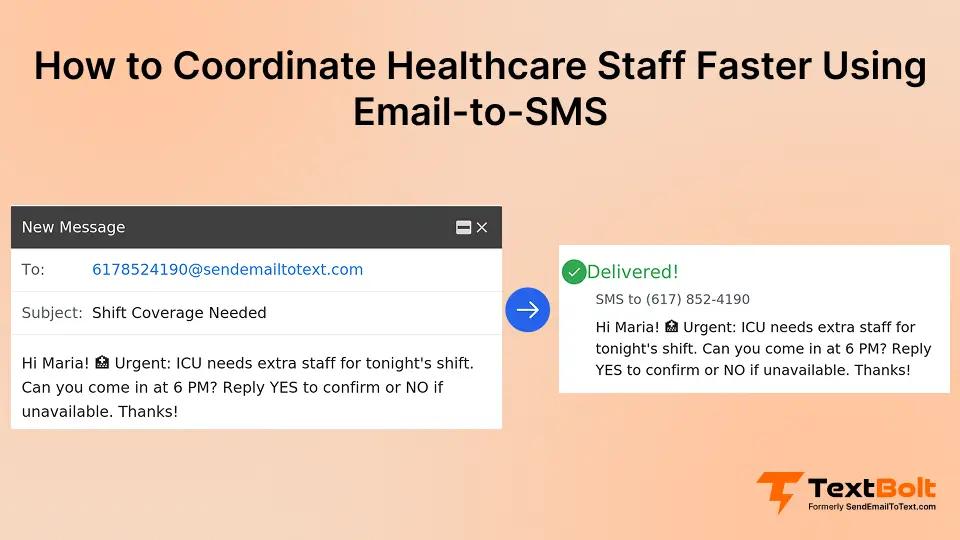
Email-to-SMS enables one-to-many staff coordination directly from Gmail or Outlook without requiring your team to adopt chat apps. Open your email, compose a new message, and add each team member’s phone number in the “To” field using the email-to-SMS format. Type your coordination request and click send.
Every team member receives the message as a text within seconds, and the first available person responds. There’s no new app to check, no staff training required, and no workflow disruption. This works especially well because staff already know how to use email you can send texts from email without staff training or behavior change.
This works because staff always keep their phones with them. Text notifications appear on lock screens, and messages get seen immediately, even during patient care when email sits unopened.
2. Make Coordination Messages Action-Oriented
Email-to-SMS delivers urgent messages to staff phones immediately, so focus on what you need and who should respond. Skip unnecessary context during urgent situations.
Weak coordination message: “Hi everyone, we are having a busy morning and I was wondering if anyone has time to help with a patient situation in Room 5.”
Strong coordination message: “Need wheelchair at front desk for patient discharge. Who can bring one?”
Critical coordination message: “Patient in Room 5 unresponsive. All available staff respond immediately.”
Include only critical information: what happened, what you need, and who should respond. Save detailed explanations for after the urgent situation resolves.
Clear action requests prevent confusion. “Who can cover the front desk 12 to 12:30 for lunch?” prompts immediate yes or no responses because staff know exactly what you need.
3. Use One-to-Many Messaging for Urgent Needs
Email-to-SMS allows any available team member to respond first, eliminating the bottleneck of guessing who might be free. Send urgent coordination requests to the entire team and let availability determine who responds.
Equipment needs: “Need exam table paper in Room 3. Who can restock?” The first available staff member responds and handles it.
Coverage requests: “Need 15-minute break coverage at the front desk. Who is available?” Staff member finishing with a patient responds and covers.
Critical patient needs: “Critical potassium level for Patient Johnson. Need provider review immediately.” Provider sees the message, responds, and handles the review.This same approach works for urgent patient updates when time-sensitive information needs to reach providers instantly.
This approach distributes coordination load across your team. Any qualified team member can respond, and redundancy prevents delays.
4. Keep Routine Communication in Email
Email-to-SMS works best when reserved for urgent coordination, while routine communication stays in email. This separation maintains text message effectiveness and prevents notification fatigue.
Text for urgent coordination: Equipment needs, coverage requests, critical lab results, and patient emergencies.
Email for routine communication: Weekly schedules, policy reminders, training materials, and non-urgent updates.
When staff receive a text, they know it requires immediate attention because you’ve established clear boundaries between urgent and routine channels.
These four tactics work in theory. But how do they play out in real medical practices during actual peak hours? Here’s how three different clinics implemented email-to-SMS for staff coordination—and the results they saw.
Stop Running Around Looking for Staff
Turn your inbox into instant team coordination. Reach everyone simultaneously, and first available person responds. No chat apps to adopt. No training required. Your team keeps using Gmail or Outlook.
How 3 Clinics Use Email-to-SMS to Coordinate Staff Faster
The following represent common coordination patterns observed across healthcare practices using one-to-many SMS coordination, showing typical improvements.
Example 1: Multi-Provider Family Medicine Practice
The challenge: Four physicians shared nursing staff and medical assistants. During peak morning hours, staff spent minutes walking hallways looking for available help. A nurse in Exam 2 needed assistance with a blood draw but couldn’t locate anyone—everyone was scattered across rooms handling their own patients.
The solution: The office manager created a contact group in Gmail with all staff phone numbers. When urgent needs arose, she composed one message—”Need blood draw assistance in Exam 2. Who’s available?”—and sent it via email-to-SMS to the entire group. The message reached every staff member’s phone as a text within seconds.
The result: First available staff member responded immediately. Walking around stopped. Staff reported noticeably faster coordination, and patient flow improved as delays from searching for help disappeared.
Example 2: Busy Pediatric Practice
The challenge: Sick season brought high patient volume and constant turnover. Nurses needed help with room cleanup and equipment between patients, but overhead paging failed in the noisy clinic environment. Critical requests went unheard, rooms sat unready, and frustrated staff fell further behind.
The solution: The lead nurse began sending coordination texts from Outlook to all staff phones simultaneously using email-to-SMS.. When a room needed turnover, she sent: “Room 4 needs cleanup for next patient. Who can handle?” Available staff saw the message on their lock screens and responded based on their current workload.
The result: Room readiness became more consistent. Staff felt better supported because help requests actually reached them. Overhead paging was reserved for true emergencies.
Example 3: Urgent Care Clinic
The challenge: Multiple providers worked rotating schedules across different areas of the facility. When critical lab results came back, the lab tech often couldn’t locate the ordering provider. She’d check the provider’s usual area, ask the front desk, and sometimes wait 10-15 minutes before finding them—delaying time-sensitive care decisions.
The solution: The lab tech began sending targeted email-to-SMS messages directly to relevant providers’ phones. “Critical potassium 6.2 for Patient Chen. Need immediate review.” Providers received notifications instantly, regardless of where they were in the facility.
The result: Providers responded within minutes instead of being unreachable. Critical results reached the right person immediately, and the lab tech stopped wasting time hunting down physicians.
These three practices solved different coordination problems—scattered staff, noisy environments, rotating schedules—but used the same email-to-SMS approach. The common thread: reaching staff on their phones from familiar email tools, without adding platforms or disrupting workflows.
How TextBolt Helps Healthcare Providers Coordinate Staff Faster
Email-to-SMS reaches your team where they actually see messages immediately—on their phones—without requiring new platforms or workflow changes.
TextBolt turns your Gmail or Outlook inbox into instant staff coordination. Your team composes messages the same way they always have. TextBolt delivers them as texts to every staff member’s phone within seconds. First available person responds. No chat apps to monitor. No new devices to carry. Same familiar email workflow, instant coordination.
Setup takes 30 minutes. Send your first coordination text from your inbox and see how quickly staff respond. Start your free 7-day trial today.
Frequently Asked Questions
Can we use email-to-SMS for both staff and patients?
Yes. Send staff coordination texts to internal team numbers and send appointment reminders to patient numbers. Same inbox, different recipients based on message type.
What if staff use different email systems?
Email-to-SMS works regardless of which email platform staff use. One staff member can send from Gmail, another from Outlook, and messages still deliver consistently to all phones. The system works with any standard email client, and sender identity remains consistent across platforms.
How do we prevent message overload?
Reserve text messages for urgent coordination only. Keep routine communication in email. When staff learn that texts mean urgent, they respond immediately. Establish clear team policies about when to use text versus email to preserve effectiveness.
Can we track coordination responses?
Yes. Replies come back to your email inbox with complete message threads documented automatically. This creates an audit trail without requiring a separate system to check for responses.
Is email-to-SMS HIPAA-compliant for staff coordination?
Yes, when configured properly. Staff coordination messages about critical results or patient needs can be sent securely. Avoid including full patient names or detailed PHI in text messages. Use patient room numbers or last name + first initial instead of full identifiers.
How much does email-to-SMS cost for staff coordination?
Pricing is based on message volume. Most practices sending 200-500 coordination texts monthly fall within the basic tier. There’s no per-user fee—your entire team can send and receive messages. Start with a free 7-day trial to test coordination patterns before committing.