
- Why AT&T Discontinued Email to Text
- What to Look for in an AT&T Email to Text Alternative
- The 5 Best AT&T Email to Text Alternatives
- How AT&T Email to Text Alternatives Compare
- How to Migrate from AT&T Email to Text in 30 Minutes
- Who Needs an AT&T Email to Text Alternative?
- Why TextBolt Is the Best AT&T Email to Text Alternative
- Start Your Migration Today
- Frequently Asked Questions
AT&T Email-to-Text Shutdown: Best Alternatives & Replacement

AT&T discontinued their email to text gateway on June 17, 2025, leaving thousands of businesses scrambling for alternatives. If your organization relied on sending texts to @txt.att.net addresses, your messages are no longer being delivered. The good news? Better email to text service solutions exist today that offer higher delivery rates, professional business numbers, and the same email-based workflow you already know.
This guide covers everything you need to know about replacing AT&T’s email to text service: why the shutdown happened, what to look for in an alternative, and how to migrate from AT&T in under 30 minutes.
Why AT&T Discontinued Email to Text
AT&T’s decision to shut down their email to text gateway wasn’t sudden. The @txt.att.net service had been declining in reliability for years before the official shutdown. Understanding why carriers abandoned these services helps explain why modern alternatives are actually better.
The Problems with Carrier Email Gateways
Carrier email gateways like AT&T’s @txt.att.net were never designed for business use. They were originally created as a convenience feature for consumers, allowing friends and family to send quick messages via email. When businesses started using them for appointment reminders, alerts, and notifications, problems multiplied.
- Spam abuse became rampant. The open nature of carrier gateways made them a prime target for spammers and phishing operations. Anyone could send a message to any phone number without verification, making it impossible for carriers to control abuse.
- Delivery rates plummeted. To combat spam, carriers implemented aggressive filtering that blocked legitimate business messages alongside malicious ones. Many businesses reported delivery rates below 40% in the gateway’s final years.
- No sender verification existed. Email spoofing allowed bad actors to send messages appearing to come from legitimate businesses. This created security risks and damaged the entire email to SMS ecosystem.
- Infrastructure costs escalated. Managing abuse while maintaining the gateway became increasingly expensive for carriers, with no revenue to offset the costs.
The Industry Shift to 10DLC
The telecommunications industry has moved toward regulated, verified business messaging through 10DLC (10-Digit Long Code) registration. This system requires businesses to register their identity and messaging use cases with carriers before sending texts.
10DLC provides several benefits over the old gateway system:
- Verified senders: Only registered businesses can send messages
- Higher throughput: Registered numbers can send more messages per second
- Better delivery rates: Carriers trust verified traffic and deliver it reliably
- Spam reduction: Registration requirements deter bad actors
This shift made carrier email gateways obsolete. AT&T, Verizon, and T-Mobile all discontinued their services in 2025, pushing businesses toward compliant alternatives that meet SMS compliance requirements.
What to Look for in an AT&T Email to Text Alternative
Not all AT&T alternatives are created equal. Many businesses have made the mistake of choosing a replacement that required them to completely change their workflows, learn new software, or spend thousands on API development. The best alternatives preserve what worked about the old system while adding reliability and compliance.
Essential Features:
- Email-based workflow preservation. The primary advantage of AT&T’s gateway was sending texts from your existing email client. Any worthwhile alternative should maintain this capability. If you have to learn a new dashboard or install separate software, it’s not a true replacement.
- 10DLC compliance included. Your replacement must handle carrier registration for you. 10DLC registration can take days to complete and requires understanding of carrier requirements. Look for services that manage this process automatically.
- Professional business number. Unlike carrier gateways that displayed random addresses to recipients, modern alternatives should send from a dedicated business number that recipients recognize and trust.
- High delivery rates. This is the most important metric. Carrier gateways dropped messages silently with no notification. Your alternative should achieve delivery rates of 95% or higher through proper carrier relationships.
- Two-way messaging. Recipients should be able to reply to your texts, with those replies landing in your email inbox. This enables real conversations without switching between tools.
- Team access. Multiple staff members should be able to send texts from the same business number using their individual email accounts. This eliminates the single point of failure problem that plagued phone-based texting.
Features to Avoid:
- Requiring API development. If a provider requires you to write code or hire developers, they’re not offering an AT&T replacement. They’re offering a developer tool that happens to send SMS.
- Per-user fees. Some platforms charge $10 or more per additional user. This adds up quickly for teams and discourages the collaboration that makes email-to-text valuable.
- Complex dashboards. If you need training to use the software, it defeats the purpose of email-based texting. Your staff already knows how to send email.
- No compliance handling. Any provider that expects you to handle 10DLC registration yourself is passing the hardest part of business texting onto you.
Don’t Rebuild your Workflow Just to replace AT&T
TextBolt preserves email-based texting while adding delivery confirmation, professional business numbers, and 10DLC compliance without APIs or new software.
The 5 Best AT&T Email to Text Alternatives
After evaluating dozens of options in our detailed comparison of email-to-SMS platforms, these five alternatives stand out for businesses transitioning from AT&T’s discontinued gateway.
1. TextBolt: The Most Reliable AT&T Replacement
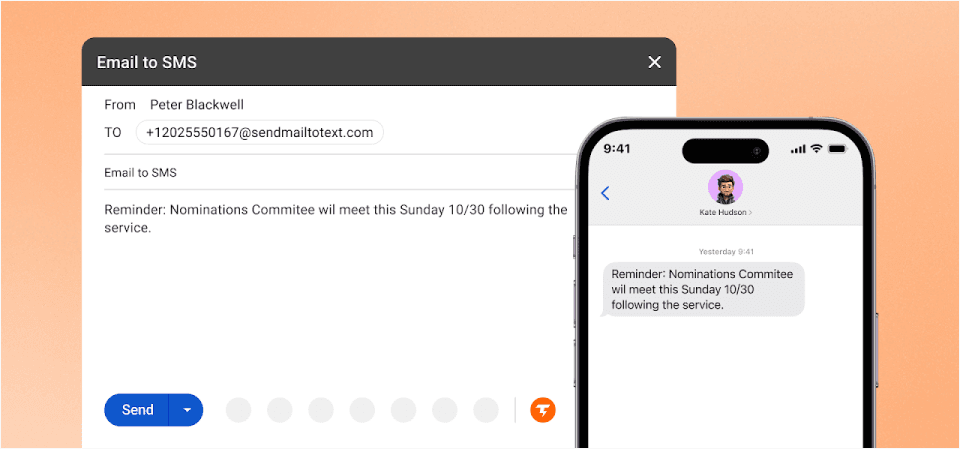
TextBolt was built specifically as a modern replacement for carrier email gateways. Unlike platforms that added email-to-SMS as an afterthought, TextBolt’s entire architecture centers on sending professional text messages from your existing email client.
Why TextBolt Stands Out
- True email-native workflow. Send texts by composing emails to phonenumber@sendemailtotext.com. Works with Gmail, Outlook, Apple Mail, or any email client. Your staff uses the same inbox they use for everything else.
- Up to 98% delivery rates. TextBolt sends through carrier-approved 10DLC routes, not legacy gateways. Messages are prioritized as verified business traffic, dramatically improving delivery compared to the old AT&T system.
- 30-minute setup. Most businesses complete migration in under half an hour. Sign up, verify your business, and start sending. TextBolt handles all 10DLC registration paperwork automatically.
- Team collaboration built in. Any team member can send texts from their email address. When Sarah calls in sick, Tom covers without missing a beat. No shared passwords, no single points of failure.
- Professional business number. Every message appears from your dedicated toll-free number, not a random gateway address. Recipients see a legitimate business contact they can save and reply to.
- Complete audit trail. Every text is logged in your email with timestamps and delivery confirmation. Know who sent what, when they sent it, and whether it was delivered.
TextBolt Pricing:
| Plan | Monthly Price | Message Credits | Best For |
| Basic | $29/month | 500 credits | Solo practitioners, consultants |
| Standard | $49/month | 1,000 credits | Growing businesses, medical practices |
| Professional | $99/month | 2,500 credits | Busy practices, multi-locations |
| Enterprise | Custom | 5,000+ credits | Large organizations, healthcare networks |
All TextBolt pricing plans include 10DLC registration, two-way messaging, and email support. The Standard plan adds multi-user access for up to 10 team members.
2. ClickSend: Best for Multi-Channel Messaging
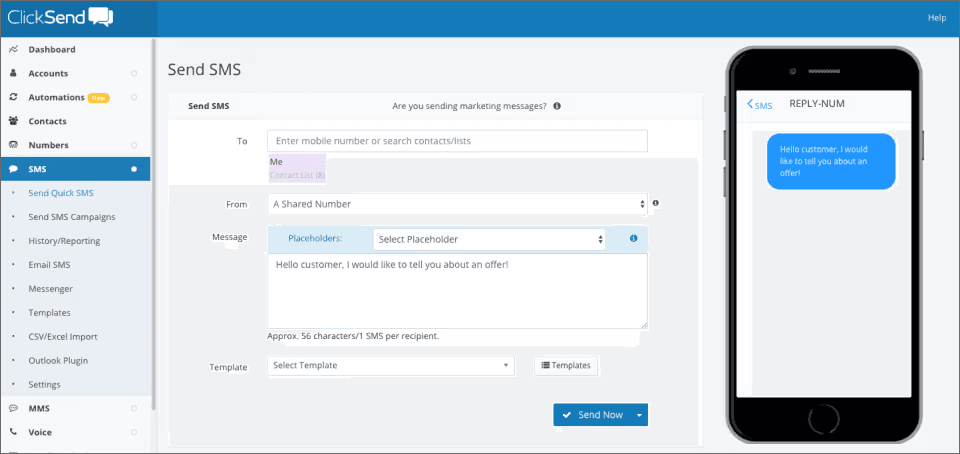
ClickSend offers email-to-SMS alongside voice, fax, and direct mail capabilities. It’s a solid choice for businesses that need multiple communication channels in one platform.
Strengths:
- Multiple communication channels beyond SMS
- Global reach with international messaging
- Pay-as-you-go pricing option
Limitations vs. TextBolt:
- More complex interface with more features than most businesses need
- Email-to-SMS is one of many features, not the core focus
- Pricing can be confusing with multiple options and add-ons
Starting Price: $0.0262 per SMS (pay-as-you-go)
3. SMSGlobal: Best for International Businesses
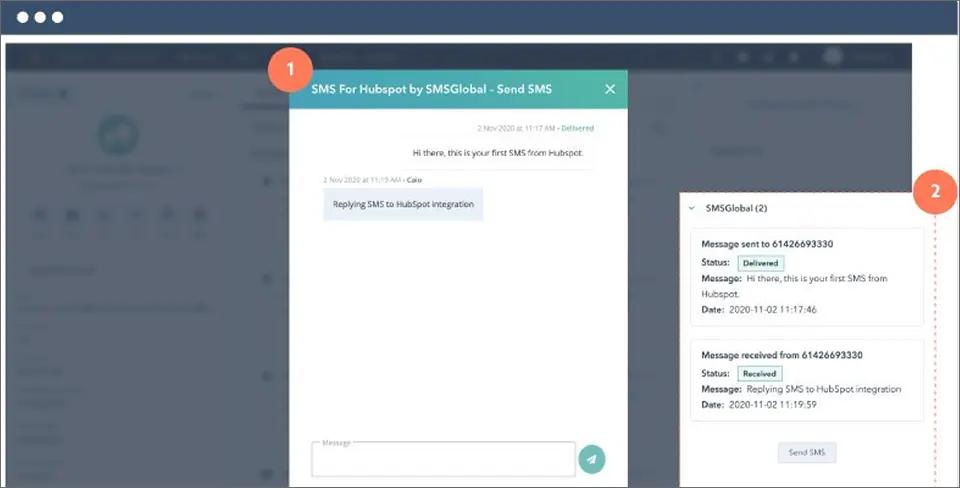
SMSGlobal provides email-to-SMS with strong international coverage. If your business sends texts to multiple countries, SMSGlobal offers competitive rates globally.
Strengths:
- Strong international presence
- Multiple integration options
Limitations vs. TextBolt:
- Complex pricing with carrier pass-through fees
- 10DLC registration support varies
- Need complex integration
For a deeper breakdown of these differences, see this SMSGlobal vs TextBolt comparison.
Starting Price: Starts from $39/month (Basics plan). Pricing can vary based on usage and carrier fees see SMSGlobal pricing for full details.
4. MessageMedia: Best for Enterprise Integration

MessageMedia (part of Sinch) offers enterprise-grade SMS with CRM integrations. Larger organizations with Salesforce or HubSpot deployments may find value in their integration ecosystem.
Strengths:
- Strong CRM integrations (Salesforce, HubSpot)
- Enterprise security features
- Dedicated account management
Limitations vs. TextBolt:
- Higher price point ($49/month starting)
- Separate platform to learn
- Overkill for simple notification needs
Starting Price: $49/month (Basics plan)
5. Google Voice: Best for Personal Use Only
Google Voice offers free texting from a computer, but it’s designed for personal use, not business communication.
Strengths:
- Free for personal use
- Simple setup
- Integrates with Google ecosystem
Limitations vs. TextBolt:
- Not designed for business messaging
- No 10DLC compliance (messages often blocked)
- No team access or shared numbers
- Messages frequently filtered as spam
- No professional business number
How AT&T Email to Text Alternatives Compare
Below is a comparison of the best AT&T Email-to-Text alternatives:
| Feature | TextBolt | ClickSend | SMSGlobal | MessageMedia | Google Voice |
| Email-to-SMS | Yes | Yes | Yes | Yes | No |
| Works from Gmail | Native | Via gateway | Via gateway | Via gateway | No |
| 10DLC Included | Yes | Yes | Varies | Yes | No |
| Two-Way in Email | Yes | Limited | Limited | Limited | No |
| Team Access | Included | Included | Included | Included | No |
| Setup Time | 30 minutes | 1-2 hours | 1-2 hours | 2-4 hours | 30 minutes |
| Starting Price | $29/month | Pay-per-use | Pay-per-use | $49/month | Free/Limited |
| Best For | Email users | Multi-channel | International | Enterprise | Personal only |
How to Migrate from AT&T Email to Text in 30 Minutes
If you’ve been using AT&T’s @txt.att.net addresses, migration to TextBolt takes approximately 30 minutes. Here’s the step-by-step process.
Step 1: Sign Up and Verify Your Business
- Visit TextBolt and create your account
- Complete business verification with your company name and EIN
- TextBolt initiates 10DLC registration automatically (completes in background)
Step 2: Get Your Dedicated Business Number
- Receive your dedicated toll-free number
- This number appears on all outgoing texts
- Recipients can save it as your business contact
Step 3: Update Your Email Contacts
- Replace @txt.att.net with @sendemailtotext.com
- Example: 5551234567@txt.att.net becomes 5551234567@sendemailtotext.com
- Save the new format in your email contacts
Step 4: Test Your First Message
- Compose a new email in Gmail, Outlook, or your preferred client
- Address it to [phone number]@sendemailtotext.com
- Type your message in the email body
- Send and verify delivery
For more detailed instructions on formatting, best practices, and troubleshooting, see our complete step-by-step email-to-text sending guide.
Step 5: Update Any Automated Systems
- Find any scripts, monitoring tools, or EMR systems using @txt.att.net
- Update the destination address format
- Test each system to confirm messages are delivered
That’s it. Your existing workflow remains identical. The only change is the email domain.
Send & Receive SMS From Email Reliably
TextBolt gives you a modern, compliant alternative to AT&T email-to-text that works seamlessly with Gmail and Outlook.
Who Needs an AT&T Email to Text Alternative?
Several types of organizations relied heavily on AT&T’s email gateway and now need reliable alternatives.
Healthcare Providers
Medical practices used @txt.att.net for appointment reminders, reducing no-shows by up to 38%. After the shutdown, many practices saw no-show rates spike immediately.
TextBolt provides healthcare-focused messaging with HIPAA-conscious data handling. Messages transmit directly without storage on intermediate servers. Complete audit trails document every patient communication.
Common healthcare uses:
- Appointment reminders and confirmations
- Lab result notifications
- Prescription refill reminders
- Pre-procedure instructions
- Mass patient notifications for closures or schedule changes
IT Departments
System administrators relied on carrier gateways for critical alerts. When a server goes down at 3 AM, email alone isn’t reliable enough. SMS cuts through.
TextBolt’s IT alert text messaging solutions integrate with monitoring tools like Nagios, Zabbix, and PRTG through simple email configuration. Any system that can send email can now send SMS notification.
Common IT uses:
- Server down notifications
- CPU/memory threshold alerts
- Security incident notifications
- On-call engineer rotation
- Backup failure alerts
Small Businesses
Service businesses used @txt.att.net for customer communication without investing in expensive SMS platforms. Auto shops, salons, tutors, and countless other businesses need simple, affordable texting.
TextBolt offers affordable small business text messaging starting at $29/month, which is less than the cost of one missed appointment at most businesses. No learning curve, no training required.
Common small business uses:
- Appointment reminders
- Service completion notifications
- Order status updates
- Payment reminders
- Customer follow-ups
- Urgent lead capture via text button instead of slow contact forms
Educational Institutions
Educational institutions used carrier gateways for emergency notifications, parent communication, and staff coordination. Snow day alerts need to reach thousands of parents in minutes.
TextBolt enables any authorized staff member to send bulk notifications from their email. One email to a contact group delivers hundreds or thousands of texts simultaneously.
Common education uses:
- Emergency and weather alerts
- Event reminders
- Bus delay notifications
- Parent-teacher communication
- Staff coordination
Why TextBolt Is the Best AT&T Email to Text Alternative
When AT&T shut down their gateway, over 500 businesses switched to TextBolt. Most discovered their messaging actually improved.
Same Workflow, Better Results
The transition requires changing one email address. Everything else stays the same. Your contact lists, your email templates, your sending habits. Just swap @txt.att.net for @sendemailtotext.com.
Delivery That Actually Works
AT&T’s gateway had become so unreliable that many businesses didn’t even know their messages weren’t being delivered. There were no bounce notifications, no failure alerts. Messages simply vanished.
TextBolt achieves up to 98% delivery rates through 10DLC-registered routes. You’ll see delivery confirmation for every message, and failures are reported immediately.
Team Resilience Built In
The biggest risk with phone-based texting is dependence on a single person. When that person is sick, on vacation, or leaves the company, patient reminders stop, IT alerts go unseen, and customer communication breaks down.
With TextBolt, any team member sends texts from their own email address. Shared visibility means anyone can cover. The business number stays consistent regardless of who’s sending.
Professional Appearance
AT&T gateway messages came from addresses like 5551234567@txt.att.net. Recipients often didn’t recognize the sender or assumed it was spam.
TextBolt messages arrive from your dedicated business number. Recipients see a professional contact they can save and trust.
Complete Documentation
Healthcare providers, IT departments, and regulated businesses need documentation. TextBolt logs every message in your email with timestamps and delivery status. When you need to prove a message was sent and delivered, the evidence exists in your inbox.
Start Your Migration Today
AT&T’s email to text shutdown doesn’t have to disrupt your business communication. TextBolt provides the same workflow you’ve relied on for years, with dramatically better reliability and professional features.
What you get with TextBolt:
- Same email-based sending workflow
- Up to 98% delivery rate (vs. 40% or less with old gateways)
- Professional toll-free business number
- Two-way messaging in your inbox
- Team access without per-user fees
- 30-minute setup with no coding required
- 7-day free trial to test everything
Your appointment reminders, system alerts, and customer messages deserve to actually be delivered. Start your free trial with TextBolt today and experience business texting that works.
Frequently Asked Questions
Why did AT&T shut down email to text?
AT&T discontinued their email to text gateway (@txt.att.net) due to massive spam abuse, security vulnerabilities, and the industry shift toward regulated 10DLC messaging. The service was never designed for business use, and maintaining it became unsustainable.
Can I use the same contacts I used with AT&T?
Yes. The phone numbers remain the same. You only change the email domain from @txt.att.net to @sendemailtotext.com with TextBolt.
What happens to messages sent to @txt.att.net now?
Messages sent to @txt.att.net addresses are no longer delivered. AT&T does not forward them to an alternative service. You must update your sending addresses to use a working alternative.
Is TextBolt as easy as AT&T’s gateway was?
TextBolt is actually easier. The sending process is identical (compose email, send), but you get delivery confirmation, two-way replies in your inbox, and a professional business number. The AT&T gateway provided none of these.
How long does migration take?
Most businesses complete migration in under 30 minutes. The longest part is updating any automated systems. If you’re only sending manually from email, the switch takes about 5 minutes.
Does TextBolt work with Gmail?
Yes. TextBolt works with Gmail, Outlook, Apple Mail, Yahoo, and any email client. There’s also a Gmail integration available through Google Workspace Marketplace for enhanced features.