
- Why Do Clients Miss System Downtime Notifications?
- How to Send Downtime Alerts From Your Existing Email
- How SMS Downtime Alerts Reduce Client Complaints and Protect Retention
- 1. Proactive Texts Cut Inbound Call Volume During Outages
- 2. Speed Signals Competence, Even When Something Breaks
- 3. Follow-Up Updates Prevent Negative Reviews and Social Media Complaints
- 4. Messages From Your Business Number Build Recognition and Trust
- 5. Any Team Member Can Cover Night and Weekend Outages
- Best Practices for System Downtime Messages
- Ready to Improve Your Downtime Communication?
- Frequently Asked Questions
Don’t Let Outages Damage Client Trust
How to Alert Clients During System Downtime Using Email-to-SMS

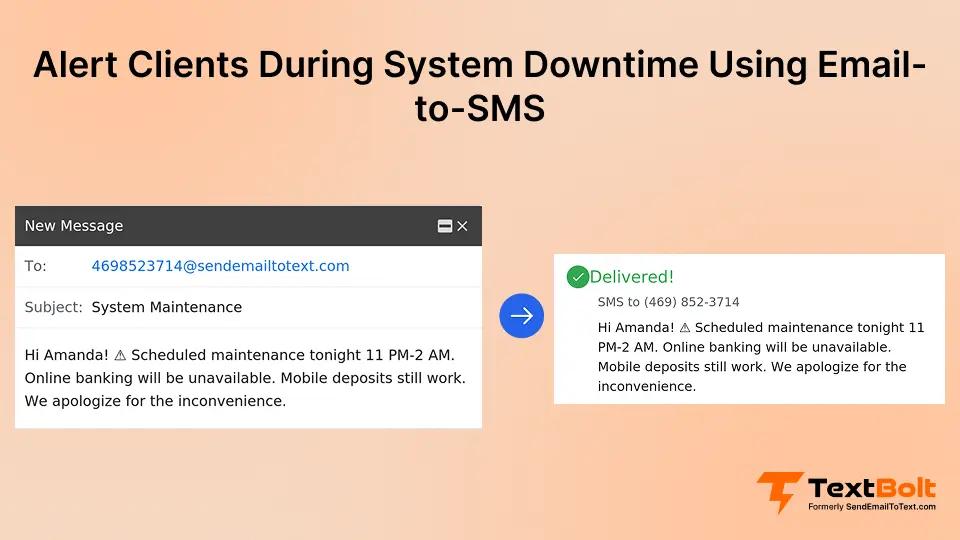
When your client-facing system goes down, every minute without communication drives customers to flood your support lines. Clients trying to access their accounts, complete transactions, or use your platform hit a wall and panic.
Most businesses rely on email to send downtime notifications. But those emails sit unread while clients refresh the app, call your team, or post complaints on social media.
SMS offers a faster path. Text messages get read within minutes and require zero effort from recipients. That is why companies across banks and finance, and dozens of other industries use an email-to-SMS service to alert clients during system downtime from their existing email workflow.
No new platforms. No developer resources. Just reliable, instant communication when it counts.
Why Do Clients Miss System Downtime Notifications?
Most downtime notifications fail because they arrive through channels clients aren’t actively monitoring when they need information most.
Businesses invest in reliable platforms. But when outages happen, the communication gap between your team knowing about the issue and clients hearing about it creates real damage.
1. Emails Get Buried During the Exact Moment Clients Need Help
The average person receives dozens of emails daily. Your outage notification competes with newsletters, promotions, and spam for attention.
Clients don’t check email when they’re trying to complete a time-sensitive task or meet a payment deadline. They’re refreshing your platform, calling your support line, or searching online to see if anyone else has the same problem.
By the time they see your email, the outage may be resolved. But the frustration and distrust have already set in.
2. Status Pages Are Invisible to Most Clients
Some businesses maintain status pages for transparency. The problem is that most clients don’t know these pages exist, and they certainly don’t think to visit them during an outage.
When a client can’t log in to complete a task, their first thought is “Why isn’t this working?” not “Let me check the status page.” For everyday users, status pages are invisible when it matters most.
3. Phone Calls Collapse When Hundreds of Clients Are Affected
Some businesses rely on staff to call clients during outages. This works for five VIP accounts but falls apart at scale.
When hundreds of clients are affected and your team has limited phone capacity, outbound calls become impossible. Your staff spends the entire outage fielding inbound complaints instead of proactively communicating.
The result is a reactive posture that makes clients feel like an afterthought.
| Notification Method | Typical Read Time | Client Effort Required | Scales to Hundreds of Clients |
| Hours | Must check inbox | Yes | |
| Status Page | Often never | Must visit website | Yes |
| Phone Call | Immediate | Must answer | No |
| SMS | Minutes | None | Yes |
SMS combines the immediacy of a phone call with the scalability of email. For businesses handling hundreds or thousands of clients, it’s the only channel that delivers both reach and speed.
With the problem clear, let’s walk through exactly how your team can convert existing email alerts into instant client notifications.
Stop Letting Outages Erode Client Trust
Turn your existing system alerts into instant SMS notifications. No developers required.
How to Send Downtime Alerts From Your Existing Email
Email-to-SMS system alerts convert your existing email-based notifications into instant text messages delivered to clients’ phones. The process uses your current infrastructure with no new platforms to learn.
Step 1: Connect Your Office Email and Complete Business Verification
Set up TextBolt in under 30 minutes. It works with Gmail, Outlook, and any email client your team already uses.
TextBolt handles 10DLC compliance registration on your behalf, ensuring your messages are carrier-approved. You provide basic business information, and approval typically takes up to 48 hours.
Step 2: Build Client Contact Groups by Segment
Import client phone numbers into Google Contacts or your preferred contact management tool. Group clients by service tier, region, product line, or account type.
When one system is down but another is unaffected, you reach only the clients who need to know. No mass-blasting irrelevant alerts to your entire contact list.
Step 3: Configure Your System’s Email Alerts
Set up your existing platform to send alert emails to TextBolt’s address format: [phonenumber]@sendemailtotext.com. Many business platforms and monitoring tools already generate email alerts automatically.
When your system detects downtime, the monitoring tool sends an email. TextBolt converts it into an SMS delivered to the client’s phone within seconds. For automated text message workflows, you can configure triggers based on severity level or affected service.
Step 4: Send Alerts and Track Delivery in Real Time
Once configured, your team can send downtime alerts manually from email or let automated triggers handle it. Either way, the process is identical: compose an email, and it arrives as a text.
TextBolt’s dashboard shows delivery status for every message within two to five minutes of sending. You can filter by delivery outcome to quickly identify which clients received the alert and which messages need follow-up.
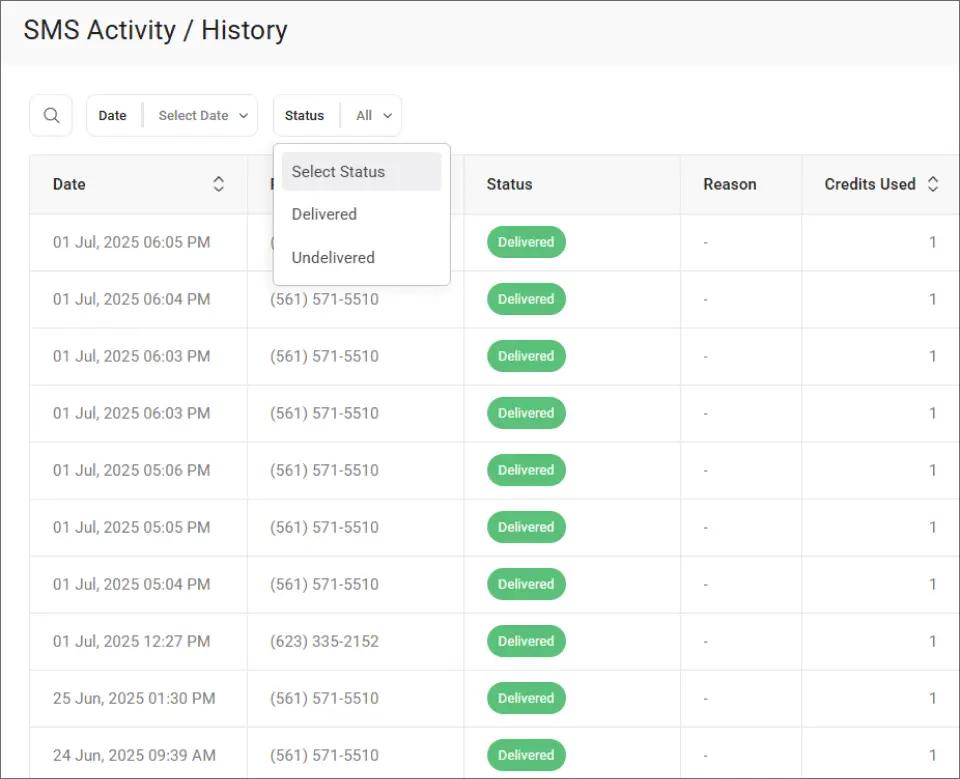
This view makes it easy to spot any undelivered messages and resend them before a client misses the notification entirely.
What clients see on their phone:
- A text from your dedicated business number
- A clear message about the system outage
- Expected resolution time
- Instructions for urgent needs or payment alternatives
Now that the technical setup is covered, here’s how SMS alerts translate into measurable improvements for your business and client relationships.
How SMS Downtime Alerts Reduce Client Complaints and Protect Retention
SMS downtime alerts improve retention by turning potential frustration into moments of proactive transparency that strengthen trust.
1. Proactive Texts Cut Inbound Call Volume During Outages
When clients don’t know about an outage, they call your support line. Multiply that by hundreds of affected accounts, and your team is overwhelmed within minutes.
An SMS sent at the moment of detection gives clients the information they need. Most won’t call if they already know the issue and expected resolution time. Businesses that notify clients proactively see dramatically fewer inbound calls during outages.
2. Speed Signals Competence, Even When Something Breaks
Clients trust you with their business. When they can’t access your platform to complete critical tasks and hear nothing from you, that trust erodes fast.
SMS alerts arrive within minutes of an outage. That speed signals competence and control, whether you run a SaaS platform or help clients to track account updates. A client who receives a prompt alert thinks, “They’re handling it.” A client who discovers the outage on their own thinks, “Do they even know?”
3. Follow-Up Updates Prevent Negative Reviews and Social Media Complaints
One initial alert isn’t always enough. If an outage stretches beyond the estimated resolution time, silence breeds anxiety and public complaints.
SMS makes sending follow-up updates effortless. Your team composes a quick email, and clients receive an updated timeline on their phones. This steady communication prevents speculation and keeps your online reputation intact.
4. Messages From Your Business Number Build Recognition and Trust
Messages from TextBolt arrive from your dedicated business number, not a random sender ID. Clients recognize the number and associate it with your company.
This consistency matters as phishing scams targeting businesses are increasingly common. A recognized business messaging platform number builds credibility.
5. Any Team Member Can Cover Night and Weekend Outages
What happens when the person who handles outage communications is off for the weekend? With phone-based texting, the answer is often “nobody sends anything until Monday.”
TextBolt gives up to 10 team members access on every plan with no per-user fees. The on-call engineer, account manager, or team lead can send alerts from their own email. If one person is unavailable, someone else covers without disruption.
With the right tools in place, crafting messages that clients actually find helpful during an outage is the final piece. Here’s how to get the content right.
Keep Clients Informed Without Overloading Your Team
Send system alerts from your existing email. Reach every affected client in seconds.
Best Practices for System Downtime Messages
The best downtime messages are short, specific, and focused on what clients need to know and do next. People during a disruption don’t want corporate language. They want facts.
1. State the Problem in Plain Language
Start every message by naming the affected system. Avoid technical jargon clients won’t understand.
Good: “Our platform is temporarily down. Account access and transactions are unavailable until approx. 3 p.m.”
Bad: “We are experiencing an infrastructure incident affecting authentication services on our cloud-hosted platform.”
2. Always Include an Estimated Resolution Time
Clients can handle downtime. What they can’t handle is uncertainty. An estimated resolution time, even if approximate, significantly reduces anxiety and support calls.
If you don’t have a firm timeline, say so honestly: “We’re investigating and will update you within 30 minutes.”
3. Provide an Alternative for Urgent Needs
If the platform is down and a client has an urgent need, they need to know how to reach you. Include a support phone number or alternative contact method.
“For urgent requests, call 555-0199 directly. Non-urgent items can wait until the platform is restored.”
4. Segment Alerts by Client Group, Not Your Entire Database
Not every client needs every alert. If one service is down but another is fine, only notify affected clients.
Over-notifying trains clients to ignore your messages. Use contact groups to send alerts only when clients are genuinely affected.
5. Close the Loop With a Resolution Confirmation
When the outage is resolved, send a follow-up text. This closes the communication loop and reassures clients that normal service has resumed.
“Our platform is back online. You can now access your account and complete transactions as usual. Thank you for your patience.”
TextBolt’s dashboard lets you verify which resolution messages were delivered successfully.
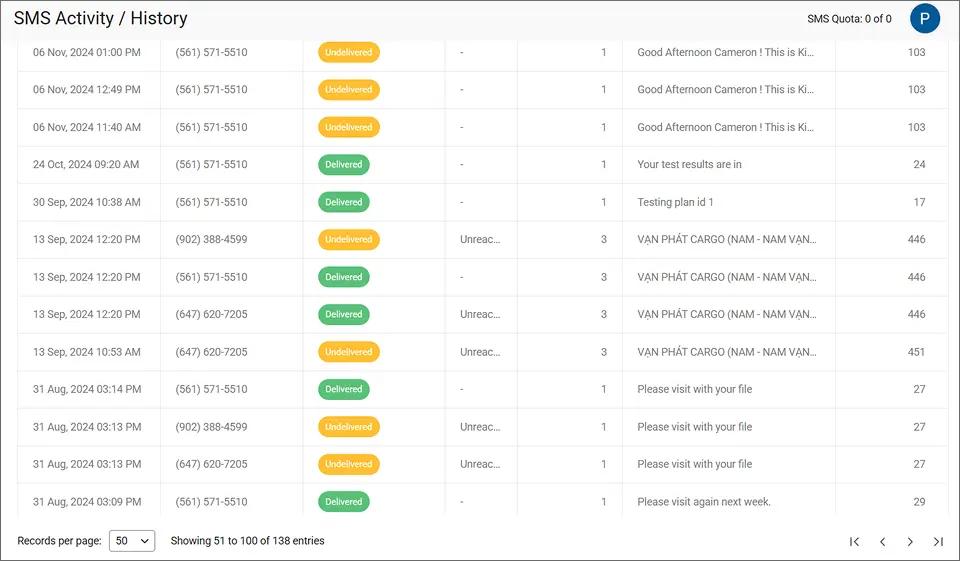
This summary view shows delivered and undelivered messages side by side, so your team can identify any clients who missed the resolution update and follow up individually.
| Message Element | Good Example | Bad Example |
| Issue Statement | “Our platform is temporarily down” | “We’re experiencing technical difficulties” |
| Timeline | “Expected fix by 3:00 p.m.” | “We’re working on it” |
| Alternative | “For urgent requests, call 555-0199” | “Please be patient” |
| Resolution | “Platform is back online” | (No follow-up sent) |
Clear, specific messages build the reliability clients expect from your business. Each outage handled well becomes an opportunity to demonstrate professionalism.
Ready to Improve Your Downtime Communication?
You don’t need a new platform or development team to alert clients during system downtime. You need a better delivery channel for alerts you’re already generating.
TextBolt works with any email client, supports up to 10 team members on every plan, and handles carrier compliance automatically. 500+ businesses already trust TextBolt to deliver time-sensitive notifications with an up to 98% delivery rate.*
Visit TextBolt pricing to start your 7-day free trial with 10 message credits. Your team can send SMS from Outlook or Gmail with zero new tools to learn.
*Delivery rates vary based on carrier policies, message content, and compliance factors.
Frequently Asked Questions
How quickly do SMS alerts reach clients after an outage is detected?
TextBolt converts emails to SMS within seconds. Combined with automated monitoring triggers, clients can receive alerts within a minute of detection. Delivery status updates appear on your dashboard within two to five minutes.
Does TextBolt store our client data or message content?
TextBolt uses a pass-through architecture. Messages are not stored on TextBolt servers. Complete records are maintained in your email account for audit and compliance purposes.
What happens if a client has opted out of text messages?
TextBolt includes built-in STOP keyword support for TCPA compliance. If a client replies STOP, they are automatically removed from future messages. Your team should maintain separate consent records.
Can multiple team members send downtime alerts from their own email accounts?
Yes. All TextBolt plans include up to 10 user accounts with no per-user fees. Any team member can send alerts from their own email, ensuring coverage during nights, weekends, and vacations.
How many clients can we notify during a single outage event?
TextBolt does not impose daily message limits. Sending capacity depends on your email provider. Google Workspace supports up to 2,000 emails per 24 hours. Your plan’s hourly rate limit also applies.