---
title: "Send Text Alerts Directly from Zabbix"
url: "https://textbolt.com/integration/zabbix-email-to-text-alerts/"
date: "2026-05-27T02:27:15-05:00"
modified: "2026-06-24T06:50:02-05:00"
type: "WebPage"
resource: "https://textbolt.com/integration/zabbix-email-to-text-alerts/"
timestamp: "2026-06-24T06:50:02-05:00"
author:
name: "Rakesh Patel"
word_count: 2868
reading_time: "15 min read"
summary: "Send Text Alerts Directly from Zabbix"
description: "Send text alerts from Zabbix to DevOps engineers and IT Operations in seconds. Replace dead carrier gateways and GSM modems with 10DLC-compliant email-to-SMS."
keywords: "Zabbix Text Alerts"
language: "en"
schema_type: "WebPage"
---
# Send Text Alerts Directly from Zabbix
_Published: May 27, 2026_
_Author: Rakesh Patel_

Turn any Zabbix Email Media Type alert into an instant SMS with TextBolt, sent from a [10DLC-compliant business number](https://textbolt.com/blog/10dlc-compliance/). No GSM modem on the Zabbix server.
[Start Standard Plan Trial →](https://my.textbolt.com/signup/)[Book a Demo](https://calendly.com/rp-spaceo/textbolt-demo-or-consultation-call-via-zoom)  SMS Delivery Rate  Setup Time  Team Members  Trusted by DevOps, IT, and Support teams worldwide. 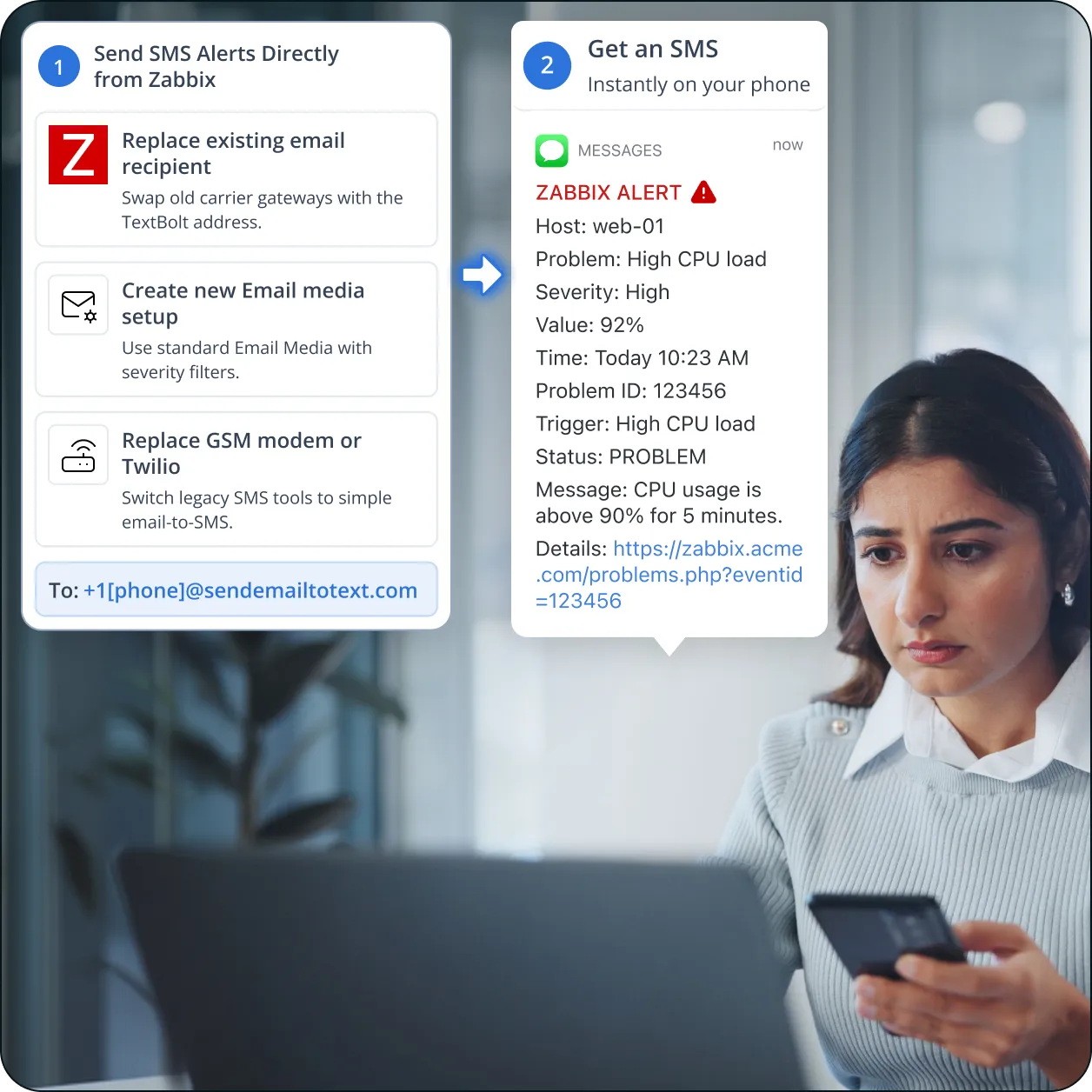Zabbix’s SMS paths (GSM modem, Email Media Type pointing at dead carrier gateways, Webhook plus Twilio, GitHub-hosted scripts) each come with trade-offs that DevOps engineers, IT Operations engineers, infrastructure engineers, and network admins hit at scale. TextBolt slots in on top using the Email Media Type you already configure. Six SMS challenges teams encounter on Zabbix.
Zabbix’s documented SMS Media Type only works with a serial GSM modem physically connected to the Zabbix server. The Zabbix docs require a serial device (typically `/dev/ttyS0`), `zabbix` user read/write access to it, the modem PIN entered and preserved across resets, and serial-line speed matched to the modem. A failed modem silently drops every alert. Multi-server or HA Zabbix deployments need a modem per server.
For years, Zabbix shops bypassed the GSM modem requirement by using the Email Media Type with carrier gateway addresses (`[phone]@vtext.com`, `@txt.att.net`, `@tmomail.net`) as the recipient. The Zabbix Forum thread “ATT ceasing their email to sms gateway” documents this exact pain. [AT&T retired `txt.att.net`](https://textbolt.com/migration/att/) in June 2025. [T-Mobile took `tmomail.net` offline](https://textbolt.com/migration/tmobile2/) in December 2024. [Verizon’s `vtext.com` shutdown](https://textbolt.com/migration/verizon/) completes by March 31, 2027.
A Zabbix Forum discussion explicitly notes the gap: limited on-premise modem or appliance options for SMS gatewaying in the US. Varius Message Router is Asia-only. HW-group SMS-GW3 doesn’t work in the US. SMSEagle is the primary US-supported appliance at $1,000-$2,500+. Infrastructure engineers in US shops face fewer hardware paths than European or APAC counterparts.
Zabbix added the Webhook Media Type in version 4.4. It supports SMS providers like Twilio, but the integration requires writing custom JavaScript code in the media-type configuration, managing Twilio account credentials and HMAC verification, and ongoing maintenance when Zabbix versions change. DevOps engineers pick up the maintenance burden plus a separate Twilio billing relationship and per-message pricing.
Searching GitHub for Zabbix SMS turns up `Tectu/zabbix-sms-vonage`, `ClickSend/zabbix-sms`, `ericallenpaul/Zabbix-Twilio.sh`, and dozens more. Each is maintained or abandoned by a different author with different SMS provider integrations and different Zabbix-version compatibility. IT Operations and infrastructure engineers face the same plugin-evaluation problem Nagios admins face on Nagios Exchange: which script still works, which is forked, which compiles against current Zabbix.
Whether through carrier gateway email, GSM modem, or Twilio webhook, none of the standard Zabbix SMS paths produce an exportable 10DLC-compliant audit trail with sender authentication, consent records, and timestamped delivery logs. None support two-way SMS where a DevOps or IT Operations engineer’s “ack” reply lands in the Zabbix admin’s inbox. For regulated infrastructure (financial, federal-contractor, government) the SMS layer has been audit-failing for years.
TextBolt connects Zabbix to a registered 10DLC business number through the same Email Media Type your existing User Media already knows. No GSM modem, no Webhook JavaScript, no GitHub script.
Each Zabbix problem becomes an SMS within seconds. Critical alerts (host down, service down, disk full, network outage) reach the on-call DevOps or IT Operations engineer immediately, not buried in an inbox they check next morning.
TextBolt registers your sender identity with The Campaign Registry during onboarding. SMS routes through carrier-approved 10DLC infrastructure with up to 98% delivery rate, a professional toll-free business number, and an exportable audit trail for federal-contractor, financial, and government Zabbix installs.
When a DevOps engineer or network admin replies “ack,” “rerouting,” or “investigating” by SMS, the reply lands as an email in the inbox of the alert sender. The whole rotation sees acknowledgments without logging into the Zabbix UI. Two-way SMS that no native Zabbix Media Type supported.
In Zabbix, go to Alerts → Media types → Email and configure the recipient as `+1[phone]@sendemailtotext.com`. Or set it on a per-user basis under User Media. Same actions, same operations, same triggers. The integration is one Email Media Type configuration.
Skip the $1,000-$2,500+ per modem cost, the SIM management, the Webhook Media Type JavaScript code, and the abandoned GitHub script that infrastructure engineers and DevOps engineers otherwise have to evaluate and maintain. TextBolt is cloud-based; one account covers every Zabbix server, proxy, and HA pair across every region.
The Email Media Type is the same in Zabbix 6.x, 7.x, Zabbix Cloud, and the Glaber fork. The TextBolt gateway address slots into any version. Multi-server, HA pair, and proxy-based architectures all share the same Media Type configuration with no per-server modem required.
SMS Delivery Rate
SMS Replies to Your Inbox
Routes & Infrastructure
Up to 10
Team Members on Shared Account
Hands-on setup takes around 30 minutes. TextBolt handles 10DLC business verification with The Campaign Registry on your behalf, which typically takes 1-2 business days to approve. No modem to install, no JavaScript to write, no GitHub script to compile.
**01 Sign Up for TextBolt**
Create your TextBolt account using your work email. Account creation takes about 2 minutes. The account ties to your domain so you can add coworkers later.
**02 Choose a Toll-Free Business Number**
An dedicated toll-free business number is available, and annual billing includes a discount.. The number is the sender ID on every SMS Zabbix sends through TextBolt.
**03 TextBolt Handles 10DLC Business Verification**
Provide your business details during TextBolt onboarding. TextBolt handles 10DLC business and campaign registration with The Campaign Registry on your behalf, so you don’t manage the registration process yourself. Business verification typically takes 1-2 business days. Once approved, your number is enabled for compliant business SMS.
**04 Configure the Email Media Type in Zabbix**
In Zabbix, go to Alerts → Media types → Email. Configure SMTP settings if not already set. Save. Then assign the Media Type to a user with the recipient set to `+15551234567@sendemailtotext.com` using the engineer’s actual phone number.
**05 Trigger a Test Alert**
Use Zabbix’s “Test” button on the user’s media or fire a real trigger by causing a temporary problem state. The SMS should land within seconds. Check the TextBolt delivery log to confirm and view the audit-trail entry.
**06 Add Up to 10 Team Members**
Invite the rest of your DevOps and IT Ops rotation to the shared TextBolt account. Add each engineer’s TextBolt-bound recipient address to their Zabbix User Media. Use Zabbix Action conditions to route alerts to the right rotation member.
If your User Media already had `[phone]@vtext.com` as the Email recipient, replace just the domain part with `+1[phone]@sendemailtotext.com`. Existing Actions, Operations, and trigger conditions keep working untouched. One-line change in User Media.
For new Zabbix deployments, create a User Media entry with Type = Email, the engineer’s TextBolt-bound recipient address (`+1[phone]@sendemailtotext.com`), and the desired severity filter. Standard Email Media Type, no Webhook scripting required.
Disable the SMS Media Type pointing at the GSM modem, or remove the Webhook Media Type calling Twilio. Route those Action operations through the Email Media Type instead. Decommission the modem hardware or delete the Webhook JavaScript. Notification flow keeps working, but the modem cost and JavaScript maintenance go away.
Six common Zabbix monitoring categories where SMS to the on-call engineer replaces a GSM modem, a Webhook+Twilio script, or a dead carrier gateway. Each links a Zabbix trigger to an on-call phone in seconds.
**Server Monitoring**
Host availability, CPU saturation, memory pressure, disk-full thresholds, and process-level alerts via Zabbix agent and SNMP. SMS the on-call DevOps or IT Operations engineer the moment a host or service crosses a critical threshold.
**Network Monitoring**
Link-down events, switch port failures, packet loss thresholds, and bandwidth saturation via SNMP traps and ICMP checks. Network admins get SMS the moment a circuit, interface, or router degrades. Zabbix’s strongest historical use case maps directly to TextBolt SMS.
**Database Monitoring**
Slow query thresholds, replication lag, connection-pool exhaustion, and storage growth from PostgreSQL, MySQL, MariaDB, MongoDB, and Oracle agents. Database administrators get SMS the moment a query backlog or replica falls behind, before user-facing impact compounds.
**Cloud Infrastructure**
AWS, Azure, and GCP integrations via Zabbix templates and the cloud monitoring proxies. Infrastructure engineers get SMS for cloud-side incidents: instance failures, autoscaling events, billing anomalies, and managed-service disruptions surfaced through Zabbix dashboards.
**Application and Service Monitoring**
HTTP checks, port checks, custom user-parameter checks for application services. DevOps engineers running the web tier, API gateway, or middleware services get SMS when a service goes from OK to PROBLEM state in Zabbix.
**Multi-Site and Distributed Zabbix Deployments**
Zabbix proxies in remote sites, HA Zabbix server pairs, and distributed monitoring topologies all route SMS through one shared TextBolt account. Infrastructure engineers running global Zabbix fleets skip per-site GSM modems and consolidate the SMS path.
Three common paths for adding SMS to Zabbix, three different mental models. GSM modems require physical hardware. The Webhook Media Type plus Twilio is a custom JavaScript integration. TextBolt slots into the Email Media Type your existing User Media already knows.
$1,000-$2,500+ per modem
SMSEagle, Multi-Tech, Siemens TC35, Huawei e1550 connected to the Zabbix server’s serial port. Industrial-grade SMS, but US options are limited and every Zabbix server needs its own modem.
- $1,000-$2,500+ hardware per server
- SIM card management
-  Limited US appliance options
- Single-server by default
- No two-way replies to inbox
Recommended
Flat monthly plan, no per-node license (Standard plan)
Email-to-SMS gateway. Drop `+1[phone]@sendemailtotext.com` into the Zabbix Email Media Type recipient. Same Actions, same Operations, same triggers. Now compliant, audit-trailed, two-way.
[Start Standard Plan Trial →](https://my.textbolt.com/signup/)JavaScript code plus per-message billing
Zabbix 4.4+ supports the Webhook Media Type. Wire it to Twilio via custom JavaScript with HMAC verification, API credentials, and ongoing maintenance when Zabbix versions change.
- Custom JavaScript media-type config
- Twilio API keys and HMAC setup
- Ongoing version-compatibility maintenance
- Per-message Twilio billing
- Inbound replies need separate flow
Three ways customers route SMS through Zabbix with TextBolt: replacing the GSM modem on the Zabbix server, swapping carrier-gateway Email Media Types, and adding 10DLC compliance.
DevOps Engineer, FinTech Backend
Infrastructure Engineer, Manufacturing IT
Network Admin, Healthcare IT Operations
The numbers that matter when wiring SMS into a Zabbix alerting stack.
SMS Delivery Rate
Hardware Required
Team Members (Standard Plan)
4.4★
Workspace Marketplace (493 reviews)
**Does Zabbix have native SMS support?**
Sort of. Zabbix has a native SMS Media Type that requires a serial GSM modem connected to the Zabbix server. It also has the Email Media Type that historically pointed at carrier gateway addresses (`[phone]@vtext.com`) for pseudo-SMS, and the Webhook Media Type (since 4.4) that can call Twilio with custom JavaScript. With carrier gateways shut down and modems expensive, DevOps and IT Ops teams now route through TextBolt’s email-based gateway: drop `+1[phone]@sendemailtotext.com` into the Email Media Type recipient and the alert becomes an SMS.
**What replaced the Email Media Type carrier gateway path for Zabbix?**
After AT&T retired `txt.att.net` in June 2025, T-Mobile took `tmomail.net` offline in December 2024, and Verizon’s `vtext.com` shutdown completes by March 2027, Zabbix admins have three options: replace the carrier gateway address with TextBolt’s gateway in the Email Media Type recipient (closest one-line replacement), buy GSM modem hardware ($1,000-$2,500+ per Zabbix server), or write Webhook Media Type JavaScript calling Twilio. TextBolt preserves the original mental model: address-an-email-to-a-phone, no JavaScript or hardware required.
**Do I need a GSM modem to send SMS from Zabbix?**
No. The native Zabbix SMS Media Type requires a GSM modem on the Zabbix server, but the Email Media Type bypasses the modem. Pointing the Email recipient at `+1[phone]@sendemailtotext.com` sends through TextBolt’s cloud-based gateway, with no modem hardware on any Zabbix server, proxy, or HA pair. One TextBolt account covers a multi-site Zabbix deployment without per-site modem hardware.
**Can I use my existing Email Media Type for SMS?**
Yes. The integration uses the standard Email Media Type. Replace the dead carrier gateway value (`[phone]@vtext.com`) in your User Media’s Email recipient with `+1[phone]@sendemailtotext.com`. Existing Actions, Operations, severity filters, and trigger conditions all work unchanged. SMTP settings on the Email Media Type are the same.
**How is this different from Webhook Media Type plus Twilio?**
The Webhook Media Type plus Twilio works but requires writing custom JavaScript code in the media-type configuration, managing Twilio API credentials and HMAC verification, ongoing maintenance when Zabbix versions change, and a separate Twilio billing relationship. TextBolt is email-only: standard Email Media Type, drop the gateway address into the recipient, you’re done. No JavaScript, no API credentials, no webhook for inbound replies. The TextBolt account also covers up to 10 engineers on one shared business number.
**Is Zabbix SMS via TextBolt 10DLC compliant?**
Yes. TextBolt registers your sender identity with The Campaign Registry during onboarding so SMS sent through TextBolt routes through carrier-approved 10DLC infrastructure. This satisfies FCC business SMS requirements and produces the audit trail financial-services, federal-contractor, and government Zabbix installs need for compliance.
**Can engineers reply to acknowledge Zabbix alerts via SMS?**
Yes. When a DevOps engineer, IT Operations engineer, or network admin replies “ack,” “rerouting,” or any text to a TextBolt-sent SMS, the reply lands as an email in the inbox of the alert sender. The whole rotation sees acknowledgments without logging into the Zabbix web UI. Two-way SMS that no native Zabbix Media Type supports.
**Does this work with Zabbix 6.x, 7.x, Glaber, and HA setups?**
Yes. The Email Media Type configuration is consistent across Zabbix 6.x, 7.x, Zabbix Cloud, and the Glaber fork. The TextBolt gateway recipient slots into any version. Multi-server, HA pair, and proxy-based architectures all share the same Media Type configuration with no per-server hardware. One TextBolt account covers the entire deployment.
**How much does it cost to send SMS from Zabbix with TextBolt?**
Basic plan (500 credits, single user), Standard plan (1,000 credits, up to 10 team members), Professional plan (2,500 credits, up to 10 team members), Enterprise custom (5,000+ credits). An dedicated toll-free business number is available, and annual billing includes a 20% discount. Visit [TextBolt pricing page](https://textbolt.com/pricing/) for more details.
**How long does it take to set up Zabbix-to-SMS with TextBolt?**
About 30 minutes of hands-on configuration: account creation, toll-free number selection, and configuring the Email Media Type and User Media in Zabbix. TextBolt handles 10DLC business verification with The Campaign Registry on your behalf, which typically takes 1-2 business days to approve. Once the carriers approve your number, trigger a test alert and the first SMS lands in seconds.
Reach DevOps and IT Ops Engineers Without a Modem or Webhook Script
Send SMS from any Zabbix trigger in about 30 minutes. Drop the gateway address into the Email Media Type and your existing Actions and Operations keep working, now compliant and two-way.
[Start Free Trial ](https://my.textbolt.com/signup/)
---
_View the original post at: [https://textbolt.com/integration/zabbix-email-to-text-alerts/](https://textbolt.com/integration/zabbix-email-to-text-alerts/)_
_Served as markdown by [Third Audience](https://github.com/third-audience) v3.6.1_
_Generated: 2026-07-26 18:30:07 UTC_