
- Which Platform Fits Your Business at a Glance?
- Which Platform Is Right for Your Industry?
- How Do Notifyre and TextBolt Pricing Models Compare?
- What Features Does Each Platform Offer?
- How Easy is it to Get Started with Each Platform?
- Which Platform Should You Choose for Specific Use Cases?
- Final Verdict: Which Email-to-SMS Platform Should You Choose?
- Frequently Asked Questions
Send Texts Without Leaving Your Inbox
Notifyre vs TextBolt: Which Email-to-SMS Platform Fits Your Business?

Notifyre and TextBolt both let you send text messages from email. But the way they handle pricing, setup, and day-to-day sending could not be more different. Notifyre is a multi-channel platform built around pay-as-you-go credits, an online dashboard, and API access. TextBolt is an email-to-SMS service built for teams that want to send texts without leaving their inbox.
This Notifyre vs TextBolt comparison breaks down pricing, features, setup, and use cases so you can pick the right platform for your business. If you have already started researching Notifyre, our Notifyre reviews analysis adds context on real user experience.
Which Platform Fits Your Business at a Glance?
Before diving into the details, here is a side-by-side snapshot of how these two platforms compare across the factors that matter most to US businesses.
| Feature | Notifyre | TextBolt |
| Pricing Model | Pay-as-you-go ($0.02/SMS part + $16.40/month recurring fees) | Flat monthly plans starting at $29/month |
| Upfront Cost Before Sending | $70.90 minimum (10DLC registration + wallet top-up) | $0 (7-day free trial with 10 credits) |
| 10DLC Approval Time | Up to 2 weeks | Up to 48 hours |
| User Accounts | Unlimited | 10 per plan (From Standard Plan) |
| Email-to-SMS | Yes (requires sender email authorization) | Yes (native workflow, no authorization step) |
| MMS Support | Yes (via dashboard and API only) | No |
| API Access | Yes | No |
| Delivery Rate | Not disclosed | Up to 98%* |
| Free Trial | No (demo available) | Yes (7 days, 10 credits) |
| Security Certifications | ISO 27001, claims HIPAA compliant, BAA/SLA available | TLS encryption, HIPAA considerations |
| Best For | Businesses needing multi-channel (SMS + fax + API) | Teams that want to text directly from email |
The rest of this guide digs into each of these differences so you can see exactly where each platform wins and where it falls short.
Your Team Already Knows How to Send Texts
TextBolt works inside Gmail and Outlook. No new dashboard to learn.
Which Platform Is Right for Your Industry?
Different industries have different priorities when it comes to business texting. The table below maps common use cases to the platform that fits best.
| Industry | Best Fit | Why |
| Healthcare | TextBolt | Fast 10DLC approval, email-native workflow for healthcare practices |
| IT & System Alerts | TextBolt | Trigger SMS from monitoring tools via email; IT departments already use email-based alerting |
| Education | TextBolt | Mass parent notifications from one email; no staff training required |
| Automotive & Field Services | TextBolt | Service advisors and dispatchers send from their existing inbox |
| Legal & Finance | Notifyre | ISO 27001 certification and BAA/SLA may meet stricter compliance needs |
| Marketing & Promotions | Notifyre | SMS broadcasting, MMS support, and campaign management tools |
| Multi-Channel (Fax + SMS) | Notifyre | Combined fax and SMS on one platform |
| Small Businesses | TextBolt | Predictable monthly cost, no upfront registration fees, zero learning curve |
How Do Notifyre and TextBolt Pricing Models Compare?
Pricing is where these two platforms diverge the most. Notifyre uses a credit-based pay-as-you-go system with mandatory registration fees. TextBolt uses flat monthly plans with credits included.
For a deeper look at Notifyre’s full fee structure, see our Notifyre pricing breakdown.
Notifyre Pricing
Notifyre charges $0.02 per SMS part. That rate breaks down to $0.015 for message transmission plus a $0.005 Carrier Fee Surcharge. Per Notifyre’s terms of service, this surcharge can change at any time.
Before you send your first text, you need to complete 10DLC registration through Notifyre. The Quick Start package costs $60.90 upfront.
That includes brand registration ($4.80), campaign registration ($16.90), three months of campaign maintenance ($34.20), and one month of a 10DLC number ($5.00). After the prepaid period, recurring monthly fees total $16.40.
Your first month sending 500 messages costs $70.90 total. Wallet funds require a $10 minimum top-up per transaction and are non-refundable per Notifyre’s terms. However, those funds never expire, which is an advantage for infrequent senders.
TextBolt Pricing
TextBolt offers fixed pricing plans. Basic starts at $29/month for 500 credits. Standard is $49/month for 1,000 credits. Professional is $99/month for 2,500 credits.
From the Standard plan, 10 user accounts are included with no per-user fees. Annual billing saves 20% across every tier. Overages are billed at your plan’s per-credit rate with no penalty.
10DLC registration is included in every plan at no extra cost. There is no separate registration fee, no upfront wallet deposit, and no recurring compliance charges on top of your plan price.
How Do Team Costs Compare for 500 Monthly Messages?
The table below compares the real monthly cost for a five-person team sending 500 messages.
| Cost Factor | Notifyre | TextBolt (Basic) |
| Monthly message cost | $10.00 (PAYG) | $29.00 (plan includes 500 credits) |
| 10DLC recurring fees | $16.40 | $0 (included) |
| Monthly Total | $26.40 | $29.00 |
| First Month Total | $70.90 (includes $60.90 registration) | $0 (free trial) |
At 500 messages, Notifyre’s monthly ongoing cost is slightly lower. But the $70.90 upfront investment and up-to-two-week registration wait change the equation for teams that need to start sending quickly.
What Features Does Each Platform Offer?
Both platforms can send business texts, but they are designed for different workflows. These are the feature areas where the differences matter most.
1. How Does Each Platform Handle Email-to-SMS?
Email-to-SMS is the core comparison point, since both platforms offer it but execute it very differently.
TextBolt:
- Simple address format: [phonenumber]@sendemailtotext.com
- Works with Gmail, Outlook, Zoho, ProtonMail, and any SMTP client
- No pre-authorization step for sender emails
- Replies arrive as standard email replies in your inbox
Notifyre:
- Complex address format: {smsnumber}@{accountid}.sms.us.notifyre.com
- Works with Gmail, Outlook, Yahoo, and other email clients
- Requires pre-authorizing each sender email address in SMS settings
- Email signatures can bleed into SMS (manual workaround needed)
Key takeaway: TextBolt’s email-to-SMS is simpler to configure and use daily. No account ID in the address, no sender authorization, no signature management.
2. What Channels and Messaging Options Are Available?
Both platforms support SMS, but Notifyre offers significantly more channels.
TextBolt:
- SMS only (no MMS, no API, no fax)
- Scheduling via Gmail’s native Schedule Send
- Bulk sending via Google Contacts groups
- Two-way messaging through email replies
Notifyre:
- SMS, MMS, and fax on one platform
- SMS API with webhooks for custom integrations
- Zapier integration connecting 7,000+ apps
- SMS broadcasting with campaign management tools
- MMS available via dashboard and API (not via email-to-SMS)
Key takeaway: Notifyre is the broader platform with multi-channel support and developer tools. TextBolt focuses entirely on doing email-to-SMS well.
3. How Do the Platforms Handle Delivery Tracking and Team Management?
Visibility into message delivery and team accountability matters for any business sending texts at scale.
TextBolt:
- Dashboard tracks every message with delivery status, timestamps, recipient number, and character count
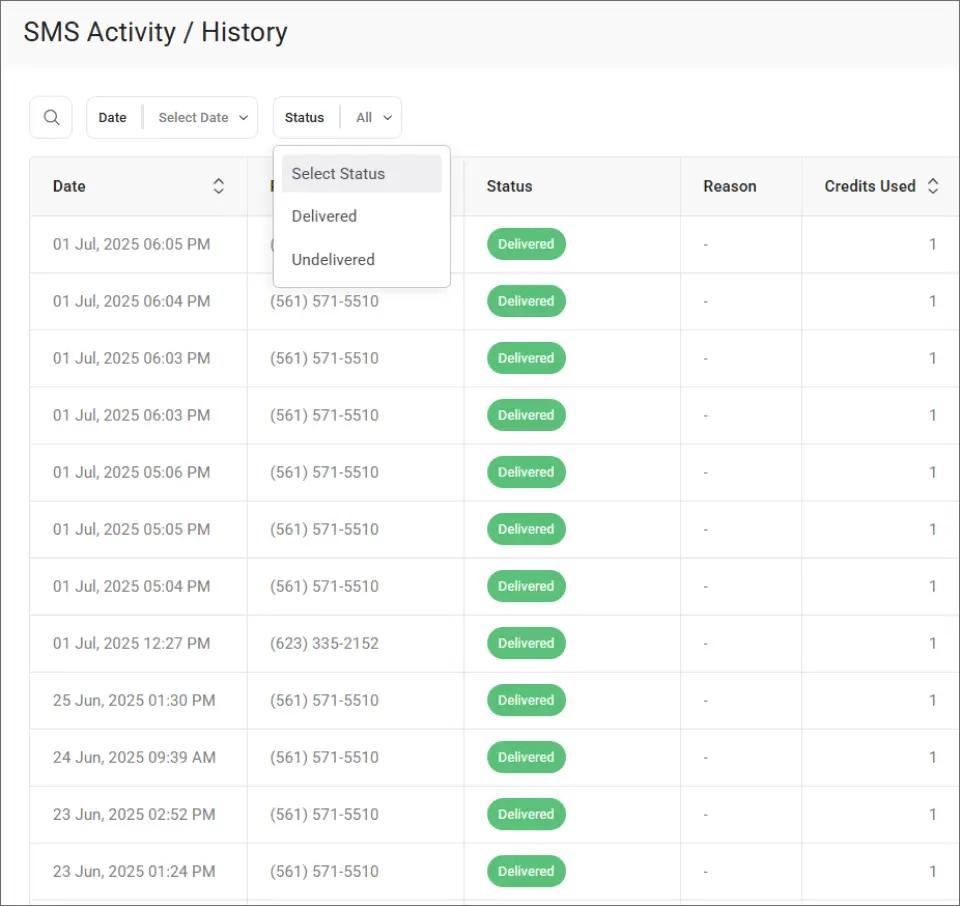
- Filter by date range, delivery status, or keyword search
- 10 user accounts from standard plan with shared credit pool
- Complete audit trail in both the dashboard and your email account
Notifyre:
- Real-time delivery reports with exportable activity logs
- Unlimited users with permission controls and number assignment
- Campaign-level reporting for broadcasts
- Email delivery notifications for sent messages
TextBolt’s dashboard gives your team a clear view of every message sent across all users. Here is what that looks like in practice:
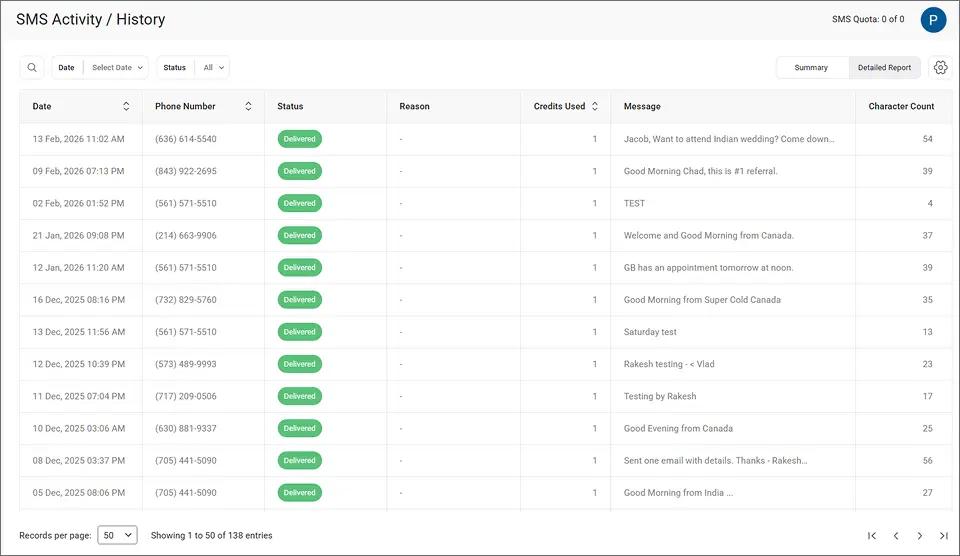
From this view, you can filter messages by delivery status to quickly identify any that failed. The status dropdown lets you isolate delivered and undelivered messages in one click.
Key takeaway:
- Notifyre wins on user scalability with unlimited accounts.
- TextBolt wins on email-native simplicity with delivery tracking built into a clean dashboard.
4. How Does Each Platform Approach Security and Compliance?
Businesses handling sensitive communications need to understand each platform’s compliance posture. Both platforms support 10DLC registration, which is now required by US carriers for all business-to-consumer text messaging.
TextBolt:
- TLS encryption for message transmission
- Pass-through architecture with no message storage on TextBolt servers
- HIPAA considerations (consult your compliance team for specific requirements)
- Automatic STOP keyword opt-out handling
Notifyre:
- ISO 27001 certified
- Claims HIPAA compliant with BAA and SLA available
- AES 256-bit encrypted cloud storage
- Multi-factor authentication and login attempt tracking
- SOC1 and SOC2 compliance via Stripe for payment processing
Key takeaway: Notifyre has stronger documented security certifications. For organizations with strict compliance requirements, ISO 27001 and available BAAs may be deciding factors.
Stop Juggling Dashboards. Send Texts From Email
From Standard TextBolt plan includes 10 users and up to 98%* delivery rates.
How Easy is it to Get Started with Each Platform?
Setup speed can make or break a platform decision, especially for teams that need to start sending immediately.
TextBolt Setup
- Sign up and complete business verification (10-30 minutes)
- TextBolt handles 10DLC registration (approved in up to 48 hours)
- Start sending from Gmail, Outlook, or any email client
Total time to first message: typically one to two days. Total upfront cost: $0 during the 7-day free trial.
You can send email to text messages the moment your 10DLC registration is approved. The address format is simple enough that your team can start without training.
Notifyre Setup
- Create a Notifyre account and wait for phone verification
- Pay $60.90 for 10DLC Quick Start registration
- Wait for brand and campaign approval (up to 2 weeks per Notifyre’s pricing FAQ)
- Order a 10DLC number ($5/month)
- Add wallet funds ($10 minimum top-up)
- Authorize each sender’s email address in SMS settings
Total time to first message: up to two weeks or more. Total upfront cost: $70.90 minimum.
Migrating From Another Platform?
If you are switching from a carrier gateway like AT&T or Verizon, TextBolt’s email-based workflow mirrors what you already know. Change the recipient address to @sendemailtotext.com and keep everything else the same.
TextBolt’s summary dashboard helps you monitor message volume and delivery rates from day one.
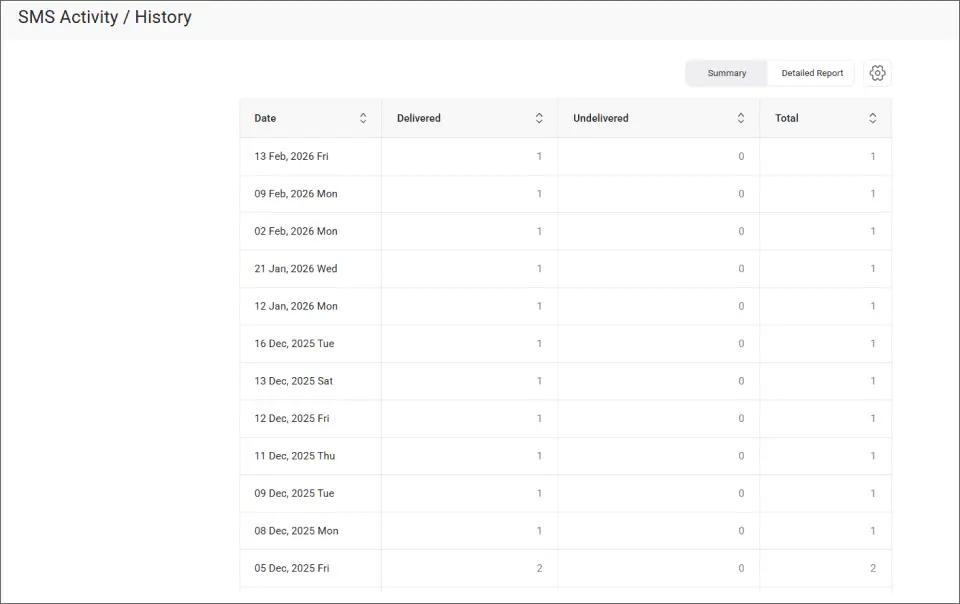
You can start your free 7-day trial to test the workflow before committing to a paid plan.
Which Platform Should You Choose for Specific Use Cases?
The right choice depends on how your team sends texts and what you need beyond basic messaging. Here are five common scenarios.
1. Teams That Want Zero New Software
If your team already lives in Gmail or Outlook, TextBolt lets you text without opening a new tab. Compose an email, address it to the recipient’s phone number, and send. Replies come back to your inbox as standard email replies.
Why TextBolt fits here:
- No dashboard login required for daily sending
- Staff who can send emails can send texts from day one
- Send directly from Gmail or Outlook with no plugins
Notifyre gap: Email-to-SMS requires pre-authorizing sender addresses and using a complex address format with your account ID.
Better choice: TextBolt, for true email-native simplicity.
2. Businesses That Need to Start Sending This Week
When a service shuts down or a new process launches, waiting two weeks for 10DLC approval is not an option.
Why TextBolt fits here:
- 10DLC approval in up to 48 hours, not weeks
- Free trial means $0 upfront cost
- No separate registration fees to budget for
Notifyre gap: 10DLC registration can take up to two weeks, and you must invest $70.90 before sending a single message.
Better choice: TextBolt, for speed to first message.
3. Organizations With Strict Compliance Requirements
If your legal or IT team requires ISO certification, signed BAAs, or formal SLAs before approving a vendor, Notifyre checks those boxes.
Why Notifyre fits here:
- ISO 27001 certified with documented security controls
- BAA and SLA available for healthcare and enterprise
- AES 256-bit encryption for stored data
TextBolt gap: TextBolt offers TLS encryption and HIPAA considerations, but does not hold ISO 27001 or offer formal BAAs.
Better choice: Notifyre, for documented compliance certifications.
4. Businesses That Need MMS, API, or Multi-Channel Messaging
Some workflows require picture messages, programmatic integrations, or fax alongside SMS. Notifyre covers all three.
Why Notifyre fits here:
- MMS support via dashboard and API
- REST API with webhooks for custom integrations
- Fax and SMS combined on a single platform
- Zapier connects to 7,000+ apps
TextBolt gap: TextBolt is SMS-only with no MMS, no API, and no fax.
Better choice: Notifyre, for multi-channel and developer workflows.
5. Small Teams Sending Appointment Reminders and Notifications
For teams that send emergency alerts, appointment reminders, or internal notifications, the priority is reliability and simplicity over feature breadth.
Why TextBolt fits here:
- Flat monthly pricing with no surprise fees
- Any team member can cover for another, since everyone sends from email
- SMS notifications from work email require no extra setup
Notifyre gap: Pay-as-you-go billing and registration fees add complexity for teams with predictable monthly volumes.
Better choice: TextBolt, for predictable costs and team continuity.
Final Verdict: Which Email-to-SMS Platform Should You Choose?
Notifyre and TextBolt serve different types of businesses. The right choice comes down to what your team needs most.
- Choose Notifyre if you need multi-channel messaging (SMS, MMS, and fax), API integrations, or formal compliance certifications like ISO 27001 and BAA. Notifyre’s unlimited user accounts and pay-as-you-go pricing also work well for organizations with variable sending volumes and no urgency on setup.
- Choose TextBolt if your team wants to send texts directly from email with no new software, no training, and no upfront registration costs. TextBolt’s flat monthly plans, and 48-hour 10DLC approval make it the faster, simpler path for businesses focused on operational messaging like reminders, alerts, and notifications.
According to Pew Research, 98% of American adults now own a cellphone. That means the texts you send are almost guaranteed to land on a device your customers carry daily. The question is not whether to text. It is whether your team can do it reliably from the tools they already use.
For most US businesses that want their team texting from day one, TextBolt is the email-to-text service that gets you there without the complexity.
Ready to see how it works? Start your free 7-day trial and send your first text in minutes.
Frequently Asked Questions
Does Notifyre offer a free trial for SMS?
No. Notifyre does not offer a free SMS trial. You can request a demo, but sending requires completing 10DLC registration ($60.90) and adding wallet funds ($10 minimum). TextBolt offers a 7-day free trial with 10 message credits and no upfront payment beyond card verification.
Can both platforms send texts from Gmail and Outlook?
Yes. Both Notifyre and TextBolt support sending SMS from Gmail and Outlook. The difference is in setup complexity. TextBolt uses a simple address format ([phonenumber]@sendemailtotext.com) with no extra steps. Notifyre requires pre-authorizing each sender email and uses a longer address that includes your account ID.
Which platform is better for healthcare businesses?
It depends on your compliance needs. Notifyre claims HIPAA compliance and offers BAA and SLA agreements, which some healthcare organizations require. TextBolt supports messaging with HIPAA considerations and uses a pass-through architecture that does not store messages on its servers. We recommend consulting your compliance team to determine which approach fits your requirements.
How long does 10DLC registration take on each platform?
TextBolt handles 10DLC registration in up to 48 hours at no extra cost. Notifyre’s registration can take a few days to up to two weeks, per their pricing page FAQ, and costs $60.90 to start.