
- What Notifyre Does and Who it is Built for
- Notifyre Ratings Across Review Platforms
- What the Reviews Actually Say
- What Notifyre Users Say They Would Improve
- What Works Well in Notifyre
- Notifyre Pricing: What Registration, Monthly Fees, and Per-SMS Costs Actually Add Up To
- Notifyre vs TextBolt: Setup, Pricing, and Email-to-SMS Workflow Compared
- Frequently Asked Questions
Send SMS Without the Complexity
Notifyre Reviews 2026: Features, Pricing, and What Real Users Say

Selecting the right business SMS platform requires more than scanning a star rating. Pricing structures, registration timelines, and workflow compatibility all factor into whether a platform actually works for your team once you are up and running.
Notifyre carries strong, consistent ratings across every major review platform, backed by a substantial volume of verified user feedback. The platform covers a lot of ground: HIPAA-compliant messaging, 10DLC registration support, online fax, and a proactive support model that reviewers mention by name.
This article covers what verified users say on Capterra, Trustpilot, and SourceForge, how Notifyre’s three-part pricing structure breaks down with exact numbers, and how it compares to TextBolt email to sms gateway for teams currently evaluating both options.
What Notifyre Does and Who it is Built for
Notifyre is a cloud-based business communication platform that covers SMS and online fax. It is built for teams that need HIPAA-compliant, multi-channel messaging without managing their own infrastructure. Healthcare practices, law firms, government agencies, e-commerce businesses, and marketing teams all use it.
The platform operates across three main interfaces: a web dashboard for manual sending, an API for developer integrations, and email-to-SMS for teams who want to send texts directly from their inbox.
1. Business SMS with 10DLC Compliance
All outbound SMS on Notifyre runs through a 10DLC-registered business number. 10DLC is the carrier-required registration system for application-to-person (A2P) SMS in the US. Notifyre handles the registration process as part of onboarding, which matters because unregistered SMS traffic faces high filtering and blocking rates from major carriers. For businesses in healthcare or legal that need consistent, deliverable appointment reminders or client notifications, 10DLC compliance is not optional.
2. SMS, MMS, and Fax in One Platform
Notifyre is one of the few SMB-focused platforms that combines outbound and inbound SMS, MMS (images and media), and online fax under one account. For industries like healthcare and legal, where fax remains a required communication format, this consolidation reduces the number of tools a team needs to manage. Teams that only need SMS will not use the fax capability, but for those that do, it removes a separate subscription.
3. API and Zapier for Workflow Automation
For developer teams or businesses with complex workflows, Notifyre offers a REST API with webhooks and a Zapier integration that connects to thousands of apps. IT teams using Notifyre to route server and infrastructure alerts through SMS can connect monitoring platforms like Grafana or Datadog via Zapier without writing custom code. Comparable workflows are available for Grafana alerts and Datadog alerts through email-based gateways for teams that prefer a no-Zapier setup. Native integrations include Asana, Google Drive, Gmail, Microsoft Teams, Mailchimp, Shopify, Slack, and Stripe.
Start Sending SMS Faster Than You Think
TextBolt handles 10DLC registration quickly and includes a free trial. No wallet to manage.
Notifyre Ratings Across Review Platforms
| Platform | Rating | Notes |
|---|---|---|
| Trustpilot | 4.3/5 | Lower review count, mostly fax users |
| Capterra | 4.8/5 | Lower review count |
| SourceForge | 4.8/5 | 47 ratings across 17 user reviews and 30 third-party sources |
| G2 | No reviews yet | Profile is live but no user reviews submitted yet |
Notifyre does not have any user reviews on G2, which is one of the most widely used software comparison platforms for business buyers. Teams that rely on G2 during their evaluation process will find limited information to work with, making side-by-side comparisons harder to complete before committing.
What the Reviews Actually Say
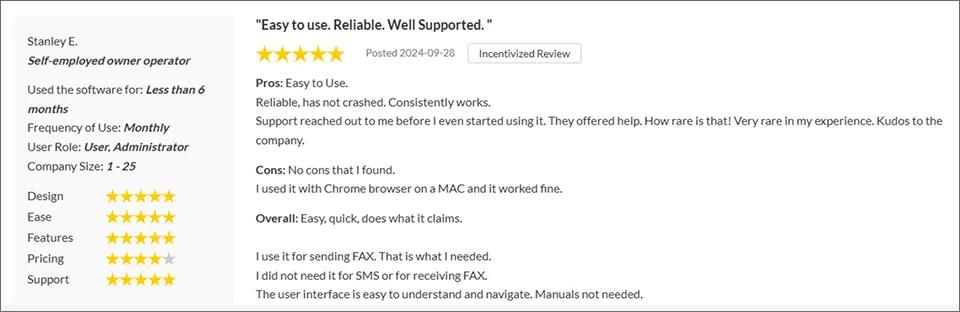
Reading through the verified reviews on SourceForge, Capterra, and Trustpilot, the same themes come up repeatedly. The support team is mentioned in nearly every positive review, and not in a generic way. Users describe specific interactions: personal calls before they started using the product, direct help with 10DLC registration, and problems resolved within the hour.
What stands out most is the proactive outreach pattern. Multiple reviewers describe being contacted by Notifyre’s team before they had run into any issues, suggesting a deliberate onboarding investment rather than reactive support.
1. A SourceForge reviewer (Stanley E., self-employed) wrote that support reached out before he even started using the product and offered help, calling that level of proactive service rare.
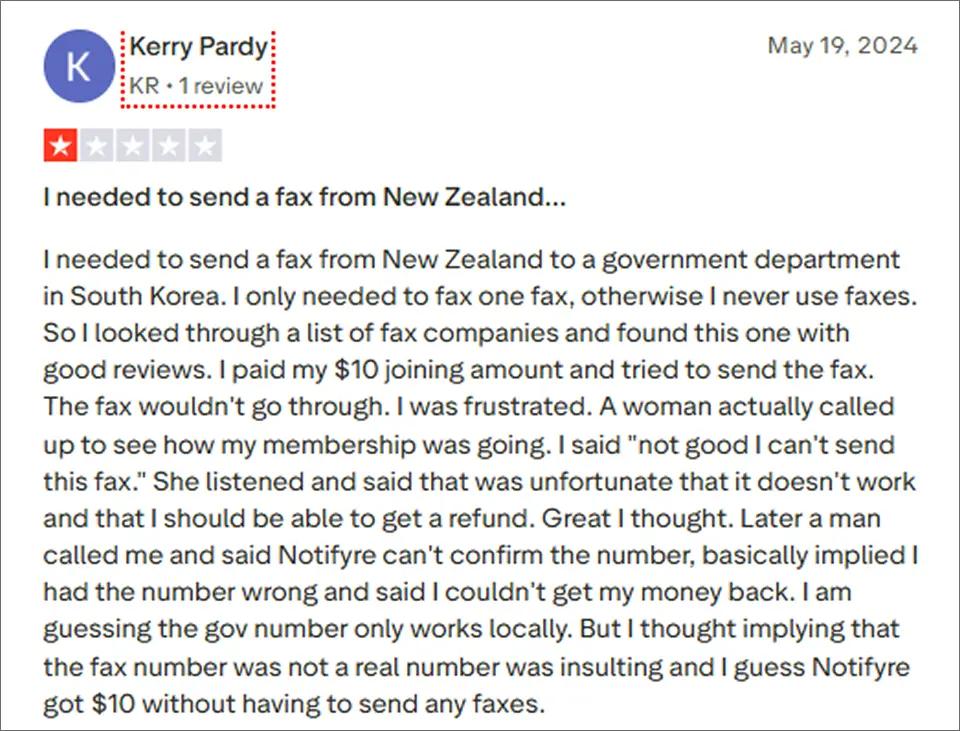
2. A Trustpilot reviewer (Kerry Pardy, individual user) wrote that she paid the joining fee to send a single international fax, but the transmission failed and a follow-up call from a male representative implied her number was invalid and denied her a refund, leaving her out of pocket without sending anything.
What Notifyre Users Say They Would Improve
The same reviews that praise support also surface a consistent set of limitations. These come up across platforms in different words but point to the same friction points.
1. The Upfront Registration Cost
The $60.90 Quick Start fee is the most commonly mentioned concern. Several users noted that the cost is reasonable once explained, but the need to pay before testing the service creates hesitation, particularly for small businesses comparing multiple platforms. A few reviewers mentioned they would prefer a trial period before committing.
2. The Wallet Balance Requirement
Notifyre’s pay-as-you-go model requires a minimum $10 SMS wallet balance before sending. While the funds do not expire, users looking for zero-upfront access find this an additional step, even after paying the registration fee. Some reviewers noted they would prefer to pay purely per message without a minimum top-up.
3. Dashboard and Integration Gaps
A handful of reviews flagged that dashboard functionality does not cover every workflow. ASCHLEIGH P., an operations manager, noted that HubSpot integration is improving but currently requires workarounds. For teams with established CRM-to-SMS processes, this can add friction to an otherwise smooth experience.
4. No Free Trial Means Committing Before You Test
Most competing SMS platforms offer at least a limited free trial. Notifyre provides a demo on request but does not offer a self-serve trial where you can send real messages before paying. For teams evaluating multiple platforms simultaneously, this puts Notifyre at a disadvantage in head-to-head comparisons where a competitor’s free trial is available the same day.
5. 10DLC Approval Adds Up to 2 Weeks Before You Can Go Live
After the quick start payment, US carrier approval for brand and campaign registration can take up to 2 weeks. This timeline is not entirely in Notifyre’s control because carriers set their own review timelines. But it has real consequences for teams with urgent timelines. If you are replacing a discontinued AT&T or Verizon carrier gateway that stopped working overnight, a 2-week wait is a significant delay. T-Mobile gateway users face the same urgency. By comparison, TextBolt completes business verification in 1 to 2 business days, which matters most for teams that cannot afford to wait on carrier timelines. Teams who plan ahead and start registration early can work around this, but it requires knowing the timeline before you begin. For background on how 10DLC works and what carriers require.
What Works Well in Notifyre
1. Proactive Support That Guides Setup, Not Just Fixes Problems
Notifyre’s support model stands apart from most SaaS platforms. The team reaches out before users run into issues, not after. For a business setting up 10DLC registration for the first time, that proactive outreach can make the difference between a clean launch and a week of confusion. Reviewers with no prior SMS platform experience consistently say the support team gave them enough context to get started confidently. This is especially valuable for small businesses that do not have an IT department to lean on.
2. Pay-As-You-Go Pricing That Matches Variable Sending Volumes
Notifyre does not force you into a fixed credit allocation every month. If your sending volume is unpredictable, a healthcare practice that has a slow February and a busy March, or a seasonal business with campaign spikes, pay-as-you-go means you pay for what you actually use. There are no leftover credits and no overage fees. For teams that cannot predict monthly volume, this flexibility is a real advantage over flat-rate platforms.
3. Unlimited User Accounts With No Per-Seat Pricing
Adding team members to Notifyre does not increase your monthly cost. This matters for organizations with distributed teams, multiple departments, or high staff turnover where managing per-seat licenses creates administrative friction. Every team member can have their own login and sending access without any incremental cost per user.
Notifyre Pricing: What Registration, Monthly Fees, and Per-SMS Costs Actually Add Up To
Notifyre’s pricing has three separate components. Understanding each one helps you estimate real costs before you commit.
Component 1: The $60.90 Quick Start Registration (One-Time)
Every new Notifyre SMS account requires a $60.90 Quick Start package. This is a one-time fee paid at account setup. It covers:
- Brand registration ($4.80)
- Campaign registration ($16.90)
- Three months of campaign maintenance, prepaid ($34.20)
- One month of 10DLC number rental ($5.00)
The $60.90 is not a deposit. It is a non-refundable setup cost. It reflects the actual cost of 10DLC registration, which is a US carrier requirement. Every platform that provides compliant business SMS has to cover this cost somewhere. Notifyre passes it through transparently as a line item.
Component 2: $16.40/Month in Ongoing Maintenance Fees
After the prepaid Quick Start period, a $16.40 monthly maintenance fee applies. This covers continued 10DLC number rental and campaign maintenance. It is charged every month regardless of how many messages you send.
Component 3: $0.02 Per SMS Segment
Each outbound SMS costs $0.02 per segment. That total breaks down into $0.015 for message transmission plus a $0.005 carrier fee surcharge. Per Notifyre’s terms, the carrier fee can change at any time. A standard SMS is one segment (up to 160 characters). Longer messages split into multiple segments and cost more. A 300-character message counts as 2 segments at $0.04. For a side-by-side breakdown against flat-rate alternatives, see this Notifyre pricing analysis.
What 500 Messages Per Month Actually Costs
| Period | What you are paying for | Total |
|---|---|---|
| Month 1 | $60.90 Quick Start + $10 in SMS (500 x $0.02) | $70.90 |
| Month 2 onward | $16.40 monthly fee + $10 in SMS (500 x $0.02) | $26.40/month |
The cost drops significantly after the first month once the registration fee is behind you. At 500 messages per month, ongoing costs are $26.40. At 1,000 messages, it is $36.40. At 2,000 messages, it is $56.40.
Minimum wallet balance: Notifyre requires a $10 minimum balance in your SMS wallet before you can send. This balance does not expire, but it is an upfront amount that sits in your account as credit.
Note: Notifyre is an Australian-headquartered company that operates a US entity for North American customers. Confirm whether invoicing is in USD or AUD when you create your account.
Replacing a Discontinued Carrier Gateway?
Skip the two-week wait. TextBolt approves 10DLC in up to 48 hours and works from the email client your team already uses.
Notifyre vs TextBolt: Setup, Pricing, and Email-to-SMS Workflow Compared
For teams whose primary need is sending SMS from their email client, TextBolt is a direct alternative worth comparing. TextBolt is email to text gateway: send an email to [phonenumber]@sendemailtotext.com and the recipient gets an SMS from a business number.
Here is how the two platforms compare across the dimensions that matter most.
1. Setup Time and Registration Process
Notifyre’s 10DLC registration takes up to 2 weeks after the initial $60.90 payment. TextBolt’s 10DLC approval typically completes within 48 hours, a difference that matters most for teams replacing discontinued carrier gateways or with urgent deployment timelines.
TextBolt also offers a 7-day free trial with 10 message credits and no upfront payment beyond card verification, so you can test the full email-to-SMS workflow before committing. Notifyre does not have a self-serve trial. The $60.90 registration is required to start.
2. Pricing Model and First-Month Cost
| Feature | Notifyre | TextBolt |
|---|---|---|
| Pricing model | Pay-as-you-go | Flat monthly plans |
| Upfront registration fee | $60.90 (one-time) | $45/year business number |
| Monthly fee | $16.40/month | Included in plan |
| Per-SMS cost | $0.02/segment | Included in credit allocation |
| First month (500 messages) | $70.90 | $29 (Basic plan) |
| Ongoing (500 messages/month) | $26.40/month | $29/month |
| Free trial | No | 7 days (10 credits) |
| Annual discount | Not offered | 20% off (Basic at $23.20/month) |
TextBolt plan options:
| Plan | Monthly | Annual | Credits/month | Team Members |
|---|---|---|---|---|
| Basic | $29/month | $23.20/month | 500 | 1 |
| Standard | $49/month | $39.20/month | 1,000 | Up to 10 |
| Professional | $99/month | $79.20/month | 2,500 | Up to 10 |
| Enterprise | Custom | Custom | 5,000+ | Custom |
TextBolt’s flat monthly pricing makes budgeting straightforward from day one. No upfront registration fee, no wallet minimum, and a 7-day free trial means you can confirm the platform works for your team before spending anything. The annual discount drops the Basic plan to $23.20/month, making it the more predictable option for teams with consistent sending volumes. For businesses that want to go live quickly without absorbing an upfront cost, TextBolt is the stronger starting point.
3. Email-to-SMS Workflow
This is where the two platforms differ most in daily use.
Notifyre’s email-to-SMS address format includes your account ID: {smsnumber}@{accountid}.sms.us.notifyre.com. Each sender email must be pre-authorized before it can use the gateway. Email signatures need to be suppressed to prevent them appearing in the SMS text.
TextBolt’s format is simpler: [phonenumber]@sendemailtotext.com. Any email address on your account can send through it immediately after setup, with no per-sender authorization. A new receptionist or team member can send their first message in minutes.
4. Compliance
Notifyre holds ISO 27001 certification, offers a formal BAA, and uses AES 256-bit encryption in cloud storage. For healthcare teams requiring documented compliance frameworks, Notifyre provides the paperwork.
TextBolt uses TLS encryption for transmission and a pass-through architecture where messages are not stored on TextBolt servers.
5. Which Platform Fits Which Team
Notifyre is the stronger fit when:
- Your team needs SMS and fax from a single HIPAA-compliant platform
- API integration or Zapier automation is part of your workflow
- Sending volumes are variable and pay-as-you-go saves money vs. a fixed plan
TextBolt is the stronger fit when:
- Email-to-SMS is the only feature you need
- Fast setup matters (48-hour 10DLC approval vs. up to 2 weeks)
- Your team uses Gmail or Outlook and you want SMS to fit into that existing workflow
- A predictable flat monthly fee is easier to plan around than per-message billing
- You want to test before paying (7-day free trial with no upfront cost)
Teams migrating from AT&T’s discontinued email-to-text gateway or Verizon VText will find TextBolt the most direct replacement: same concept, same email-based workflow, with compliant delivery. Try TextBolt free for 7 days to confirm it fits before committing. For a feature-by-feature breakdown, read the full Notifyre vs TextBolt comparison. Try TextBolt free for 7 days to confirm it fits before committing.
Frequently Asked Questions
Is the $60.90 Quick Start fee refundable if I cancel?
No. Per Notifyre’s Terms and Conditions (Section 13), all funds deposited to a Notifyre account, including the $60.90 Quick Start registration, are non-refundable. This applies whether the funds have been used or not, and applies to setup fees, plan subscriptions, and unused wallet credit. The exception is that unused wallet funds do not expire, so any prepaid SMS credit remains usable for future sending without a time limit. Verify the current refund policy at there legal page before signing up.
Can sole proprietors or individuals use Notifyre for SMS?
No. Per Notifyre’s pricing page, the SMS service is not enabled for sole proprietors or individuals. SMS through Notifyre is for business use only, and the platform does not support personal messaging or receiving one-time verification codes. If you operate as a sole proprietor, you will need to register a business entity first or consider an alternative platform that accepts individual senders. The fax service has different rules and does accept individual users.
Does Notifyre offer a free trial before I commit?
No. Notifyre requires the $60.90 start registration fee before you can send a single message. There is no self-serve trial. TextBolt offers a 7-day free trial with message credits and no upfront payment, so you can test the full workflow before spending anything.
How long does SMS registration take before I can start sending?
Notifyre’s 10DLC brand and campaign registration can take up to 2 weeks after your initial payment. TextBolt completes business verification in 1 to 2 business days, which matters most for teams replacing a discontinued carrier gateway or working against a tight launch deadline.