---
title: "What is Email-to-SMS? A Complete Business Guide"
url: "https://textbolt.com/blog/email-to-sms/"
date: "2026-01-29T05:20:21-05:00"
modified: "2026-09-22T07:45:32-05:00"
type: "Article"
resource: "https://textbolt.com/blog/email-to-sms/"
timestamp: "2026-09-22T07:45:32-05:00"
author:
name: "Rakesh Patel"
categories:
- "Email to SMS"
word_count: 4817
reading_time: "25 min read"
summary: "You want to send a text without leaving your inbox. No new app to learn, no copy-pasting numbers, no switching tabs between Gmail and a separate SMS dashboard. If your system can send an email, it ..."
description: "Send texts from Gmail, Outlook, or any email client. Learn how email-to-SMS works in %currentyear% after the AT&T, T-Mobile, and Verizon gateway shutdowns."
keywords: "Email-to-SMS, Email to SMS"
language: "en"
schema_type: "Article"
related_posts:
- title: "How to Trigger SMS Notifications from Email: The Complete Business Guide"
url: "https://textbolt.com/blog/trigger-sms-notifications-from-email/"
- title: "How to Increase Lead Conversion Rates with Email-to-SMS (Complete Guide)"
url: "https://textbolt.com/blog/increase-lead-conversion-with-email-to-sms/"
- title: "How to Stop Staff From Using Personal Phones to Text Patients"
url: "https://textbolt.com/blog/stop-staff-personal-phone-texting-patients/"
---
# What is Email-to-SMS? A Complete Business Guide
_Published: January 29, 2026_
_Author: Rakesh Patel_
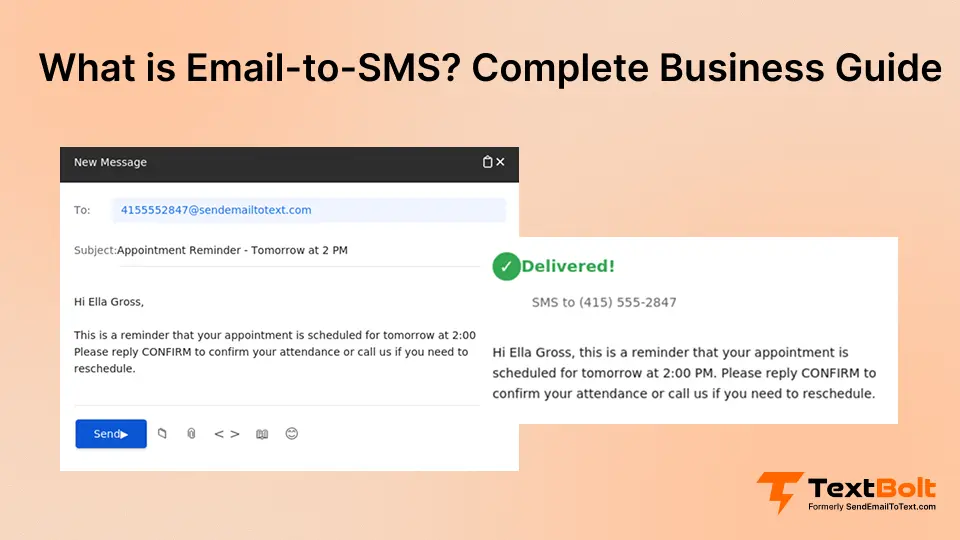
You want to send a text without leaving your inbox. No new app to learn, no copy-pasting numbers, no switching tabs between Gmail and a separate SMS dashboard. If your system can send an email, it can send a text.
**Email to text (also known as email-to-SMS) is a method of sending a text message directly from an email client like Gmail or Outlook to a mobile phone, where an SMS gateway converts the email into a standard text and delivers it to the recipient’s number.** You type a message the way you’d type any email, hit send, and it lands on the recipient’s phone as an SMS within seconds. [Email to SMS services](https://textbolt.com/solutions/email-to-text-service/) like TextBolt give your business a dedicated number and turn your existing inbox into a full texting channel, so appointment reminders, order updates, and customer replies all flow through the email tools your team already lives in.
This guide explains how email-to-SMS works, the difference between the retired free carrier gateways and modern business services, the use cases where it makes the most sense and which setup you actually need for one-way alerts versus two-way customer messaging.
## What is Email-to-SMS?
**Email-to-SMS is a communication method that converts standard email messages into text messages delivered to mobile phones.** You compose an email in Gmail, Outlook, or any email client, send it to a special address format, and the recipient receives it as SMS. If you are evaluating platforms, our guide to the [best email to SMS services](https://textbolt.com/blog/best-email-to-sms-service/) breaks down pricing, compliance, and deliverability across providers.
**Basic example:** You send an email to `+15551234567@sendemailtotext.com` with the message “Your appointment is confirmed for Tuesday at 2:00 p.m.” Your customer receives this as a text message on their mobile device.
At a glance, every email-to-SMS send follows the same four moves:
- **Compose:** Write the message in the body of an email from Gmail, Outlook, or any client.
- **Address:** Send it to a phone-number-plus-gateway address (for example, `+15551234567@sendemailtotext.com`).
- **Convert & Deliver:** An SMS gateway strips the email formatting, converts the body to SMS, and routes it to the recipient’s phone over the cellular network.
- **Reply:** With a modern platform, the recipient’s SMS reply routes back into the original sender’s inbox as a threaded email.
The entire process happens in seconds and feels exactly like sending normal email. Learn the detailed setup process in our [how to send email to text guide](https://textbolt.com/blog/how-to-send-email-to-text/).
Send Texts From Gmail
TextBolt connects your existing email to professional SMS delivery with 10DLC compliance. Your team already knows email. Now they can send business texts just as easily.
[ Start Your Free Trail ](https://my.textbolt.com/signup/)
## How Does Email-to-SMS Work? (4 Simple Steps)
Email-to-SMS converts your email into text messages through a straightforward four-step process.
### Step 1: Compose your Email-to-SMS Message
Open Gmail, Outlook, Apple Mail, or any email client you use for regular business communication. You don’t need special software or a dedicated SMS application.
Write your message in the email body just as you would for any email. Keep your message under 155 characters if you want it delivered as a single SMS segment. This character limit is a standard SMS restriction, not specific to email-to-SMS.
**Character limits:**
- Standard SMS: 155 characters per segment
- Unicode/emoji messages: 70 characters per segment
- Longer messages split automatically
The subject line is typically ignored by email-to-SMS gateways, so focus your message content in the body. Some platforms may use the subject line for internal tracking, but recipients only see the body content.
**Example:** “Hi John, your prescription is ready for pickup at our Main St location. We’re open until 6:00 p.m. today.”
This 98-character message sends as a single SMS segment, ensuring quick delivery and minimal credit usage.
### Step 2: Format the Recipient Phone Number
The recipient address follows a specific format: phonenumber@gateway-domain.com. The phone number must include the area code with no spaces, dashes, parentheses, or special characters. Use only digits.
**Correct formatting examples:**
- +15551234567@sendemailtotext.com (modern platform)
- 12135551234@sendemailtotext.com (with country code for international)
**Incorrect formatting (won’t work):**
- (555) 123-4567@sendemailtotext.com (contains special characters)
- 555-123-4567@sendemailtotext.com (contains dashes)
- 555 123 4567@sendemailtotext.com (contains spaces)
The gateway domain determines which email to SMS service processes your message. Modern business platforms use one dedicated domain, while legacy carrier gateways used a different carrier-specific address for every recipient you had to look up whether a number was on Verizon, AT&T, or T-Mobile before you could send. That carrier-by-carrier guesswork is exactly what modern platforms remove.
**Legacy carrier formats (discontinued):**
| Carrier | Gateway domain(s) | Status | Effective/scheduled date | Official source |
|---|---|---|---|---|
| **AT&T** | `txt.att.net` / `mms.att.net` | Permanently shut down | June 17, 2025 | |
| **T-Mobile** | `tmomail.net` | Stopped delivering (silent failures, no formal announcement) | Late 2024 | |
| **Verizon** | `vtext.com` / `vzwpix.com` | Phasing out—works intermittently | March 31, 2027 | |
| **Sprint** | `messaging.sprintpcs.com` | Discontinued after T-Mobile merger | 2020 | [https://en.wikipedia.org/wiki/Merger_of_Sprint_Corporation_and_T-Mobile_US](https://en.wikipedia.org/wiki/Merger_of_Sprint_Corporation_and_T-Mobile_US) |
| **Bell (Canada)** | `txt.bell.ca` | Ending | December 31, 2025 | |
Verizon is the only major US carrier whose gateway is still partially operating. Don’t rely on it for production alerts the wind-down is already producing intermittent delivery failures, and the announced full sunset completes March 31, 2027.
### Step 3: Send your Email and Track Delivery
Click send in your email client. Your email routes through standard email protocols (SMTP) to the email-to-SMS gateway, just like sending any email.
The gateway performs several operations:
1. **Receives and validates** your email, checking the recipient format and sender authentication
2. **Converts content** from email format to SMS protocol, stripping HTML formatting and extracting plain text
3. **Segments messages** longer than 155 characters into multiple parts (each segment uses one message credit)
4. **Routes to carriers** via direct connections with cellular networks (AT&T, Verizon, T-Mobile, etc.)
5. **Delivers to recipient** within seconds under normal network conditions
**Delivery rates:** Modern platforms with 10DLC [sms compliance laws for business messaging](https://textbolt.com/legal/sms-compliance-laws/) achieve up to 98% delivery because carriers recognize them as legitimate business senders. Legacy carrier gateways achieved only 60-70% delivery as cellular networks increasingly blocked them as potential spam. TextBolt does not automatically retry a failed message and does not alert you when a recipient number is blocked delivery status appears in the dashboard, so failures are visible instead of assumed.
**Message segmentation:** If your message exceeds 155 characters, the gateway automatically splits it into multiple SMS segments:
- 156-310 characters = 2 segments
- 311-465 characters = 3 segments
- And so on
Each segment delivers separately but displays as a single message on most modern smartphones. Very old phones may show segments separately.
### Step 4: Receive SMS Replies Directly in your Email Inbox
When your recipient replies, modern email-to-SMS platforms convert the text to email so the response arrives in your inbox. This [two-way messaging](https://textbolt.com/blog/two-way-messaging/) flow creates a seamless conversation without switching applications or logging into separate platforms.
**How replies work:**
1. Recipient taps “Reply” on their phone and types a response
2. Their SMS reply sends to the gateway’s phone number (the one they received the message from)
3. Gateway converts the SMS back to email format
4. Email delivers to your inbox, appearing as a reply to your original message
**Reply threading:** Most email clients display the reply in the same conversation thread as your original message, maintaining complete context. The “From” field shows the recipient’s phone number in email format, allowing you to simply hit “Reply” to continue the conversation. Replies thread back to the original sender’s inbox not a shared catch-all so a rep or engineer owns their own conversation.
**Conversation history:** All exchanges remain in your email system, providing searchable records of every interaction. This is particularly valuable for businesses requiring audit trails, compliance documentation, or customer service history.
**STOP keyword handling:** Modern platforms automatically process opt-out requests to maintain TCPA and carrier compliance requirements. When a recipient texts “STOP,” the platform prevents future messages to that number and may notify you via email, ensuring TCPA compliance without manual intervention.
These four steps work the same whether you’re using modern business platforms or legacy carrier gateways, but the reliability and features differ significantly.
## Email-to-SMS for System Alerts vs. Customer Messaging: Which Setup You Need
Most guides lump “alerts and reminders” into one bucket. In practice, there are two distinct email-to-SMS profiles, and the right configuration depends on which one you’re running.
### One-Way System Alerts (Monitoring and Paging)
This is machine-to-human. A monitoring tool, alarm panel, or IoT sensor already sends an email when something breaks you just change the destination address so that email lands on a phone as SMS.
- **Direction:** One-way. The system pages a human; a reply isn’t expected.
- **Who sends:** An unattended system—PagerDuty, Opsgenie, Datadog, Nagios, UptimeRobot, AWS CloudWatch, Grafana, a Honeywell or ADT alarm panel, or a custom webhook.
- **What matters:** Speed, delivery you can trust, and no code change no SDK, no integration project.
- **Setup note:** Because these emails often come from a no-reply address (an alarm panel, a CRM webhook), that address must be registered as a sender on your account before it can send.
### Two-Way Customer Messaging (Conversations Threaded to Your Inbox)
This is human-to-human. A rep, front-desk coordinator, or recruiter texts a person and expects a reply back.
- **Direction:** Two-way. The recipient’s SMS reply threads back into the original sender’s inbox as a searchable, archivable email.
- **Who sends:** A named person from Gmail or Outlook sales follow-ups alongside HubSpot, Salesforce, Pipedrive, or Apollo; recruiter outreach from Lever, Greenhouse, or Workable; appointment confirmations from Acuity, Calendly, SimplePractice, or Jane App.
- **What matters:** The reply coming back to the right person, not a shared team mailbox so a rep owns their own conversation and no one gives out a personal cell.
Knowing which profile you’re building saves you from over-buying a marketing dashboard for what is really machine paging, or under-building for two-way conversations that need replies routed to individuals.
## What’s the Difference Between Carrier Gateways and Modern Platforms?
Email-to-SMS has evolved significantly. Understanding the difference between discontinued carrier services and modern business platforms helps you choose the right solution.
### Why Free Carrier Gateways Failed (AT&T, Verizon, T-Mobile)
Carrier gateways offered free consumer-grade email-to-SMS for years but had significant limitations:
- Free service with no subscription cost
- Send-only with no business features
- Delivery rates of 60-70% (increasingly blocked as spam)
- Zero customer support or troubleshooting
- Carriers shut down: AT&T in June 2025, T-Mobile in silently stopped delivering across November and December 2024 (no formal announcement) and Verizon phasing out through fully shutdown at March 31, 2027
- Messages showed carrier addresses like “message@vtext.com”
- Single-user only with no team collaboration or audit trail
The carriers shut them down for one underlying reason: consumer gateways couldn’t meet the requirements that now govern US business texting. Spam abuse pushed carriers to enforce [10DLC (10-Digit Long Code) registration](https://textbolt.com/blog/10dlc-compliance/), TCPA, and CTIA rules and the free gateways were never built for that. AT&T’s `txt.att.net` shut down June 17, 2025; T-Mobile’s `tmomail.net` quietly stopped in late 2024; and Verizon’s `vtext.com` sunsets by March 31, 2027. Carriers exited to focus on business APIs that require developer resources.
### What Modern Platforms Offer (and Why They’re Better)
Modern email-to-SMS platforms address carrier gateway limitations with business-grade features:
**Core improvements:**
- 10DLC compliance for carrier-approved messaging (up to 98% delivery*)
- Professional business toll-free or local numbers
- Multi-user team access from individual email accounts
- Complete audit trail with timestamps and delivery confirmation
- Two-way messaging with replies to the sender’s email inbox
- Business support and troubleshooting
- 30-minute setup
**How they work:** Platforms like TextBolt handle 10DLC registration, carrier approval, and compliance automatically. TextBolt specifically designed its platform for businesses transitioning from discontinued carrier gateways [setup takes 30 minutes](https://textbolt.com/how-to/setup-textbolt/) with zero training required because your team already knows email.
For a deeper understanding of modern email-to-SMS solutions, this guide explains [what email-to-SMS software](https://textbolt.com/blog/email-to-sms-software/) is, how it works, and what features matter for businesses.
**When to choose a modern platform:**
- Your monitoring or notification system relied on a carrier gateway that is now dead or dying
- Reliable delivery is needed for critical business messages
- Multiple team members require texting capability
- Professional sender identity matters
- Compliance documentation is required for regulated industries
Businesses [migrating from AT&T’s](https://textbolt.com/migration/att/) discontinued `txt.att.net` service typically transition in 15-30 minutes—the only change is the destination address.
## How Much Does Email-to-SMS Cost in 2026?
The free carrier-gateway model is over. Modern email-to-SMS providers run on a subscription or pay-as-you-go basis. Here’s what to expect for common SMB-volume tiers.
| **Plan** | **Monthly** | **Annual (20% off)** | **Credits / month** | **Effective per-SMS** |
|---|---|---|---|---|
| **Basic** | $29 | $278.40/yr | 500 | $0.058 |
| **Standard** (most popular) | $49 | $470.40/yr | 1,000 | $0.049 |
| **Professional** | $99 | $950.40/yr | 2,500 | $0.040 |
| **Enterprise** | Custom | Custom | 5,000+ | From $0.030 |
A “credit” is one SMS segment—160 GSM-7 characters or 70 Unicode characters. For typical operational alerts (~80 chars), 1 message = 1 credit. Longer or emoji-heavy customer-conversation messages use 1.2-1.5× credits per message.
**One-time top-up packs** are available alongside the subscription for spike months, from $10 (50 credits) up to larger packs at the best per-SMS rate. Top-up credits never expire.
**Optional add-ons:**
- **Dedicated toll-free number** — $45/year. A consistent business number on every send; useful for two-way customer conversations.
- **Extra seats** — $5/seat/month on Standard or Professional, for teams above the included 10 seats.
For pay-as-you-go vs subscription, the break-even is around 250 messages/month. Below that, pay-as-you-go from a provider like ClickSend can be cheaper. Above 500/month, a subscription wins on both predictability and price.
## What are the Key Benefits of Email-to-SMS? (7 Reasons to Use it)
Using an email to SMS service delivers practical advantages that improve business operations, team collaboration, and customer communication.

### 1. Zero Learning Curve
Your team already knows email. Email-to-SMS requires no training, no software installation, no dashboard to learn. You compose messages in Gmail the same way you’ve done thousands of times. The only difference is the recipient address format.
New staff are productive immediately. No training sessions, no user manuals, no asking how the texting system works.
### 2. Team Resilience and Collaboration
Your business texting shouldn’t depend on one person’s phone. Multiple team members send from individual email accounts using the same business number.
When your office manager takes vacation, anyone covers appointment reminders. When your on-call engineer’s phone dies at 3:00 a.m., another team member sends critical alerts. You eliminate single points of failure that shut down communication.
TextBolt enables this team resilience by giving every staff member their own email-to-SMS access while maintaining centralized message history and a single professional business number.
Message history lives in your email system where it’s searchable, organized, and backed up automatically.
### 3. Professional Business Appearance
Messages appear from a dedicated business toll-free or local number. Not a personal cell phone. Not a random carrier address. Not “Unknown Sender.”
Recipients see your business number, building trust and recognition. Professional appearance drives higher open rates compared to messages from personal numbers or unknown senders.
### 4. Complete Documentation and Audit Trail
Every text logs in your email with timestamps, sender identification, and delivery confirmation. You know exactly who sent what message, when, and whether it delivered.
For healthcare, legal, or financial businesses, this documentation provides compliance proof. Dispute resolution becomes straightforward with complete records. Staff accountability improves when message history is transparent and searchable.
### 5. Work From Anywhere
You’re not tied to a physical phone or specific device. Send texts from your laptop, tablet, or phone. Any device with email access works.
Lost phone? Dead battery? Forgot your device? Your texting capability continues uninterrupted because it’s email-based, not device-dependent.
### 6. Two-Way Conversations in One Place
Customer replies arrive in your email inbox. Continue conversations without switching apps or logging into separate platforms.
All communication lives in one place: emails, text conversations, file attachments. Search your inbox to find any customer interaction, whether they emailed or texted.
### 7. Reliable Delivery With Modern Platforms
Modern platforms use 10DLC compliance for carrier-approved business messaging, which can improve delivery rates* compared to legacy carrier gateways that are often blocked as spam. When you send appointment reminders or time-sensitive alerts, delivery reliability directly impacts revenue and customer experience.
*Delivery rates vary based on carrier policies, message content, and compliance factors.
Turn Your Gmail into a Business Texting Platform
TextBolt gives you all these benefits with 30-minute setup, 10DLC compliance handled automatically, and team multi-user access included. No apps to download. No staff training required.
[ Try For Free ](https://my.textbolt.com/signup/)
## What are the Common Business Use Cases for Email-to-SMS?
Email-to-SMS serves operational communication across industries—mapping onto the two profiles above: one-way system alerts and two-way customer messaging.
### 1. Healthcare: Appointment Reminders and Patient Notifications
[Appointment reminders reduce no-shows by 38%](https://www.ncbi.nlm.nih.gov/pmc/articles/PMC6445481/). Front desk staff send confirmation texts, prescription notifications, and test result alerts from existing email using HIPAA-compliant [healthcare email-to-SMS platforms](https://textbolt.com/industries/healthcare/). No phone dependency when staff call in sick.
Complete message logs support HIPAA considerations for medical appointment confirmation workflows. See our [appointment reminder text alerts ](https://textbolt.com/use-case/appointment-reminder-text-alerts/)for the full patient reminder workflow.
### 2. IT Departments: Critical Alerts and System Monitoring
Critical [server monitoring text alerts](https://textbolt.com/use-case/server-monitoring-text-alerts/), [disk usage warnings text](https://textbolt.com/use-case/disk-usage-text-alerts/), and security notifications must reach the [on-call engineering rotation](https://textbolt.com/use-case/on-call-text-notifications/) immediately. Monitoring tools like Nagios, Zabbix, and PRTG trigger SMS notifications through email integration.
When production servers go down at 3:00 a.m., text notifications wake the on-call team. Response times improve because alerts bypass email that might go unchecked. [IT infrastructure monitoring integrates with email-to-SMS](https://textbolt.com/industries/it-departments/) for immediate incident response
### 3. Small Businesses: Customer Service and Operational Updates
Appointment confirmations, service updates, and payment reminders keep customers informed. Auto shops text when vehicles are ready. Salons confirm bookings. Consultants send meeting reminders.
This operational communication doesn’t require subscriber lists, drip campaigns, or marketing features. Just reliable notification delivery. Explore small business texting use cases.
### 4. Schools: Emergency Alerts and Parent Communication
[Emergency text alerts](https://textbolt.com/use-case/emergency-text-alerts/) reach thousands of parents in seconds for weather closings, lockdowns, or early dismissals. One email to a contact group delivers mass notifications without expensive emergency systems. Schools also send event reminders, schedule changes, and attendance alerts.
### 5. DevOps Teams: Pipeline and Deployment Notifications
Engineering teams route Jenkins, GitHub Actions, and GitLab pipeline emails as [CI/CD pipeline text alerts](https://textbolt.com/use-case/ci-cd-pipeline-text-alerts/) to catch broken builds before they reach production.
### 6. Cloud Engineering Teams: Multi-Cloud Monitoring
Cloud teams convert Azure Monitor emails into [Azure monitoring text alerts](https://textbolt.com/use-case/azure-monitoring-text-alerts/) when service health or billing thresholds fire, with equivalent [GCP monitoring text alerts](https://textbolt.com/use-case/gcp-monitoring-text-alerts/) for Cloud Monitoring.
### 7. Broadcast Engineering: Off-Air and Transmitter Monitoring
Radio and TV stations route Inovonics, Burk, or Davicom transmitter monitor emails as [off-air text alerts](https://textbolt.com/use-case/off-air-text-alerts/) so the chief engineer is paged the moment silence sensors trip.
### 8. Capacity Engineering: CPU and Resource Saturation
Capacity engineers route [CPU monitoring text alerts](https://textbolt.com/use-case/cpu-monitoring-text-alerts/) when sustained high utilization or thermal throttling is detected, paging the platform engineer before user-facing degradation lands.
## Email-to-SMS vs. SMS Marketing Platforms: Which Should You Choose?
The right choice depends on whether you need operational messaging or marketing campaigns.
**Email-to-SMS platforms** focus on operational communication: appointment reminders, customer service, transactional notifications, and time-sensitive alerts. You send from existing email without learning new software; replies return to your inbox.
**SMS marketing platforms** like SimpleTexting, EZ Texting, and SlickText serve different needs. Separate dashboards provide contact segmentation, A/B testing, automated campaigns, and loyalty programs—best for marketing teams running promotional campaigns to thousands of subscribers.
**Key differences:**
| **Factor** | **Email-to-SMS** | **Marketing Platforms** |
|---|---|---|
| Workflow | Existing email | Separate dashboard |
| Purpose | Operational 1-on-1 | Promotional broadcasts |
| Learning curve | None (it’s email) | Requires training |
| Features | Simplicity, team access | Campaign automation, analytics |
| Cost | Starting $29/month | $39-$500/month |
**When to choose each:** Use email-to-SMS for appointment confirmations, service notifications, payment reminders, or IT alerts to individual customers. Use marketing platforms for building subscriber lists and running promotional campaigns to thousands.
Many businesses use both: email-to-SMS for operations, marketing platforms for campaigns.
Now that you understand how email-to-SMS works and when to use it, here’s how to get started.
## How TextBolt Compares to Other Email-to-SMS Providers
Verified against each vendor’s published pricing page as of May 2026. Pricing changes verify on each site before contracting.
### Pricing Model Side by Side
| Facts | TextBolt | ClickSend | TextMagic | SimpleTexting |
|---|---|---|---|---|
| Pricing model | Subscription | Pay-as-you-go (top-up) | Pay-as-you-go (prepaid) | Subscription |
| Entry cost | **$29/month—500 credits, all-in** | $20 minimum top-up | $0.05 per SMS message part (as of Sep 2026) | $39/month—500 credits (as of Sep 2026) |
| Annual discount | **20% off** | N/A | N/A | 20% off |
| 10DLC registration | **Included** | Carrier fees apply (extra) | Brand registration $0 included (as of Sep 2026) | Included |
| Dedicated number | $45/year add-on | Extra cost—varies | **$10/month additional** ($120/yr) | Included |
| Inbound SMS / replies | Free, threaded to original sender’s inbox | Free | Free | Free |
| Free trial | 7 days + 10 credits (card required) | Free credits | Free credit | Free credit |
**In simple:**
- **TextBolt** wins for businesses migrating off vtext.com, tmomail.net, or txt.att.net predictable subscription, replies in your inbox, US/Canada focus, founder-led support. Lowest total cost at any volume above ~200 messages/month.
- **ClickSend** wins for developers who want pure pay-as-you-go API with global SMS reach (100+ countries). Best for very low or sporadic volume (<200/month).
- **TextMagic** a single platform for SMS plus WhatsApp, email, and live chat; best if you actually use the multi-channel features.
- **SimpleTexting** wins for SMS marketing teams running campaigns with lists, segmentation, and A/B testing. Different audience than operational-alert use cases.
## Use TextBolt for Email-to-SMS Service
Email-to-SMS has evolved from free consumer gateways to business-grade platforms built for reliability and compliance. With AT&T, T-Mobile, and Verizon carrier gateways all discontinued or sunsetting, businesses need modern alternatives that deliver professional features without complexity.
TextBolt is a business-grade, drop-in replacement for the retired carrier email-to-SMS gateways (txt.att.net, vtext.com, tmomail.net) and a simpler alternative to code-heavy SMS APIs: a team changes an email address instead of running an integration project.
TextBolt lets any system or team that can send an email send and receive text messages—text customers straight from your inbox with replies threaded back, or pipe alerts from monitoring tools, alarm panels, and IoT sensors to a phone, all with no code or APIs. A former Cricket or AT&T email-to-text user simply emails a TextBolt address instead—every account gets a unique inbound address in the format `+1XXXXXXXXXX@sendemailtotext.com`, so the destination `+1XXXXXXXXXX@txt.att.net` is replaced one-for-one with `+1XXXXXXXXXX@sendemailtotext.com`. No gateway change, no API rewrite, and you can send and receive SMS through the same path.
US business texting requires A2P 10DLC registration. TextBolt is a Verified A2P 10DLC business sender and handles 10DLC registration for each US account automatically—approval can take up to 48 hours. Trusted by 3,000+ teams across healthcare, IT, education, logistics, and government, TextBolt handed off 2.4M+ texts last month.
TextBolt has migrated 200+ enterprise customers off legacy carrier gateways, and the switch typically takes about 5 minutes: add the forwarding `noreply@` address in the Co-Worker/Alert Module, and replace the `To:` address with `+1XXXXXXXXXX@sendemailtotext.com`. Your existing alert templates, trigger conditions, recipient numbers, and message formatting all stay exactly the same. [Setup takes 30 minutes](https://textbolt.com/how-to/setup-textbolt/) with zero training, and TextBolt has 260,000+ installations on the Google Workspace Marketplace.
Start your free 7-day trial and send business texts from email in under an hour. [View pricing plans](https://textbolt.com/pricing/).
## Troubleshooting: When a Text Doesn’t Arrive
Run through these in order. Most issues fall into one of the first three categories.
### 1. Wrong Recipient Address Format
A frequent reason a text doesn’t arrive. The recipient address must be `+1<10-digit-phone>@sendemailtotext.com` for US/Canada numbers.
| **Format** | **Works?** |
|---|---|
| +12065551234@sendemailtotext.com | ✅ Best — E.164 with +1 |
| 12065551234@sendemailtotext.com | ✅ Acceptable — +1 auto-added |
| 2065551234@sendemailtotext.com | ✅ Acceptable — US-assumed, +1 auto-added |
| (206) 555-1234@sendemailtotext.com | ❌ Parentheses and spaces fail |
| 206-555-1234@sendemailtotext.com | ❌ Dashes fail |
| +44 20 7946 0958@sendemailtotext.com | ❌ Non-US/Canada numbers reject |
### 2. Your Sending Email Isn’t Authorized
By default, sends from the email tied to your admin account work immediately. Sends from other addresses (a no-reply alarm panel, a CRM webhook, a coworker’s email) require that address to be registered as a sender. Add it under **Coworkers → Invite** (use “Invite as system sender” for no-reply addresses).
### 3. KYC Isn’t Approved Yet
During your 7-day trial pre-approval window, you can text only your own verified phone number. Carrier 10DLC review takes 1-2 business days from the time you submit the business-verification wizard. “Approved” means you can text any US/Canada number.
### 4. Subscription is Past Due or Paused
If your subscription status is past_due, unpaid, incomplete, or paused, sends are blocked until it’s current. Update your payment method from the billing portal.
### 5. Recipient Texted STOP
f a recipient has texted STOP to your toll-free number, the carrier network suppresses all further outbound from your number to that recipient. This is a carrier-layer block—not something we can override. The recipient can opt back in by texting START.
### 6. Monthly Cap Reached
If period credits are exhausted and you have no top-up credits in your extras pool, sends are blocked until renewal. One-click [top-up packs](https://my.textbolt.com/account/credit-packs) restore sending immediately.
### Still Not Working?
Email support@textbolt.com with the recipient phone number, the timestamp of the test send, and the From: address you used. We can trace the send through our delivery log and tell you exactly where it dropped.
## Frequently Asked Questions
**What carriers allow email to text?**
The free carrier gateways that once allowed email to text are largely discontinued: AT&T (txt.att.net) shut down June 17, 2025, and T-Mobile (tmomail.net) stopped delivering in late 2024. Verizon (vtext.com) is the only major US gateway still partially operating, with a full sunset by March 31, 2027. Because Verizon’s gateway now produces intermittent failures, it should not be relied on for production alerts.
**Do I need a special email address or software to send email-to-SMS?**
No. Email-to-SMS works with Gmail, Outlook, Apple Mail, or any SMTP email client, and you send from your normal work email—no special software or dedicated app is needed. You compose the message in the email body and send it to a phone-number-plus-gateway address such as <+15551234567@sendemailtotext.com>.
**Do I need a developer or IT team to set up email-to-SMS?**
No developer or IT team is required—if your system can send an email, it can send a text, with no SDK or integration project. The main setup step for unattended senders like a no-reply alarm panel or CRM webhook is registering that sending address as an authorized sender on your account.
**How do I send email-to-SMS from an unattended system like a no-reply monitoring tool?**
Because monitoring tools, alarm panels, and CRM webhooks often send from a no-reply address, that address must first be registered as an authorized sender on your account before it can deliver texts. Once registered, you simply change the destination address in the tool so its existing alert email lands on a phone as SMS—your alert templates, trigger conditions, and message formatting stay the same. No code change or SDK is needed.
**Is there a free email-to-SMS service in 2026?**
For meaningful business use, no. The carrier-operated free gateways (vtext.com, tmomail.net, txt.att.net) are dead or dying, and they only ever offered 60-70% delivery with no support, no team access, and no audit trail. Modern subscription platforms start around $29/month with a 7-day free trial and deliver up to 98% reliability through 10DLC compliance.
**Can I send email-to-SMS from Gmail or Outlook?**
Yes, email-to-SMS works with Gmail, Outlook, Apple Mail, Yahoo, or any SMTP email client. No special software needed. Just compose email and send to phonenumber@gateway-domain.com format. The platform handles conversion and delivery.
**Why did AT&T, Verizon, and T-Mobile shut down email-to-text?**
Carrier gateways were free consumer services that couldn’t meet business messaging compliance (10DLC registration, TCPA, CTIA). Carriers discontinued them to focus on business APIs requiring developers. Modern platforms replaced carrier gateways with proper compliance and features.
**What is 10DLC compliance and why does it matter?**
[10DLC (10-Digit Long Code) compliance](https://www.ctia.org/the-wireless-industry/industry-commitments/messaging-principles-and-best-practices) is carrier-approved business messaging registration. It verifies you’re a legitimate business, ensuring up to 98% delivery rates* instead of spam blocking. Modern platforms handle 10DLC registration automatically without you managing technical details.
**How long are email-to-SMS messages?**
Standard SMS supports 155 characters per segment. Messages with emojis or special characters use Unicode encoding (70 characters per segment). Longer messages split automatically into multiple segments. Modern platforms handle segmentation seamlessly.
**Can recipients reply to my email-to-SMS messages?**
Yes, with modern platforms, recipient SMS replies route back to your email inbox automatically. Continue two-way conversations without switching apps. All communication lives in email where you can search and reference complete conversation history.
**What’s the difference between email-to-SMS and SMS APIs like Twilio?**
Email-to-SMS platforms provide finished products where you send from email immediately. SMS APIs require developers to build custom interfaces, costing $5,000+ in development plus ongoing maintenance. Email-to-SMS serves non-technical teams; APIs serve developers building custom applications.
**What’s the difference between email to sms and email sms gateway?**
The terms are usually interchangeable—both describe sending an email that arrives as a text. “Gateway” emphasizes the service or infrastructure layer doing the conversion; “email-to-SMS” describes the user-facing experience.
**Will my existing alert templates work after I switch?**
Yes—the only change is the destination email address. Your alert templates, trigger conditions, recipient phone numbers, and message formatting all stay exactly the same.
**Does the recipient’s mobile carrier matter?**
With the legacy carrier gateways, yes—you needed`vtext.com`for Verizon,`txt.att.net`for AT&T, and so on. With a modern 10DLC provider like TextBolt, no—one destination address (`+1@sendemailtotext.com`) delivers to all major US and Canadian carriers.
---
_View the original post at: [https://textbolt.com/blog/email-to-sms/](https://textbolt.com/blog/email-to-sms/)_
_Served as markdown by [Third Audience](https://github.com/third-audience) v3.6.1.1_
_Generated: 2026-09-22 12:45:32 UTC_